
Business Email Software for Growing Companies: Beyond Gmail, Outlook and Proton Mail
Keep your existing business email address and provider. Bodo adds the structure growing teams often miss: one client, one ticket, one complete history—with emails, files, internal Notes, assignments, tasks, follow-ups and human-reviewed AI in one workflow.
Swiss provider · standard hosting in Germany · designed for companies that want more structure behind their established email communication
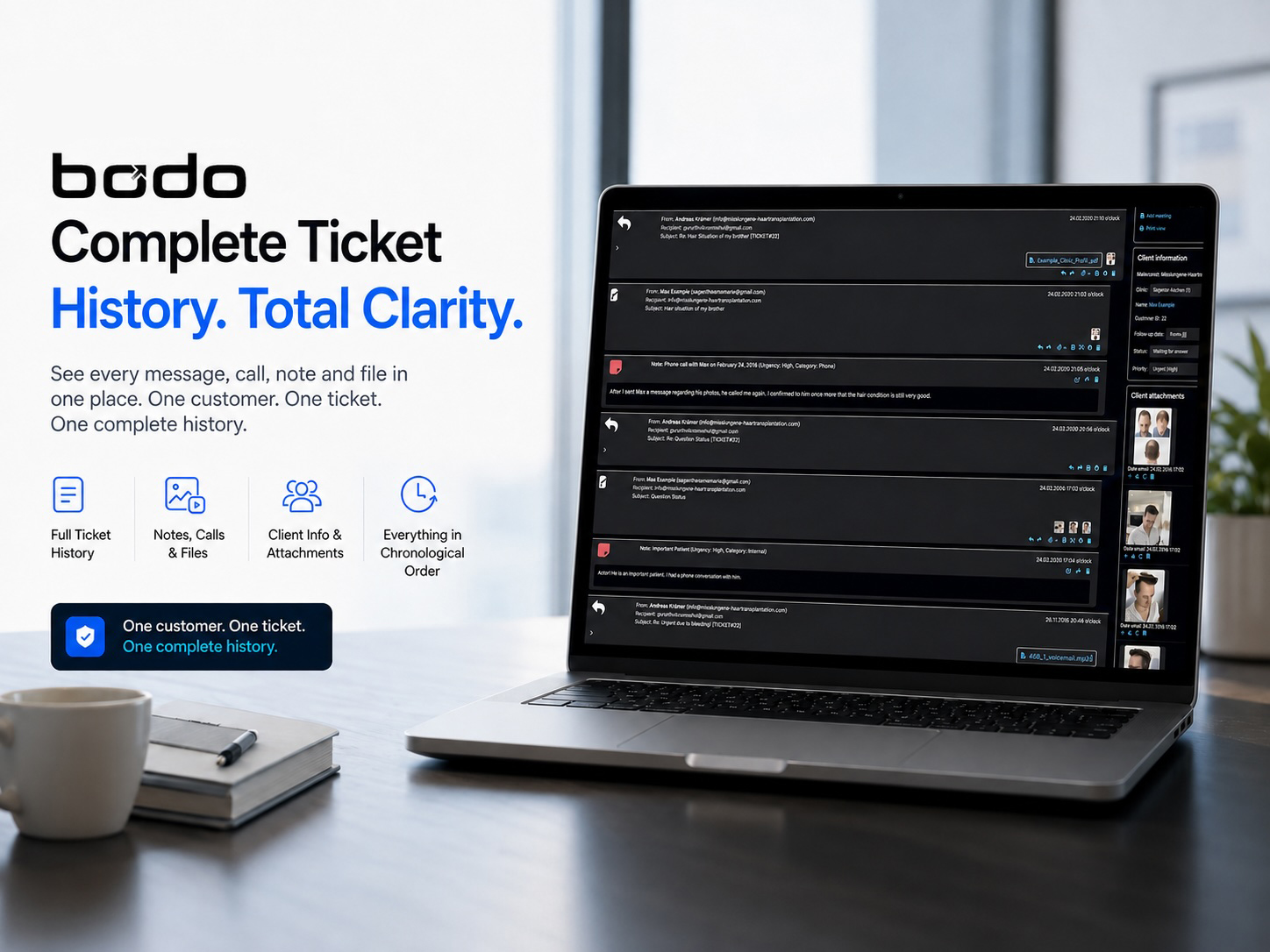
Gmail, Outlook and Proton Mail deliver email. Bodo organizes the customer work that grows around it.
A normal business mailbox can be excellent for sending, receiving, searching and storing messages. The problem begins when the inbox becomes the company’s only customer file.
Growing companies rarely struggle because email itself has stopped working. They struggle because every message can trigger additional work: find the earlier conversation, check an attachment, add an internal comment, assign the right employee, remember a promise, plan a follow-up and understand the client again when they return months or years later.
Bodo can become the daily business email software in which a team reads, writes, replies, documents and follows customer communication. The existing address and email provider can remain in place while Bodo adds email ticketing, CRM-style customer history and structured team workflow.
“Business email software” can mean five different things
Companies often search for the same phrase while looking for completely different products. Understanding the categories prevents the wrong software decision.
Creates and hosts business mailboxes, receives mail and provides company-domain addresses.
Lets users read, write, search, organize and send email from desktop, web or mobile.
Allows several users to monitor and answer a common address such as info@ or support@.
Turns email into actionable cases with status, responsibility, files, internal context and next steps.
Connects business email, customer identity, Notes, files, team activity, tasks and long-term history.
This distinction also explains why searches such as company email software, email management software for business, team email software, shared inbox software, email CRM and email ticketing software often overlap.
For a deeper category comparison, read CRM vs. Helpdesk vs. Email Ticketing System and What Is an Email Ticketing System?.
When is a normal business mailbox still enough?
A company does not need Bodo simply because it uses Gmail, Outlook, Proton Mail, GMX, Zoho Mail, Fastmail or another provider. A normal email setup can remain completely suitable when the workflow is simple.
There are no handovers, parallel replies or unclear responsibilities.
A question is answered once and rarely develops into a long-term customer case.
Attachments do not need to remain connected to decisions, calls, Notes or future tasks.
The company does not depend on future contact dates, reminders or open client cases.
A quick search reliably reveals what happened and what must happen next.
Another system already keeps the complete operational history and team context.
In these situations, changing the workflow may create more complexity than value. The need for Bodo appears when email remains the central communication channel but the inbox can no longer represent the complete customer relationship.
When growing companies need more than Gmail, Outlook or Proton Mail alone
The trigger is not a specific number of emails. It is the amount of context, coordination and future work attached to those emails.
People answer info@, support@, sales@ or office@ without a reliable view of ownership.
Two team members open the same message and start working before seeing each other.
Phone notes, decisions and customer preferences are stored in chats, documents or personal memory.
PDFs, images, offers and documents are downloaded into folders without the conversation that explains them.
Flags, stars, private calendars and spreadsheets are used to remember future customer actions.
The same relationship becomes fragmented across work, private and assistant addresses.
Vacation, illness or staff changes force another person to rebuild the full history.
The company must understand earlier promises, documents, preferences and decisions quickly.
Text is copied into separate AI tools while the actual client history remains fragmented.
Gmail, Outlook and Proton Mail already offer valuable business email capabilities
The point is not that these platforms are weak. They are built for a different primary purpose. Bodo becomes relevant when the customer workflow requires a deeper, permanent client structure.
Gmail and Google Collaborative Inbox
Google Workspace supports business email, while Google Groups can be configured as a Collaborative Inbox. Conversations can be assigned to members and searched by assignment status.
Outlook and Shared Mailboxes
Microsoft shared mailboxes allow multiple users to monitor and send email from a common address. They can also provide a shared calendar and common mailbox access.
Proton Mail and business organizations
Proton offers business email with custom domains, organization administration and multi-user support. Its main value is secure email infrastructure and a privacy-focused business suite.
These capabilities may be sufficient for many teams. Bodo is not based on pretending that Gmail has no collaboration, Outlook has no shared mailbox or Proton has no business administration. The difference lies in the depth and center of the workflow.
Your company does not have to abandon its established email address
The fear of migration often prevents teams from improving their email workflow. They assume that adopting business email management software means changing domains, notifying every customer and replacing the provider that already handles delivery.
That is not the Bodo proposition. Gmail, Microsoft 365, Proton Mail or another provider can continue to serve the established email infrastructure. Bodo becomes the structured working environment around customer email.
The key sentence is simple:
Email remains the channel. Bodo becomes the client file and team workflow.
What can remain unchanged
- Your company domain and familiar email addresses
- Your established email provider and delivery infrastructure
- The way customers initially contact the company
- Existing internal systems that solve other business needs
What Bodo adds
- One client and one connected ticket history
- Internal Notes, documents and customer context
- Assignments, priorities and staff working visibility
- Follow-Up Dates, To-Dos and reminder emails
- AI-supported writing inside the real case history
Gmail vs. Outlook vs. Proton Mail vs. Bodo: what is each system primarily designed to do?
This comparison avoids simplistic “yes or no” claims. Features vary by plan and configuration. The more useful question is whether a capability is the product’s central workflow.
| Area | Gmail / Google Workspace | Outlook / Microsoft 365 | Proton Mail for Business | Bodo |
|---|---|---|---|---|
| Primary role | Business email and productivity suite | Business email and productivity suite | Privacy-focused business email and workspace | Customer email workflow, ticketing and CRM history |
| Business mailbox and custom domain | Core capability | Core capability | Core capability | Uses the company’s configured email structure; not positioned as a domain registrar |
| Read and send business email | Yes | Yes | Yes | Yes, inside the structured ticket workflow |
| Shared team access | Available through Workspace and Groups configurations | Available through shared mailboxes and permissions | Available through business organizations and users | Built into the multi-user ticket workflow |
| Conversation assignment | Available in Google Collaborative Inbox | Possible through mailbox, categories and connected tools depending on setup | Organization administration, but not Bodo’s ticket model | Employee assignment connected to the client ticket |
| One permanent client ticket | Not the primary data model | Not the primary data model | Not the primary data model | Central Bodo principle |
| Multiple sender addresses in one customer history | Email aliases and search exist, but no central Bodo-style customer history by default | Aliases, contacts and search exist, but no central Bodo-style ticket by default | Multiple addresses are supported, but no Bodo-style client ticket by default | Known addresses can be connected to the same client |
| Internal Notes inside the communication case | Requires the selected Google workflow or another tool | Requires the selected Microsoft workflow or another tool | Not the primary product focus | Integrated inside the ticket history |
| Files and images in long-term client context | Attachments and Drive links | Attachments and Microsoft storage options | Attachments and Proton Drive options | Files, PDFs and images remain close to the client case |
| Follow-Up Date tied to the client case | Can be created through tasks, calendar or other workflows | Can be created through flags, tasks, calendar or other workflows | Not the primary product focus | Integrated ticket-level Follow-Up Date |
| Staff working visibility | Depends on the collaborative setup | Depends on the shared mailbox and connected tools | Depends on the organization setup | Shows when another user is already working in the ticket |
| AI inside the complete client history | AI capabilities depend on Workspace plan and product | AI capabilities depend on Microsoft plan and product | AI capabilities depend on Proton plan and product | Bodo AI Editor works inside the ticket context |
Plans and features change. This table compares the main product roles rather than claiming that a provider can never reproduce a particular function through configuration, automation or additional tools.
One client. One ticket. One complete history.
A customer relationship does not restart whenever the subject line changes. The person may ask a new question, send another file, write from a second address or return years later. The company still needs the full relationship.
Bodo is designed to keep incoming and outgoing email, internal Notes, images, documents, decisions, assignments, To-Dos and follow-ups connected to one long-term customer ticket whenever the communication belongs to the same client.
This is the difference between an email thread and a client file:
- The thread explains one conversation.
- The client ticket explains the relationship.
- The complete history explains what happened, what was promised and what comes next.
See the dedicated page about complete customer history when a client returns after years.
Eight Bodo functions that turn business email into structured work
The advantage is not one isolated feature. It is the connection between messages, context, responsibility and the next action.
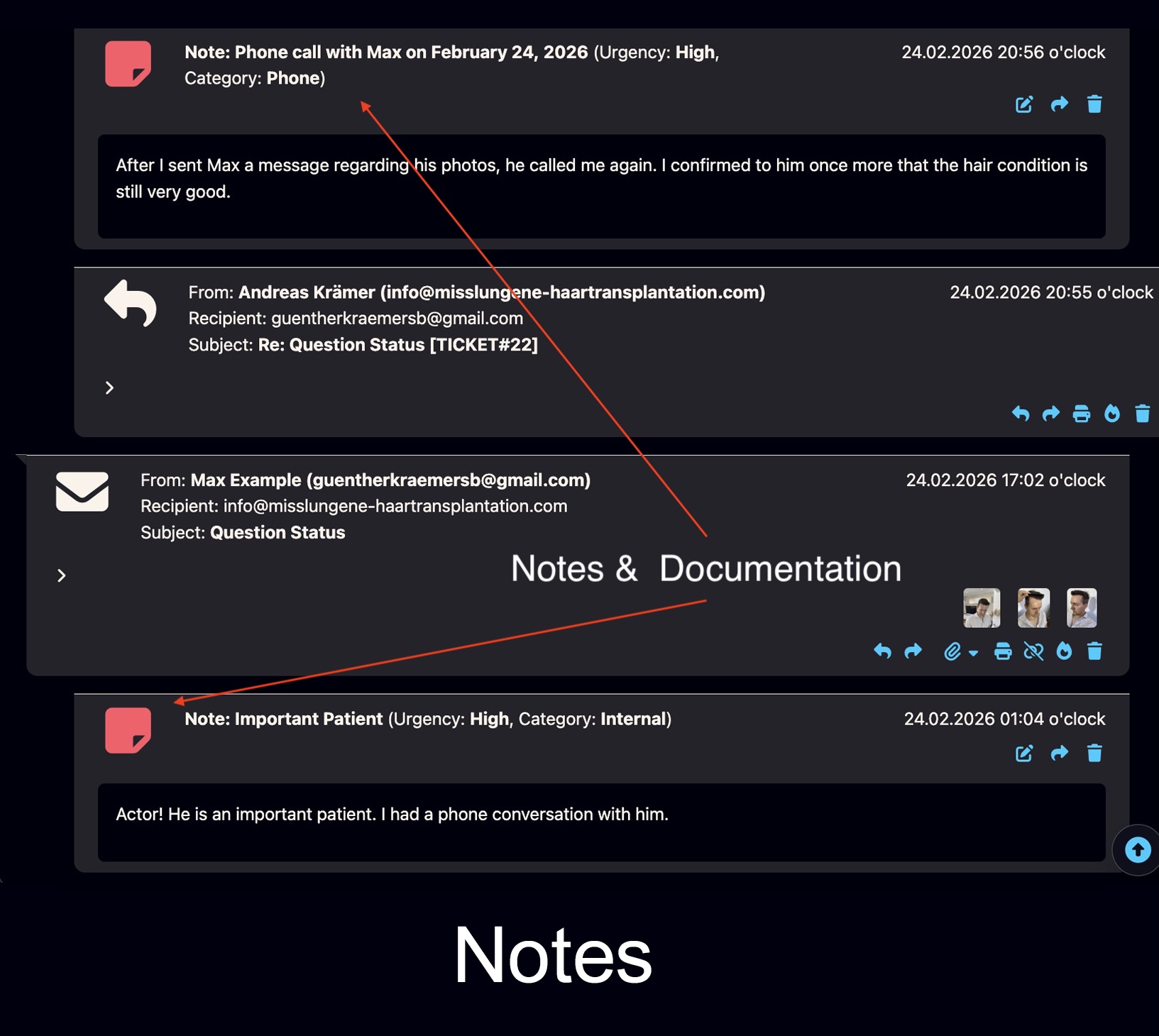
Notes and documentation
Document calls, decisions, preferences, categories and internal context directly inside the customer ticket without sending it to the client.
Explore Bodo Notes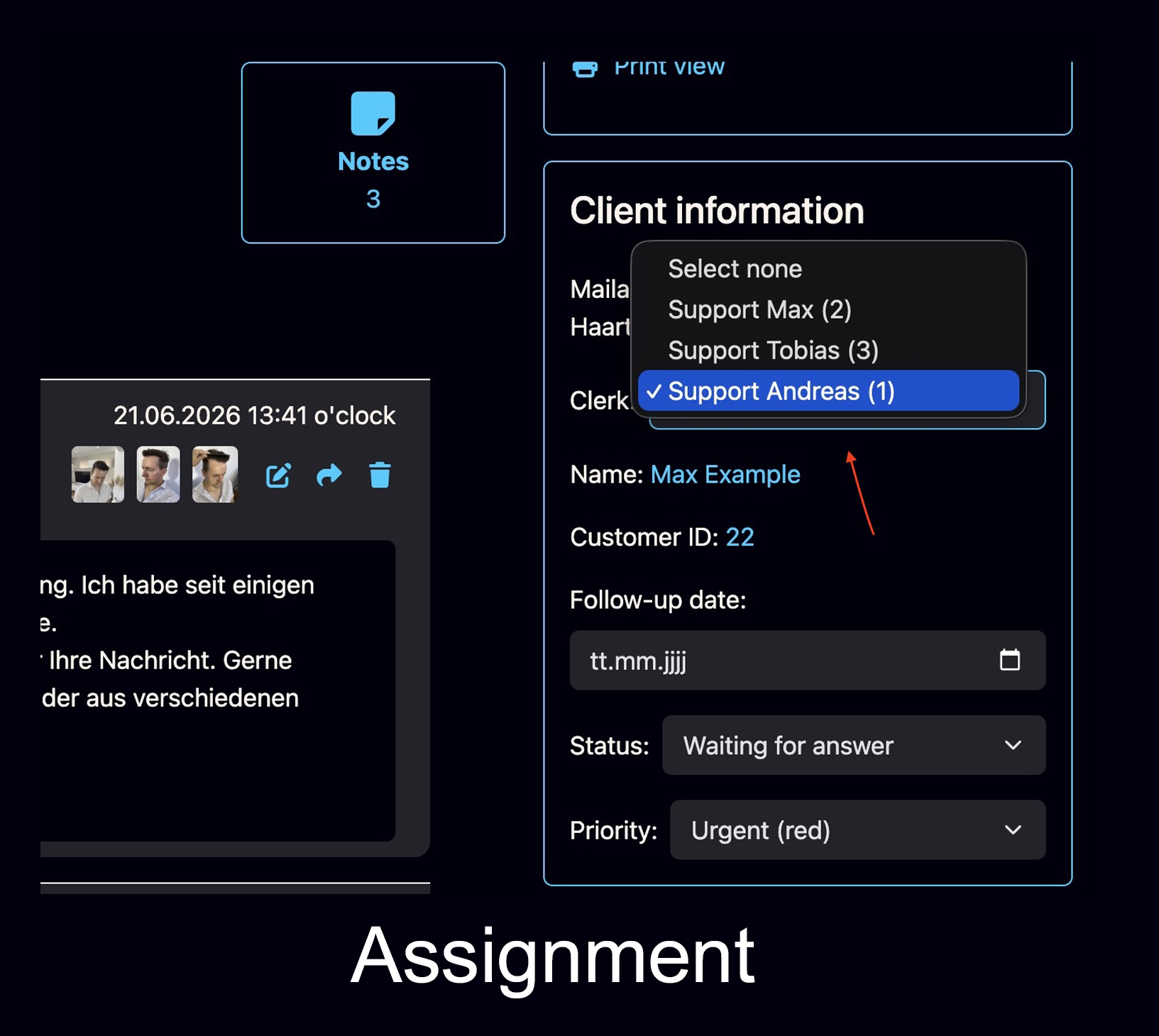
Employee assignment
Assign the client or ticket to the correct team member so responsibility is visible and less dependent on personal memory.
See Bodo team workflow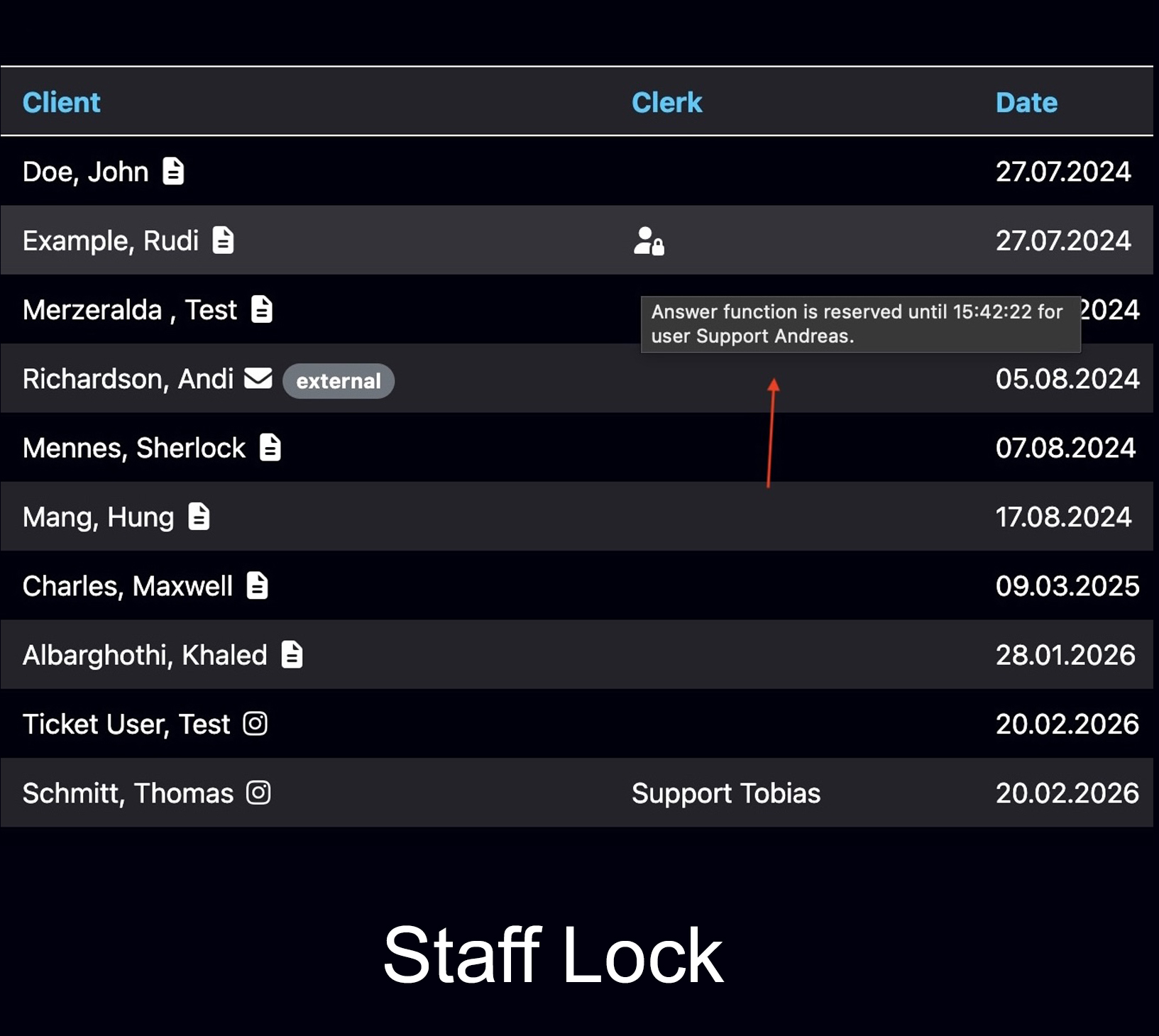
Staff working visibility
See when another authorized user is already working in the ticket, helping reduce duplicate replies in shared customer communication.
Explore multi-user ticketing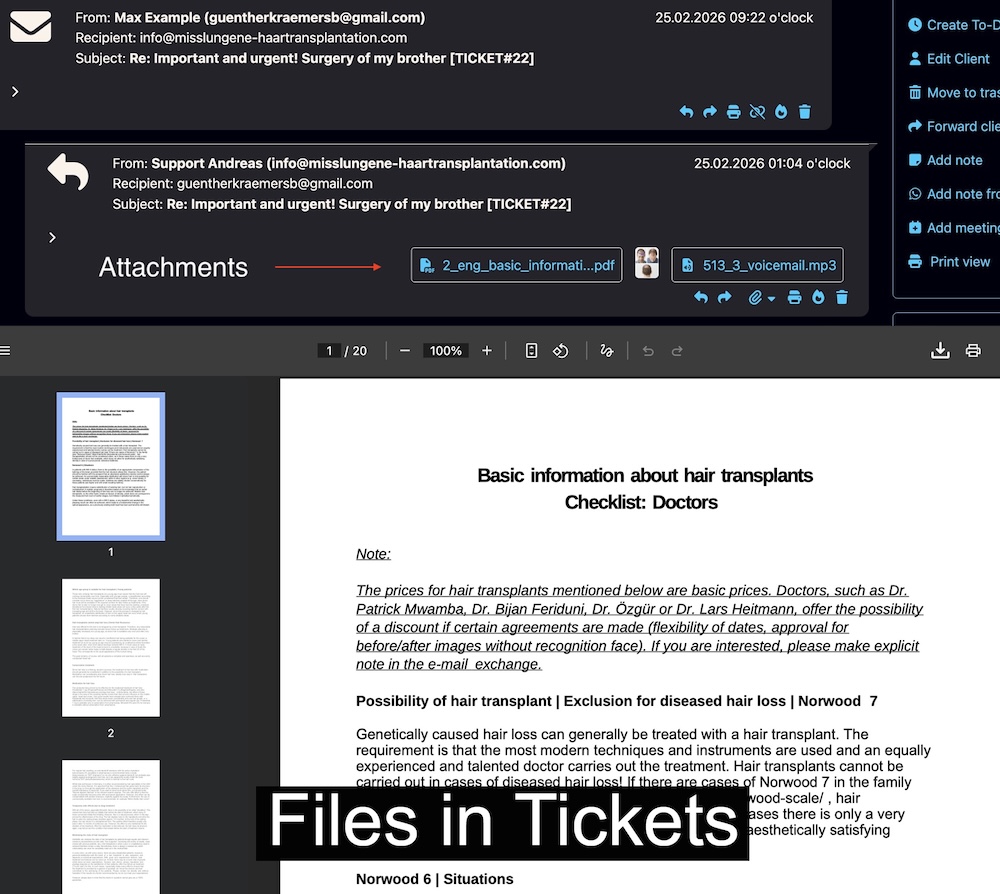
Attachments remain connected to the case
PDFs, offers, images and other files stay near the messages, Notes and decisions that give them meaning.
View all file features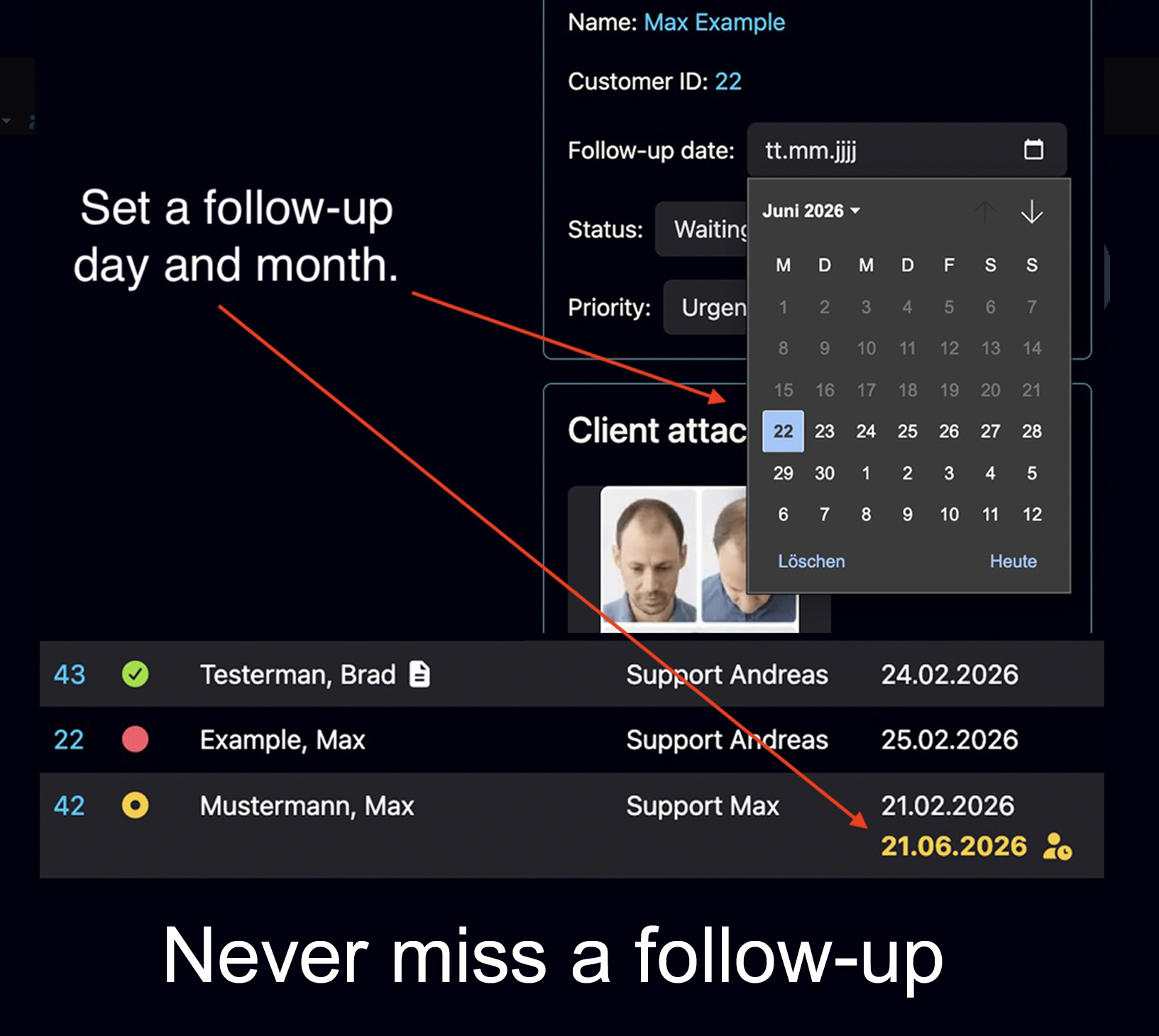
Bring the case back at the right time
A Follow-Up Date makes the ticket visible again as an open task on the selected day, keeping future work connected to the full history.
Learn why follow-ups get lost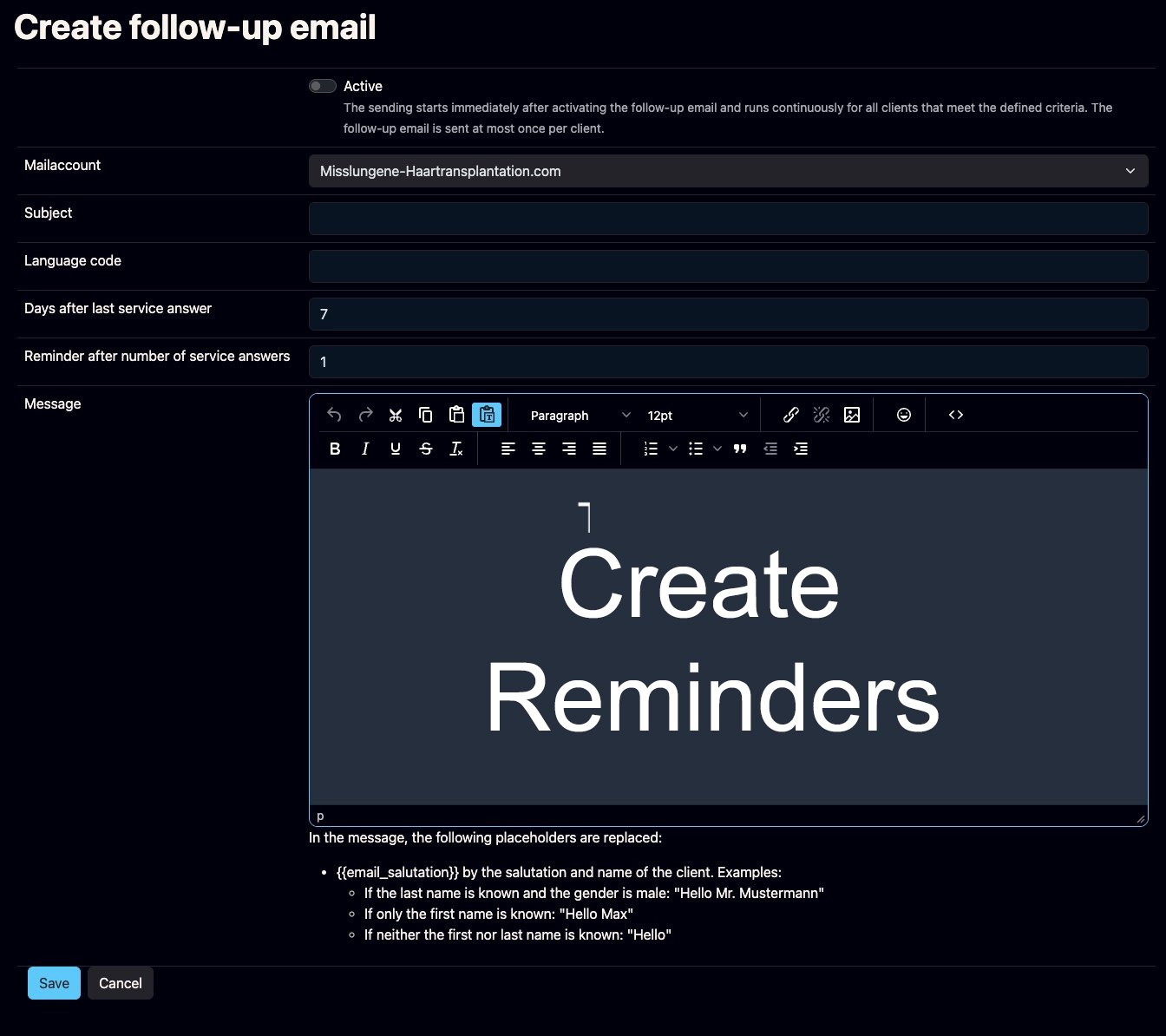
Reactivate silent customers and leads
Configurable reminder emails can contact a customer who has not responded after the team’s last service reply.
See reminder features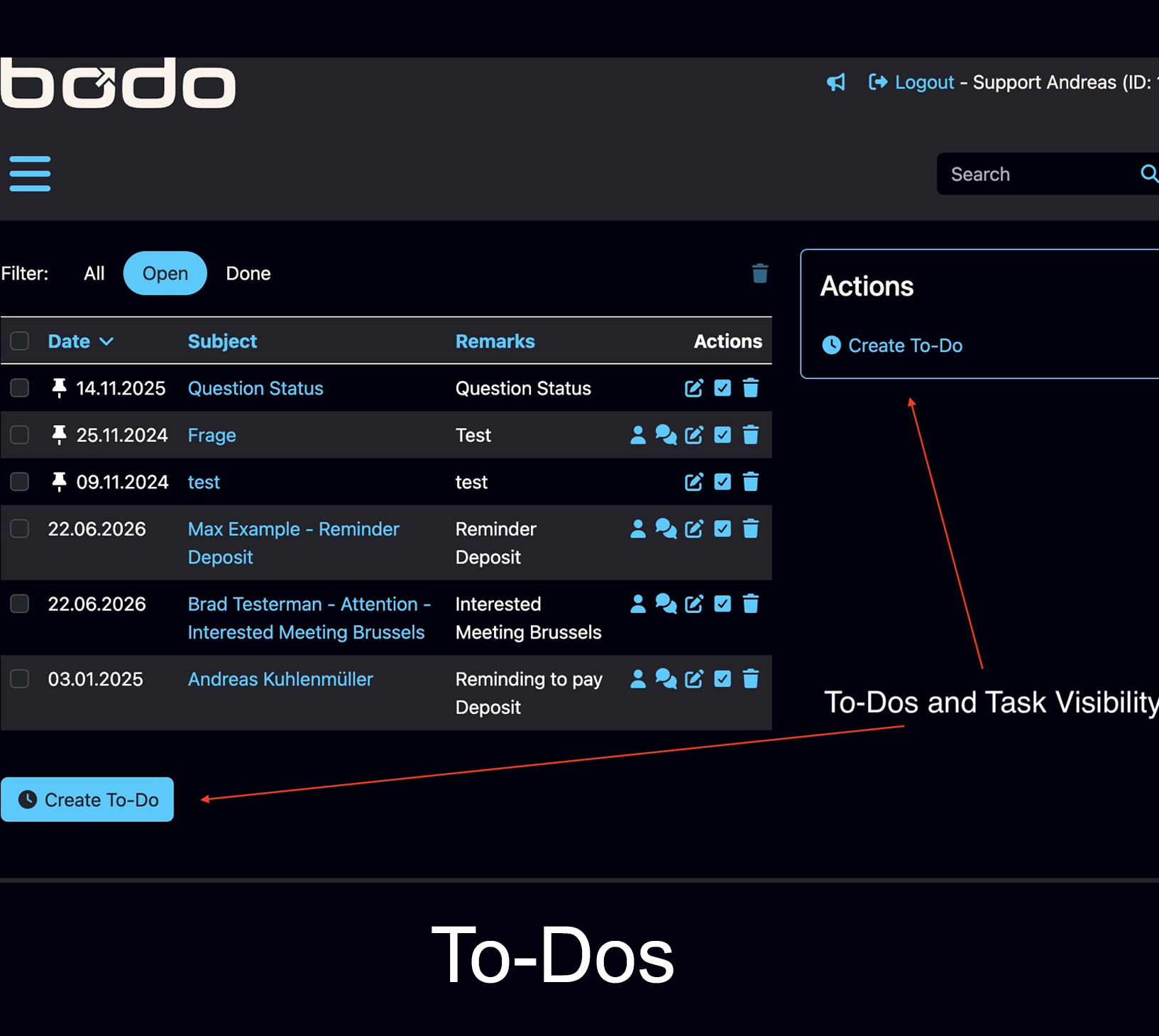
Specific To-Dos instead of vague flags
Create a clear internal action such as calling the customer, checking a file, preparing an offer or requesting a colleague’s input.
Explore task visibility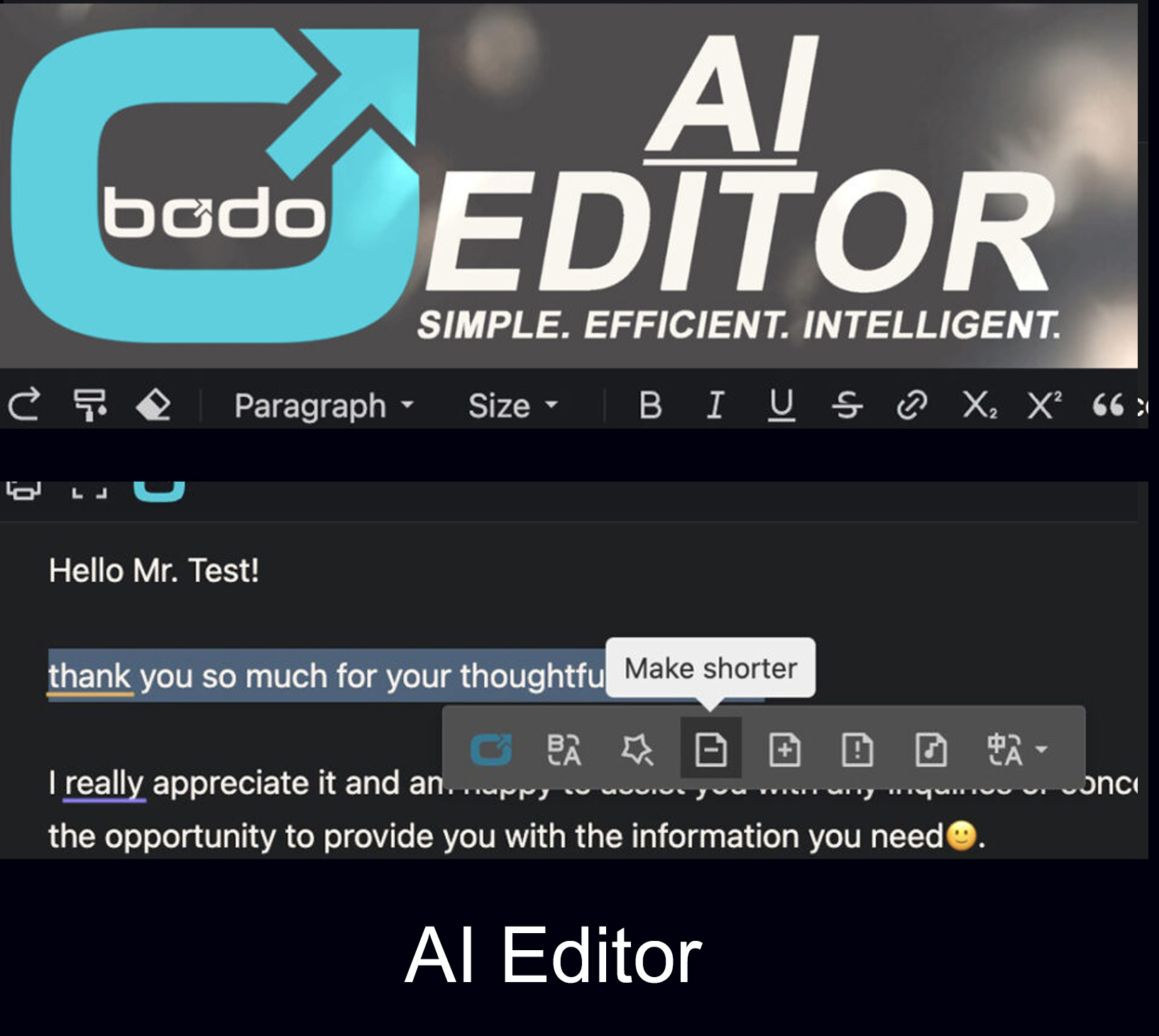
Write, improve, translate and summarize
Use AI-supported email writing inside the ticket, where the previous messages, files, Notes and current status remain available.
Explore the Bodo AI EditorA flag is not the same as a Follow-Up Date, a To-Do or an automatic reminder
Growing teams often collect several reminder systems without agreeing what each one means. Bodo separates the three main purposes.
Set the date when the customer case should become visible again for review and a new decision.
Describe the specific internal task that must be completed by the team.
Send a configurable message to a customer or lead who has not replied after the last team response.
If the next step matters to the customer relationship, it should remain inside the customer file—not only in one employee’s memory, inbox flag or private calendar. Read the practical guide to preventing lost follow-ups in client communication.
Faster writing is useful. Complete context is more valuable.
A standalone AI email assistant can improve a paragraph. It does not automatically know which files belong to the customer, what was promised earlier, who is responsible or which follow-up is still open.
The Bodo AI Editor works inside the customer ticket. It can help draft, improve, rewrite, translate and summarize while the real communication history remains nearby.
That is why Bodo is described as workflow infrastructure, not just an AI feature. AI supports the text; Bodo keeps the relationship organized.
Suitable AI-supported email tasks
- Prepare a reply draft from the current context
- Improve clarity, tone and structure
- Translate incoming or outgoing messages
- Summarize a long customer history
- Explain the latest ticket status
- Adapt templates to the current customer case
Important, sensitive or legally relevant messages should remain subject to responsible human review.
Bodo is business email software for companies where the relationship matters after the first reply
The strongest use cases are not defined by industry alone. They are defined by long conversations, documents, responsibilities and future actions.
Small companies can benefit before they become large. The relevant question is not “How many employees do we have?” but “How much customer context do we lose when one person is absent?” See how small teams can organize client communication without losing context.
Moving from a normal mailbox to structured business email does not have to be a disruptive migration
The most successful implementation starts with the real workflow rather than trying to transfer every historical message and redesign every company process at once.
Choose the addresses where long-term client communication, files and follow-ups create the greatest risk.
Agree that the Bodo ticket—not private folders, chats or memory—contains the operational case context.
Decide how assignments, priorities, staff visibility and handovers should work.
Define when to use a Follow-Up Date, a To-Do and an automatic reminder email.
Add relevant files, customer addresses, Notes or exported communication when they are needed for active cases.
First establish the workflow, then use writing assistance to make replies faster and more consistent.
Use ticket status, priorities, follow-ups and statistics to identify cases that need attention.
Track duplicate replies, forgotten follow-ups, search time, handover quality and response consistency.
Do you need a provider, a shared inbox, a helpdesk, a CRM or Bodo?
Choose the category that solves the actual bottleneck. A famous software name is not automatically the right workflow.
You mainly need reliable mailboxes, custom-domain addresses, delivery and user administration.
Several users need to see and answer the same mailbox, but the communication cases remain simple.
Your main problem is contacts, companies, deals, pipeline stages and commercial relationship data.
Most requests are short support issues that are opened, solved and closed as separate incidents.
The work around customer email—status, files, responsibility and next steps—needs structure.
You want email ticketing plus CRM-style long-term history, Notes, documents, follow-ups, team visibility and AI-supported replies.
The provider already works well and you only need to improve the operational customer workflow behind it.
You require functions outside Bodo’s core role, such as a full productivity suite, a sales pipeline platform or industry-specific operational software.
Lawful business email use depends on the company’s jurisdiction, contracts, access controls, retention, deletion, security, staff training and configuration. Standard Bodo hosting is in Germany; international organizations should assess their own requirements before deployment.
Official platform references used for this comparison
Keep the email address your customers know. Upgrade the workflow your team depends on.
Bodo turns customer email into one structured history with messages, files, internal Notes, assignments, tasks, follow-ups and human-reviewed AI—without pretending to replace every service your existing email provider delivers.
Questions about business email software, Gmail, Outlook, Proton Mail and Bodo
What is business email software?
Business email software is a broad term that can describe mailbox hosting, an email client, a shared inbox, an email ticketing system or customer email management software. The right category depends on whether a company mainly needs email delivery, shared access or a structured workflow around customer communication.
Is Bodo an email provider like Gmail, Microsoft 365 or Proton Mail?
Bodo is primarily a business email workflow, ticketing and CRM system rather than a domain registrar or general mailbox-hosting provider. A company can keep its established email address and provider while using Bodo as the working environment for structured customer communication.
Can a company keep Gmail and use Bodo?
Yes. The existing Gmail or Google Workspace email structure can remain in place while Bodo adds customer tickets, complete history, internal Notes, files, assignments, follow-ups and team workflow.
Can a company keep Outlook or Microsoft 365 and use Bodo?
Yes. Microsoft 365 can continue to provide the business mailbox and email infrastructure while Bodo organizes customer communication as structured client tickets and long-term history.
Can a company keep Proton Mail and use Bodo?
Yes, subject to the technical configuration selected for the organization. Proton Mail can continue to provide business email addresses and mailbox services while Bodo is used to structure the operational customer workflow.
Is Bodo a Gmail alternative for business?
Bodo can be an alternative to working only inside Gmail when the main problem is customer email management, team responsibility, follow-ups and complete client history. It is not positioned as a replacement for every Google Workspace service.
Is Bodo an Outlook shared mailbox alternative?
Bodo can replace or complement a shared-mailbox workflow when a team needs more than shared access: permanent customer tickets, internal Notes, files, priorities, assignments, working visibility, To-Dos and follow-up dates.
Is Bodo a Proton Mail alternative for companies?
Bodo is not a privacy-focused mailbox-hosting replacement for Proton Mail. It can instead complement Proton Mail by adding structured ticketing, CRM-style customer history and team workflow around business communication.
What is the difference between a shared inbox and email ticketing software?
A shared inbox gives multiple users access to messages. Email ticketing software turns messages into structured work with customer context, status, responsibilities, internal Notes, files, tasks, follow-ups and a traceable history. Read the detailed CRM, helpdesk, shared inbox and email ticketing comparison.
Does Bodo create one new ticket for every subject line?
Bodo is designed around a long-term customer history. Known messages and sender addresses can be connected to one customer and one continuing ticket history instead of automatically fragmenting every new subject into a disconnected case.
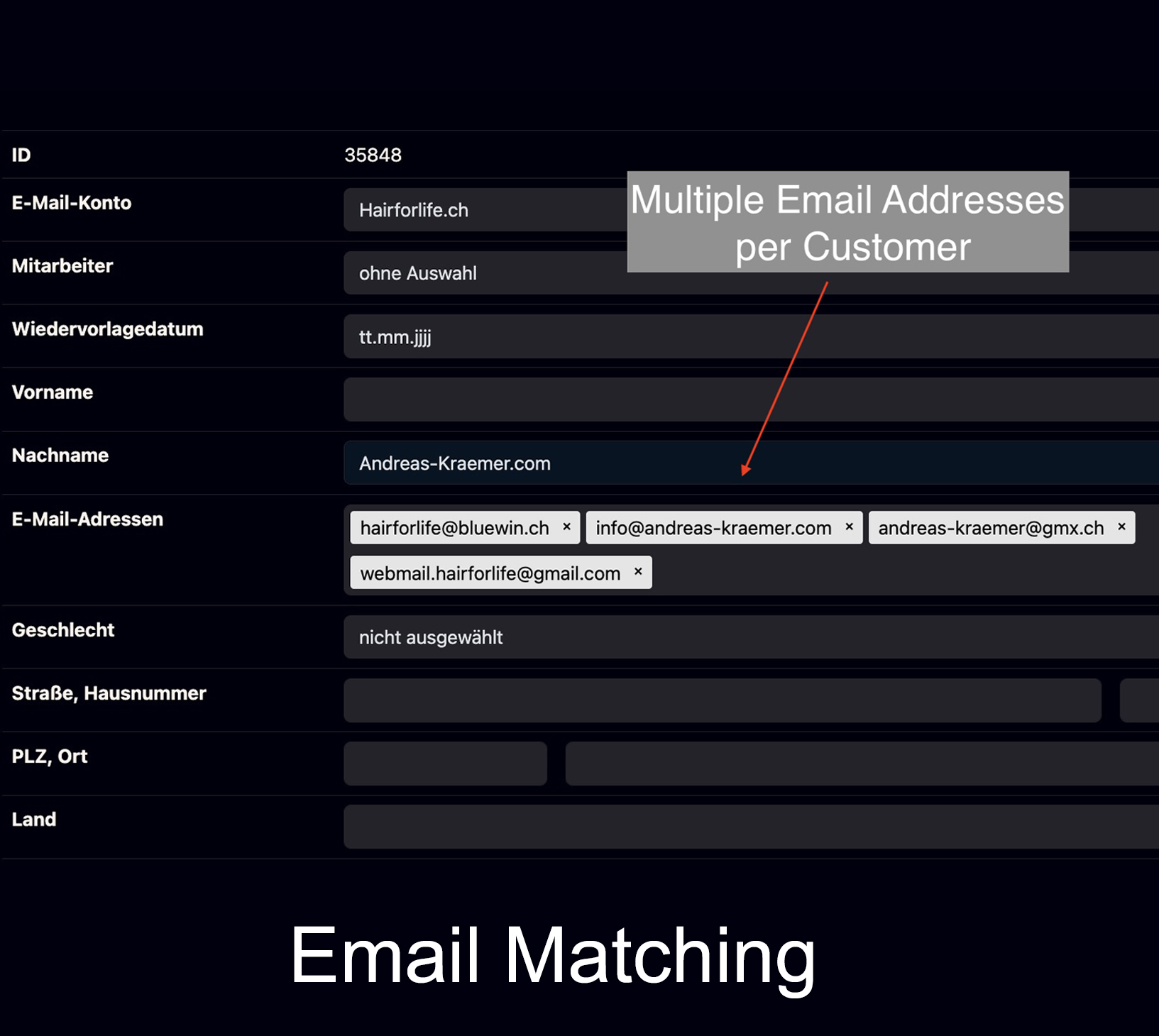
Can one customer have multiple email addresses in Bodo?
Yes. Different known sender addresses can be assigned to the same customer so communication remains consolidated in one customer history.
Can several employees work on the same business email communication?
Yes. Bodo supports multiple users, employee assignment, priorities and staff working visibility so the team can see responsibility and reduce duplicate replies. See the Bodo multi-user team workflow.
How do Follow-Up Dates, To-Dos and automatic reminder emails differ?
A Follow-Up Date makes the ticket visible again as an open task on the selected day. A To-Do describes a specific internal action. An automatic reminder email can contact a customer who has not replied after the team’s last response.
Does Bodo include AI for business email?
Yes. The Bodo AI Editor can assist with drafting, rewriting, improving, translating and summarizing emails inside the ticket workflow. The responsible person should review important content before sending.
Is Bodo suitable only for customer support teams?
No. Bodo is suitable for companies where email communication forms a long-term client relationship, including consulting firms, clinics, agencies, tax advisors, trustees, legal services, technical service teams and other professional businesses.