
How Small Teams Can Organize Client Communication Without Losing Context
Small teams often know their clients personally. That is a strength — until communication grows across email inboxes, chats, files, notes, employees, reminders and long timelines.
The real challenge is not only answering messages. It is keeping the full client story understandable when several people work on the same case, when a client returns later, or when an important next step must not disappear.
Small teams keep context by making one client file the source of truth.
Emails, files, notes, responsibilities, status, follow-ups and internal decisions should not live in separate tools. They should stay connected to one client history, so every team member can understand what happened, what was promised and what should happen next.
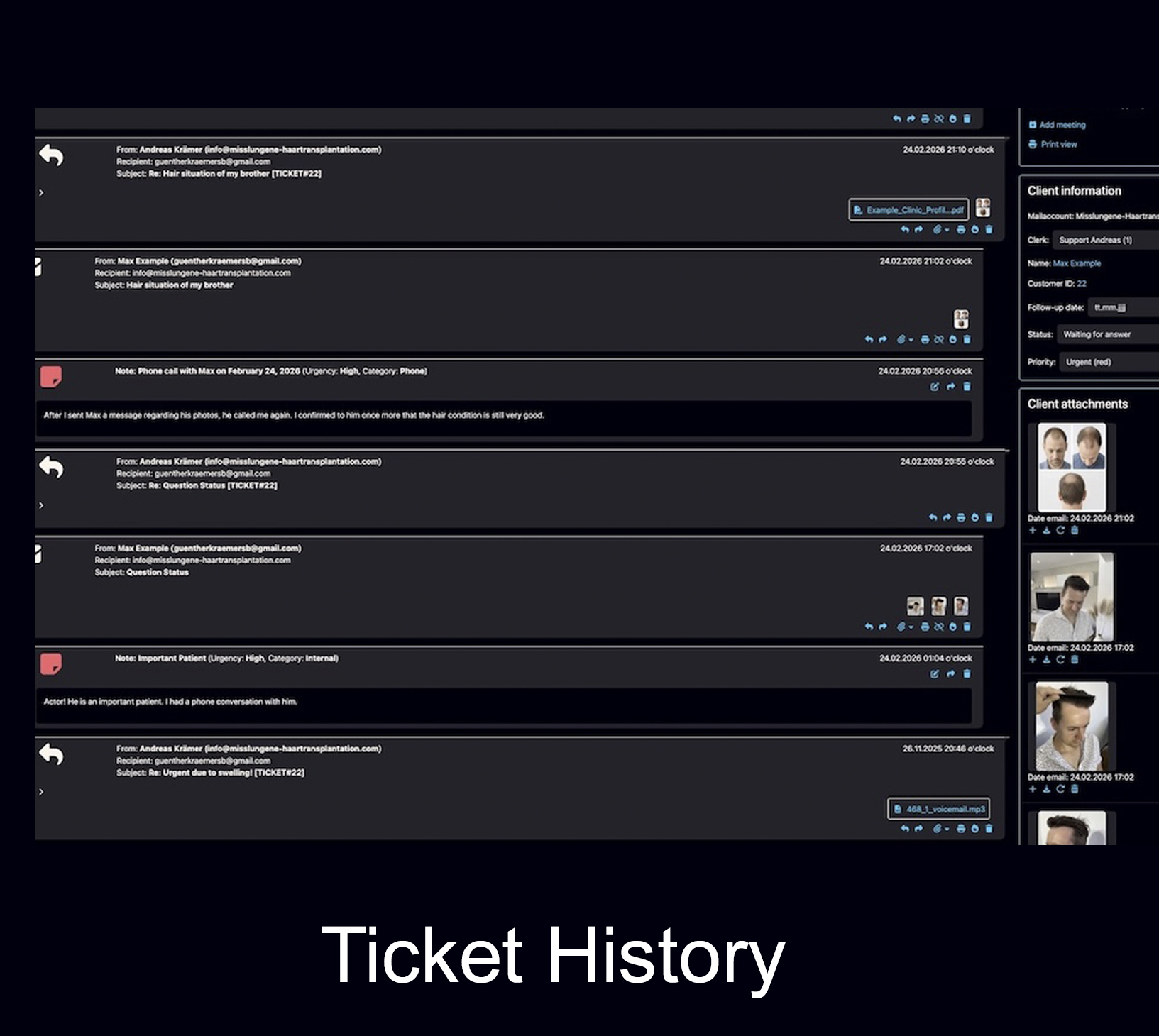
Small teams do not need more communication channels. They need less context loss.
A small clinic, consulting office, agency, trustee, tax advisor or service company may start with a normal inbox because it feels simple. One person answers emails. Another handles files. Someone else remembers the client. A spreadsheet tracks a few open items. A chat message fills the gap.
That works until the workload becomes slightly more complex: a second employee joins, a client replies months later, a document is missing, a lead needs a follow-up, or two people answer the same email. At that point the problem is not volume alone. The problem is scattered context.
Context is the difference between answering a message and understanding a client case.
A message shows what the client wrote now. A client case shows what happened before, which files belong to it, what the team decided internally and what the next step should be.
Why small teams lose client context
Context usually disappears slowly. No single tool looks completely wrong at first. The problem is that each tool holds only one part of the story.
Personal inboxes become hidden client files
One employee has the old email, another has the latest reply, and a third person only sees a forwarded fragment. The client history becomes dependent on individual inboxes.
Chats carry important details but not the full case
WhatsApp, Instagram, Telegram or internal chats can be fast entry channels. But they are not designed to hold files, notes, responsibilities, follow-up dates and long-term client history in one place.
Files lose their meaning
Images, PDFs, forms and documents may be downloaded or stored somewhere else. Later the team may find the file, but not the conversation, decision or promise it belonged to.
Responsibilities are assumed, not assigned
In a small team everyone may feel responsible — which often means no one is clearly responsible. This creates duplicate replies, missed replies and unclear handovers.
Follow-ups live in memory or private calendars
A lead may need contact next month. A client may owe a document. A case may need a later decision. If those next steps are outside the client file, they become fragile.
AI can write, but it cannot organize what is missing
AI can draft and summarize text. But it cannot reliably reconstruct a complete client file if emails, notes, files, responsibilities and follow-ups are scattered from the start.
Client context is more than the latest email.
For small teams, context should be practical. It should help the next person understand the case quickly without asking colleagues, searching old folders or making the client repeat the story.
A useful client file answers six questions.
The goal is not bureaucracy. The goal is to reduce dependency on memory. A small team should be able to open a client case and immediately understand the situation.
That matters especially when employees work part-time, when someone is absent, when several people touch the same case or when the client returns after a long pause.
Who is the client?
Name, contact details, possible multiple email addresses and the correct case history.
What happened already?
Incoming and outgoing emails, previous replies, promises, decisions and internal comments.
Which files belong to this case?
Images, PDFs, forms, documents, uploads and later added files connected to the same history.
Who is responsible?
Visible assignment, team responsibility and clarity about who should take the next step.
What is the status?
Open, waiting, urgent, planned, being handled or ready for a later follow-up.
What should happen next?
A clear next action, follow-up date or automatic reminder when a client has gone silent.
A shared inbox can receive messages. It does not automatically preserve context.
Many small teams try to solve collaboration by giving several people access to the same mailbox. That can help with visibility, but it does not automatically create a reliable client communication workflow.
A simple workflow for small teams
A small team does not need an overcomplicated process. It needs a workflow that is easy to follow every day and strong enough to protect context over time.
Capture every inquiry in one place
Decide where the official client case lives. Channels can be flexible, but the client file should be central.
Connect messages to the client history
Incoming and outgoing emails should build one understandable timeline, not isolated message fragments.
Add files and notes to the case
Documents, images and internal context should stay close to the communication, not disappear in folders.
Assign responsibility
Make it clear who owns the next action, especially when multiple employees can access the same case.
Make status visible
The team should quickly see what is urgent, what is waiting, what is being handled and what comes later.
Use follow-ups deliberately
If the next step matters, it should not depend on memory. It should be visible inside the client workflow.
Support writing with AI
AI can help draft, rewrite, translate or summarize — but it works best when the underlying case is organized.
Review open work regularly
Small teams should be able to review open tickets, silent leads and overdue next steps without searching manually.
Bodo gives small teams structure without turning communication into bureaucracy.
Bodo is built around one practical idea: one client, one ticket, one complete history. The following functions help small teams keep client communication understandable, assignable and traceable.
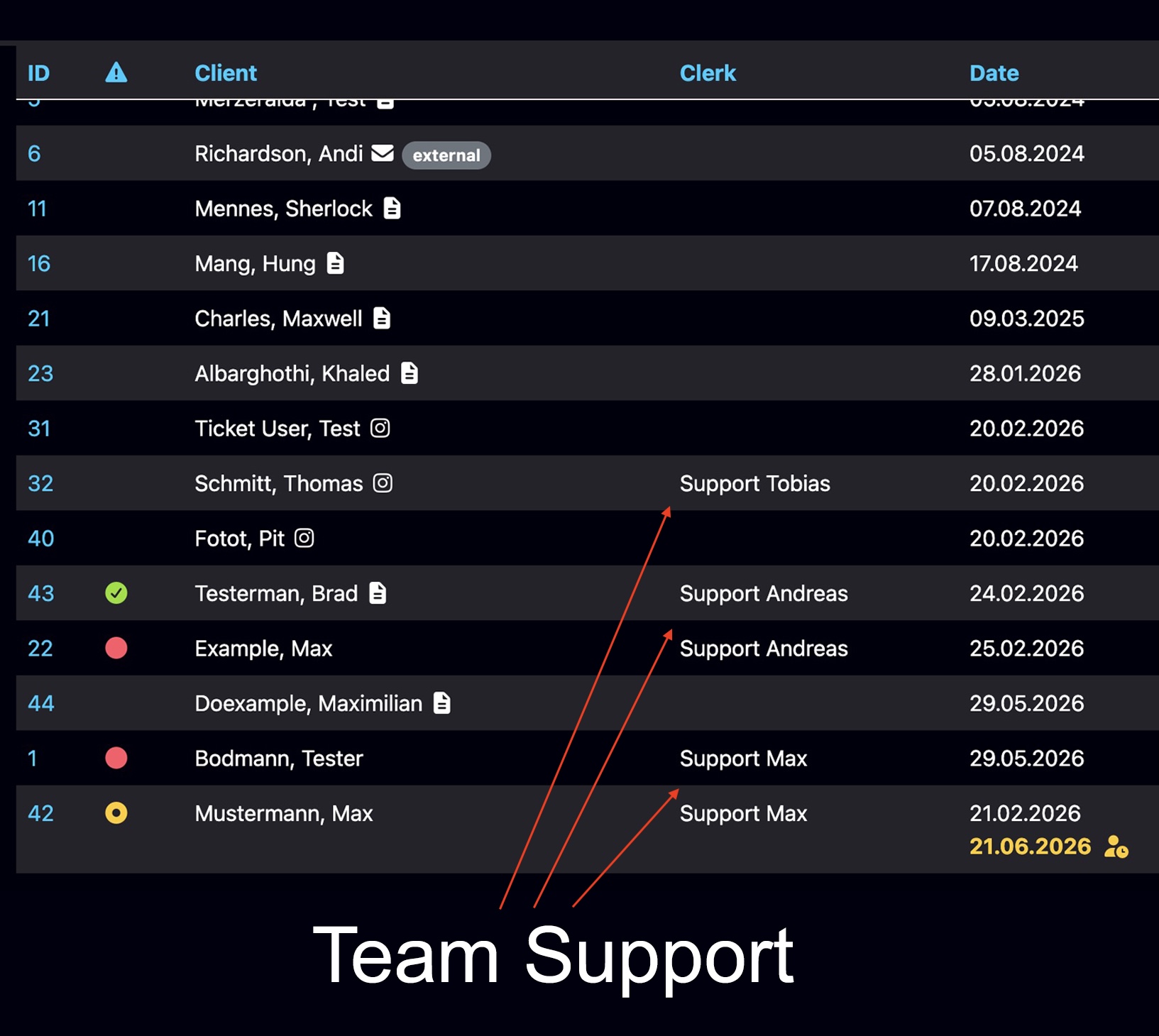
Individual access for every team member
Several people can work in Bodo with their own access instead of using one unclear shared login. This helps small teams see activity, reduce confusion and keep communication connected to the ticket.
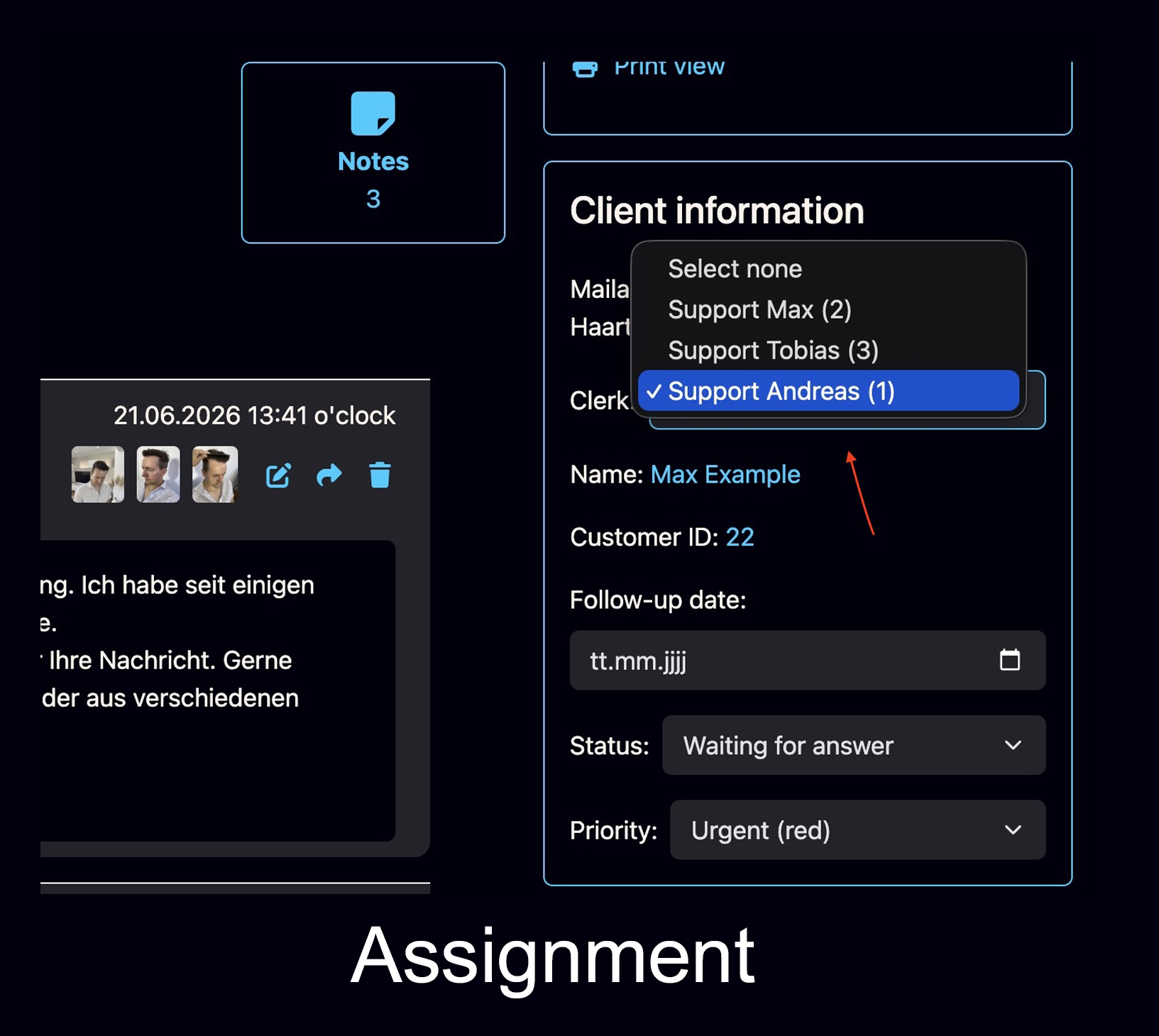
Clear ownership prevents internal uncertainty
A customer or ticket can be assigned to the responsible staff member. That makes it easier to see who should take the next step and reduces the risk that everyone assumes someone else is handling the case.
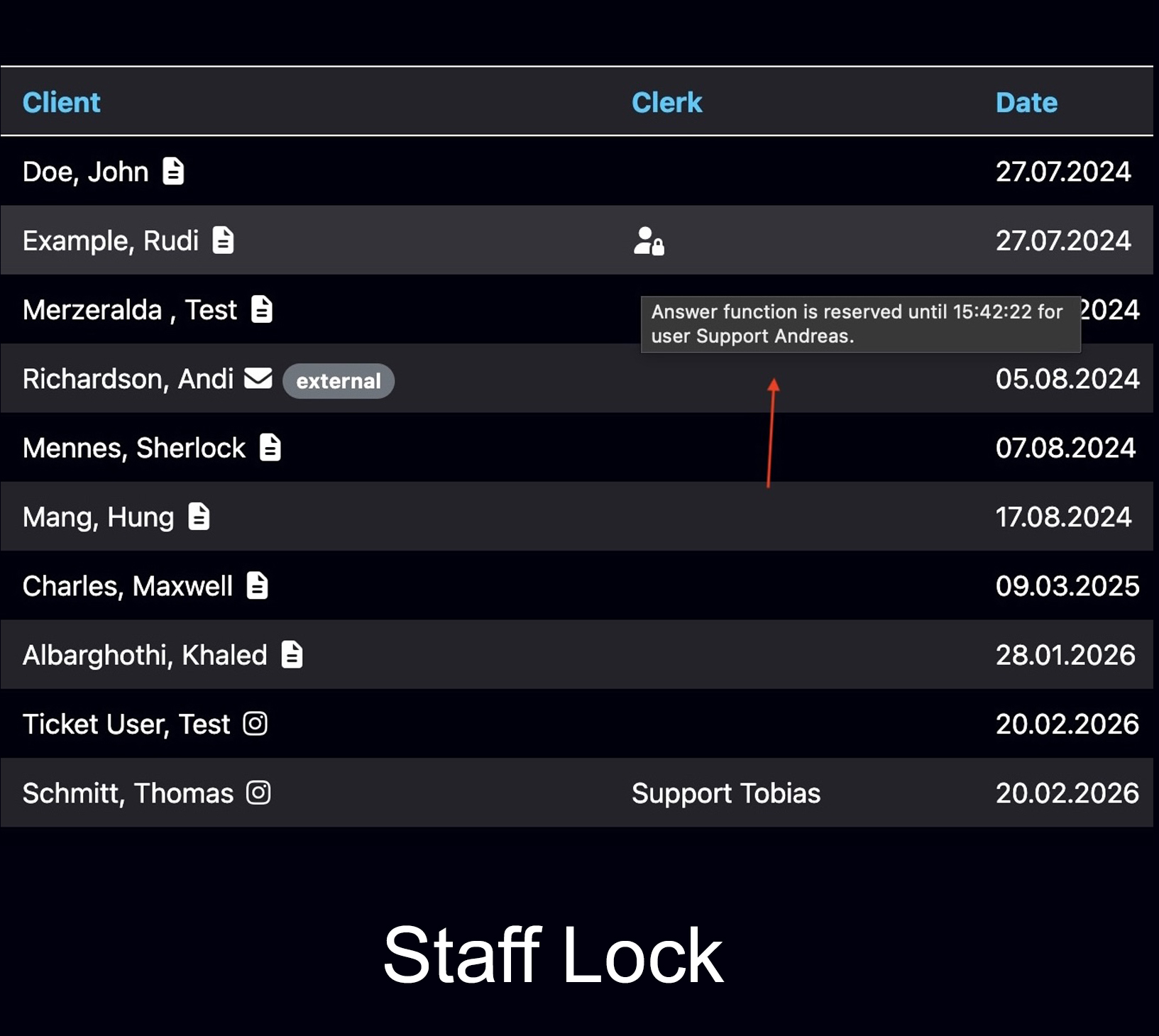
See when someone is already working on a ticket
Duplicate replies are a common small-team problem. Bodo can show when another staff member is already working on a ticket, so the team does not answer the same client twice or overwrite each other’s work.
Keep the practical details inside the case
Small teams often lose context when documents, internal notes, follow-ups and reminders are handled separately. Bodo keeps these elements close to the communication, so the next person can understand the case without reconstructing it manually.
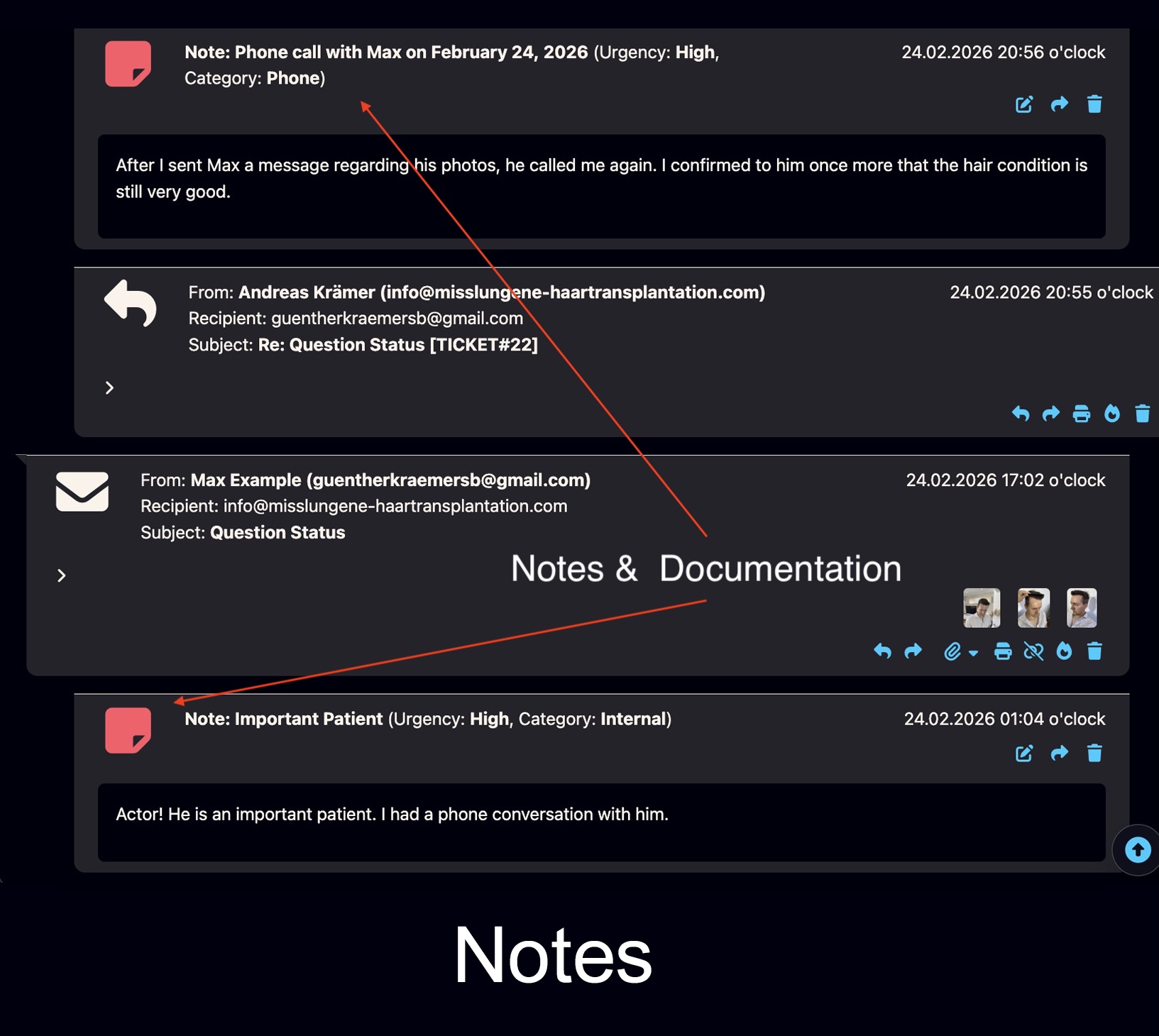
The same principle works across many small service teams.
This is not only a support-topic. Any small team that handles longer client communication can lose context when the client file is scattered.
Small clinics and medical service teams
Images, documents, appointment questions, long histories and internal notes should remain connected to the patient or client case. For aesthetic and hair transplant clinics, see the dedicated clinic ticketing use case.
Consultants and advisory offices
Long decision cycles, follow-ups, proposals and files are easier to manage when the full client history stays in one place.
Agencies and project-based teams
Client requests, approvals, files and responsibilities often cross several employees. A central history reduces misunderstandings.
Trustees, tax advisors and accounting teams
Sensitive documents, recurring questions and long-term client relationships require traceable communication and internal clarity. For tax advisors and consultants, see the dedicated tax advisor ticketing use case.
Service companies and local providers
Requests, offers, callbacks, documents and follow-ups become easier to control when the next step is visible.
Growing teams before they become chaotic
The best time to create a structured workflow is before the team becomes dependent on improvised inbox habits.
A practical checklist for small teams
Use this checklist to evaluate whether your current setup protects client context or slowly spreads it across too many places.
One official client file
Everyone knows where the real client history lives and which system is the source of truth.
Emails connected to the case
Incoming and outgoing messages are part of one timeline, not split across personal mailboxes.
Files and documents connected
Images, PDFs, forms and uploads remain connected to the case they belong to.
Internal notes separated from client messages
The team can document decisions and context without exposing internal comments to the client.
Responsibility visible
It is clear who owns the next step and who is already working on the case.
Follow-ups visible
Leads, callbacks and later decisions do not depend on memory or a private calendar.
Continue building a better client communication workflow.
These Bodo resources explain the same principle from different angles: inbox limits, team workflow, follow-ups, client history, AI and communication infrastructure.
Frequently asked questions about small-team client communication
How can small teams organize client communication without losing context?
Small teams can organize client communication by defining one official client file, keeping emails, notes, files, responsibilities and follow-ups connected, assigning ownership clearly, and making the next step visible to the whole team. The goal is not only to collect messages, but to preserve the full case history.
Why do small teams lose client context?
Small teams often lose context when communication is spread across personal inboxes, shared mailboxes, chat apps, spreadsheets, folders, calendars and employee memory. Each tool may contain part of the story, but no single place shows the complete client case.
Is a shared inbox enough for client communication in a small team?
A shared inbox can be useful for receiving messages, but it is usually not enough as the only client file. It does not automatically provide complete history, internal notes, file context, assignment, follow-up dates, working visibility or long-term traceability.
What should a small-team client communication workflow include?
A reliable workflow should include one client history, connected emails and replies, internal notes, files and documents, clear ownership, visible ticket status, priorities, follow-up dates and a way to see when another team member is already working on the same case.
How can small teams avoid duplicate replies?
Small teams can avoid duplicate replies by assigning cases, making staff activity visible and preventing several employees from answering the same client at the same time. Responsibility should be visible inside the workflow, not discussed informally after the fact.
How does Bodo help small teams organize client communication?
Bodo helps small teams by turning email communication into structured client tickets with complete history, files, notes, responsibilities, multi-user support, employee assignment, staff working visibility, priorities, follow-up dates and AI-supported replies inside one workflow.
Small teams do not lose context because they are small. They lose context because the client file is scattered.
A better workflow keeps communication, files, notes, responsibility, follow-ups and AI-supported replies connected to one client history.