AI writes better drafts. Bodo keeps the context organized.
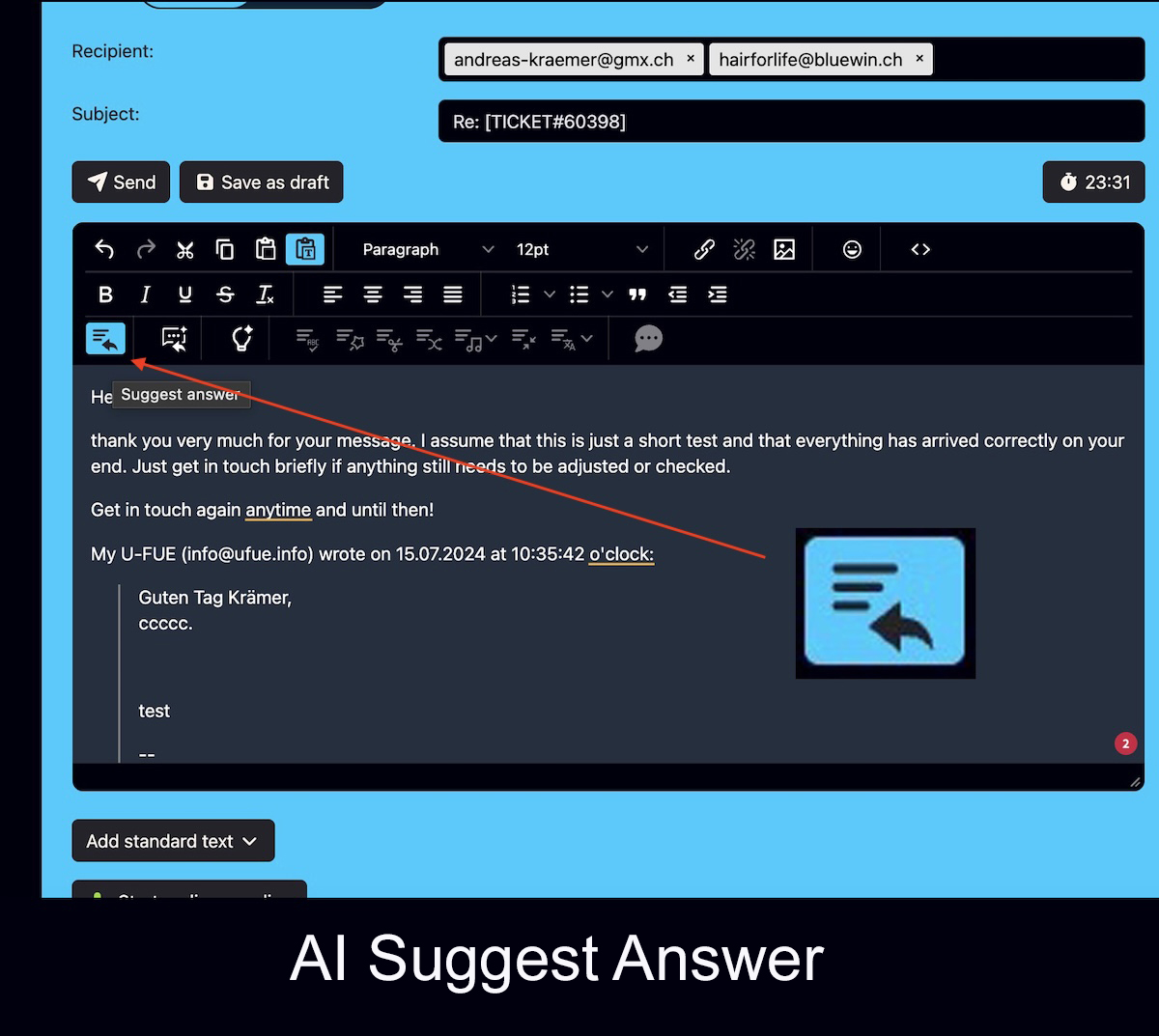
The Bodo AI Editor helps your team draft, automatically suggest, improve, summarize and translate email replies directly inside the ticket history — exactly where previous emails, notes, files, images, follow-ups and client context already belong.
In addition, Bodo can use OpenAI and the Assistants API to create automatic reply suggestions from the full ticket history, explain the current ticket status with AI, include attachments or images in the analysis and use a Bubble Menu to rewrite, improve, shorten or translate selected text directly in the editor.
See the Bodo AI Editor in action.
The video shows how AI-supported writing becomes part of the Bodo ticketing workflow instead of living in a separate tool.
The Bodo AI Editor is powerful because it works where your client communication already happens.
A separate AI chat window can write text. But professional client communication needs more than text generation. Your team also needs the case history, previous emails, internal notes, files, images, follow-up dates and responsibilities.
That is why Bodo combines AI-supported writing with structured email ticketing. AI helps with the draft. Bodo keeps the client file organized.
AI writes. Bodo organizes.
This is the central difference. AI can generate, improve or summarize text. Bodo connects that work to the real client history.
For teams, this means less copy-and-paste, less switching between tools and fewer replies written without the full case context.
Automatic reply suggestions, AI Chat and real ticket context.
The AI functions require your own OpenAI account. Bodo can work with the OpenAI Assistants API, configured prompts and stored context files so that answers are more closely aligned with the real use case. In addition, the Bubble Menu helps improve or rewrite selected text directly inside the editor with only a few clicks.
Use the history
Bodo knows the existing ticket thread and can use it to derive an AI-based reply suggestion.
Add context
Prompts, standard texts, files, images or other stored context information can also be included.
Get an answer or analysis
AI can draft a reply, explain the current status, rewrite text or summarize content.
Review as a human
The responsible person reviews the result and decides what to use, adjust or add.
AI alone does not create order in client communication.
Many teams already use AI somewhere. The real question is whether the result becomes part of a structured client file — or whether it remains just another copy-and-paste step.
Separate AI chat
Can write text, but usually has no durable client history, follow-up logic, attachments, internal notes or ticket responsibility.
Normal inbox
Stores messages, but does not turn long-term communication into a structured client case with team workflow.
Bodo AI Editor
Supports writing while the full ticket context remains visible and connected to the client history.
Team workflow
AI helps with the text. Bodo helps the team stay aligned on the case, responsibilities and next steps.
These are the strong AI functions directly inside the Bodo AI Editor.
This is not only about improving text. Bodo can evaluate the ticket history, explain the current status, work with attachments and even roughly analyze images in specific industries.
Suggested reply from the ticket history
With one button, Bodo can prepare an automatic reply based on the full ticket history. OpenAI, the Assistants API, configured prompts and stored context files help produce a strong result.
See all featuresQuick menu for selected text
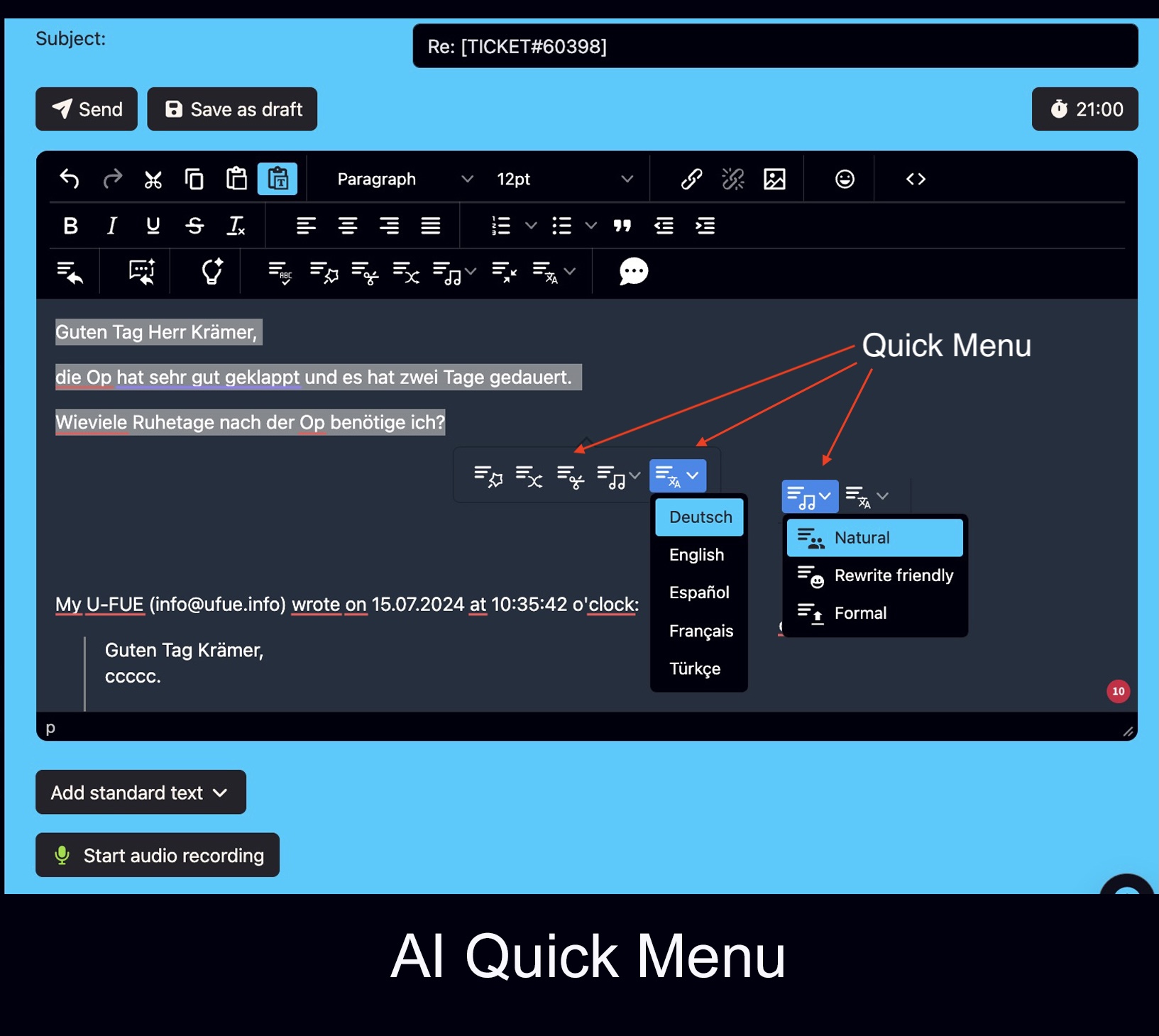
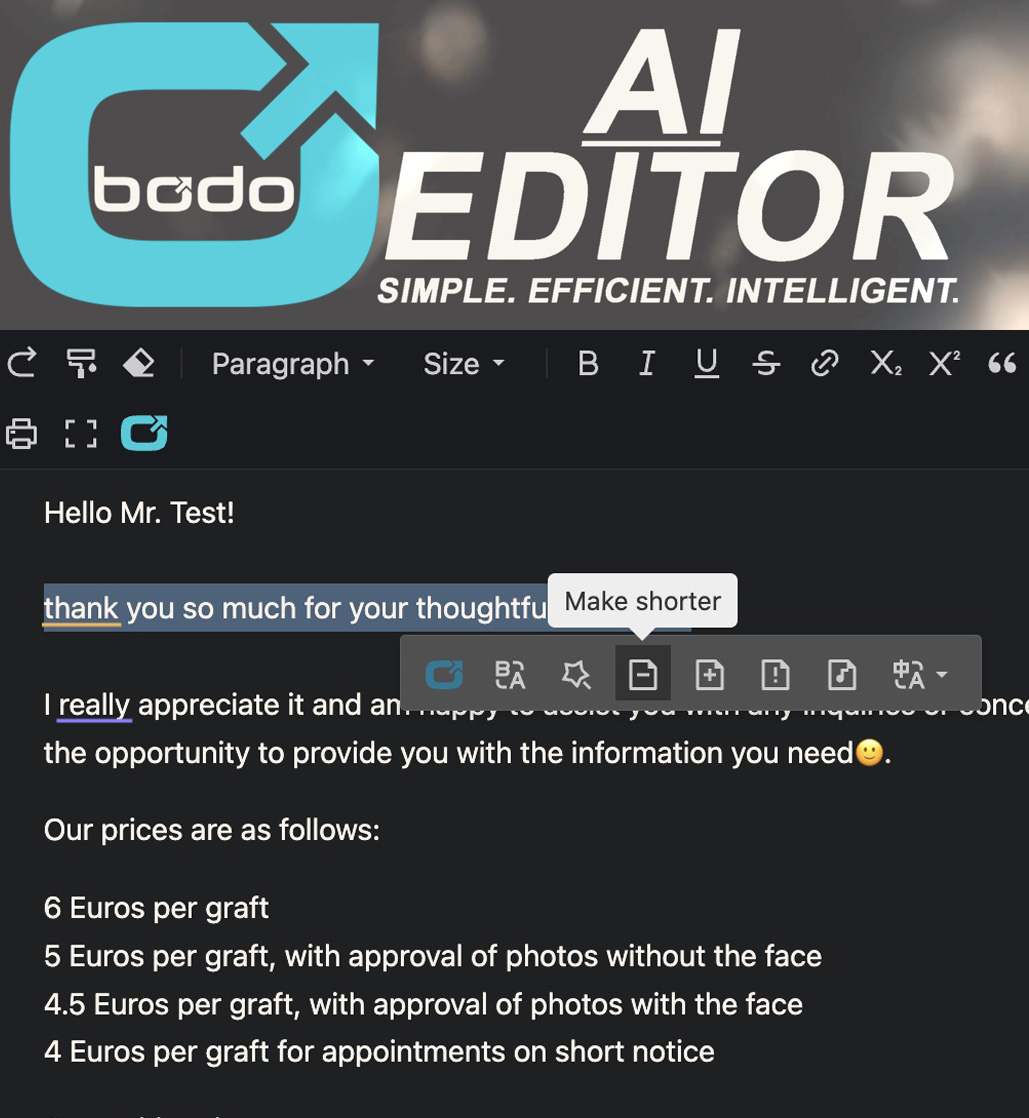
When you select text inside the editor, a dropdown Bubble Menu opens. It lets you improve, rewrite, shorten, make friendlier or more formal, and translate selected text directly with AI.
- Work directly on selected text
- Rewrite naturally, friendly or formally
- Shorten, improve and translate
Write or speak with AI
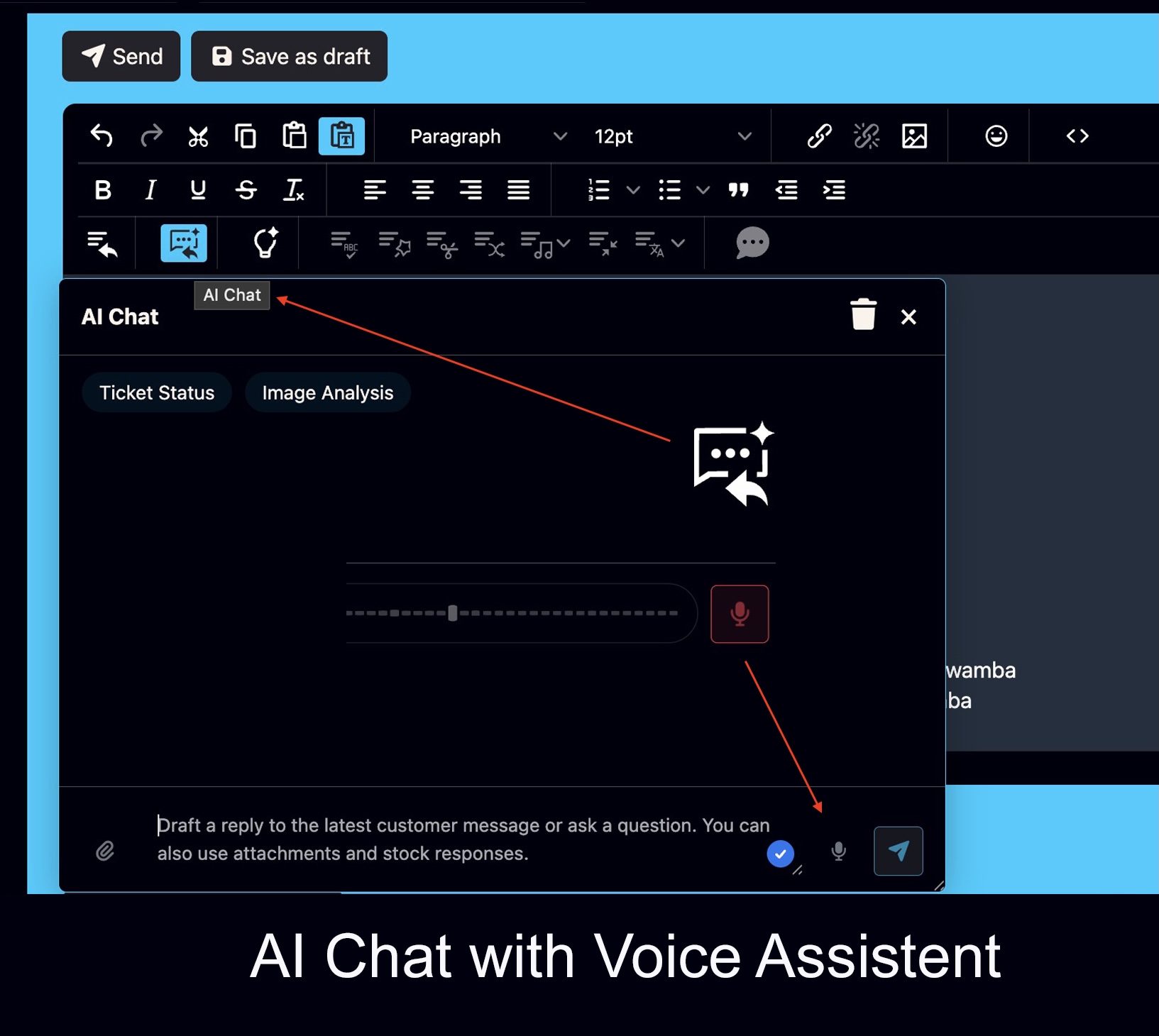
In addition to the suggested reply, there is an AI Chat. You can write or speak, for example: “Improve this paragraph” or “Draft a reply that says …”.
See all featuresAsk AI for the current ticket status
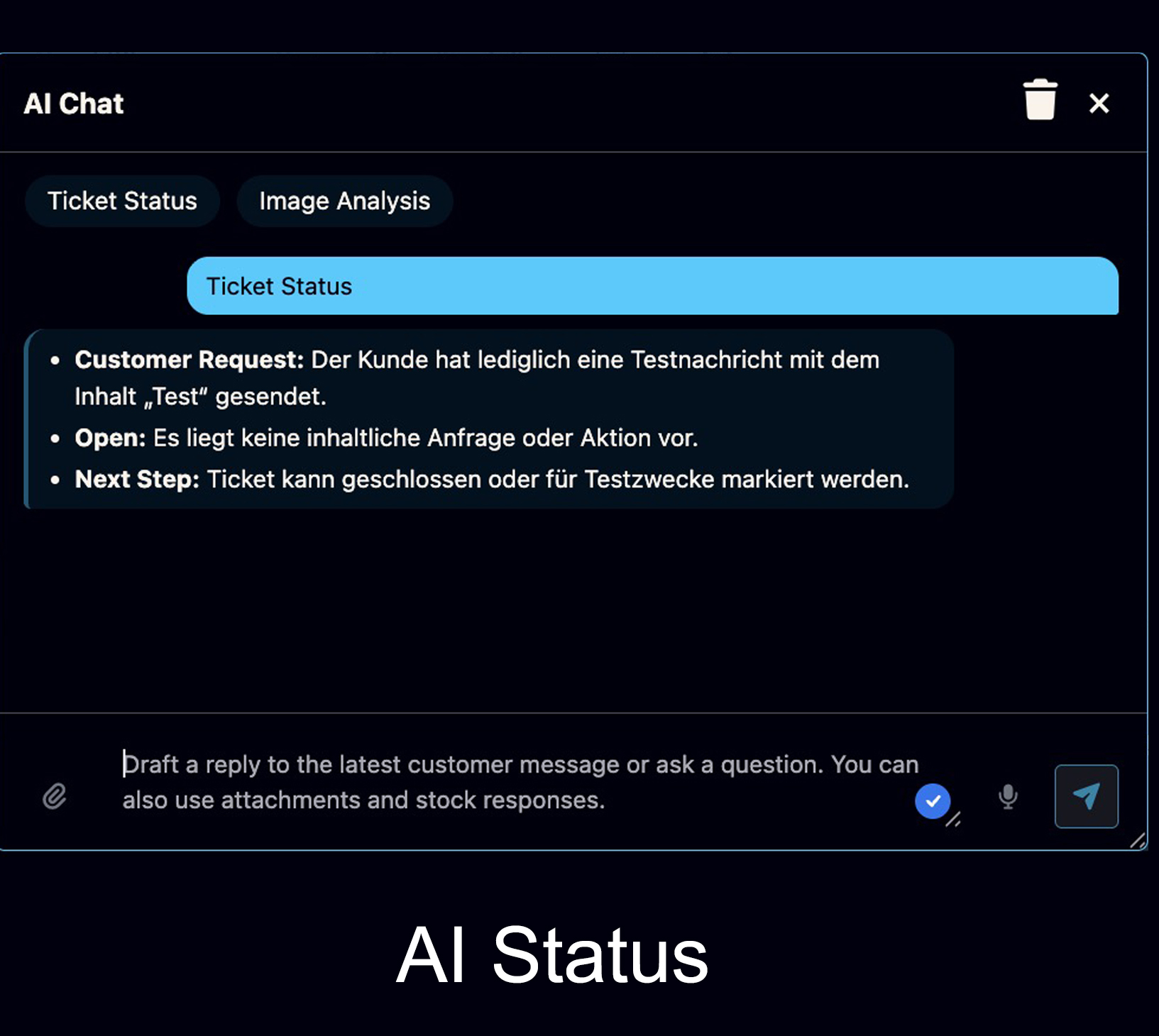
Ask AI what the current status is, what the customer wants, what is still open and what should happen next.
- Clear next-step overview
- Helpful in long threads
- Reduces misunderstandings
Include attachments in AI requests
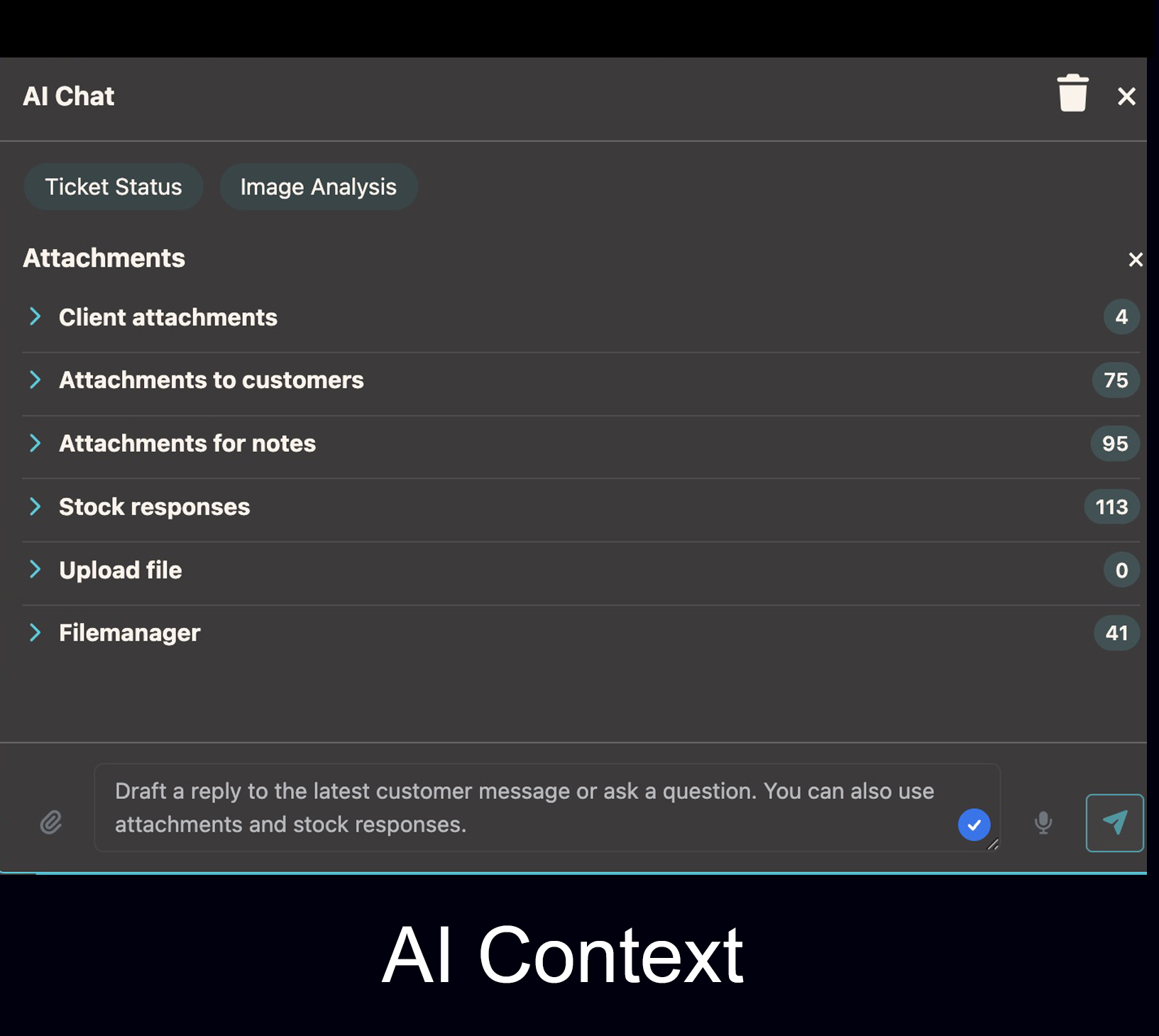
Customer images, uploaded files and standard texts can be included in the AI request so the answer has more context and becomes better.
- Select relevant attachments
- Use images or files in context
- Better AI reply quality
Image Analysis and rough graft estimation

For image-based industries such as hair transplantation, Bodo can support a rough visual first assessment and rough graft estimation.
- AI-based image analysis
- Rough graft estimation possible
- Helpful for first internal review
Text Templates
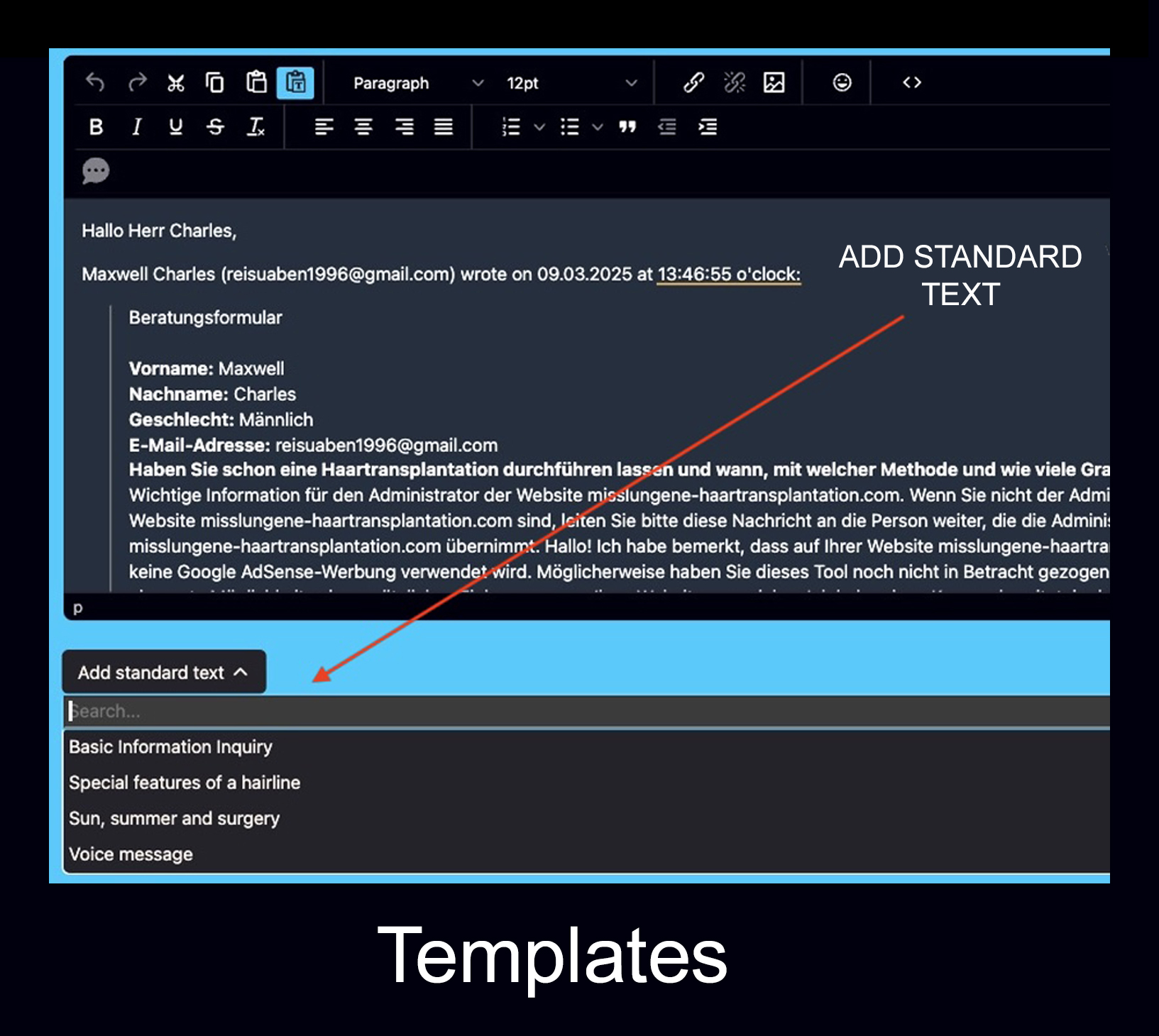
Reusable text templates help answer frequent questions faster and more consistently.
- Faster replies
- Consistent communication
- Useful for recurring questions
A better writing workflow for detailed client communication.
The Bodo AI Editor is designed for teams that answer serious, recurring or consultation-heavy emails — not for random one-off text generation. The Bubble Menu is especially practical in daily work because small text sections can be edited instantly inside the editor without rewriting the entire email.
Summarize long messages
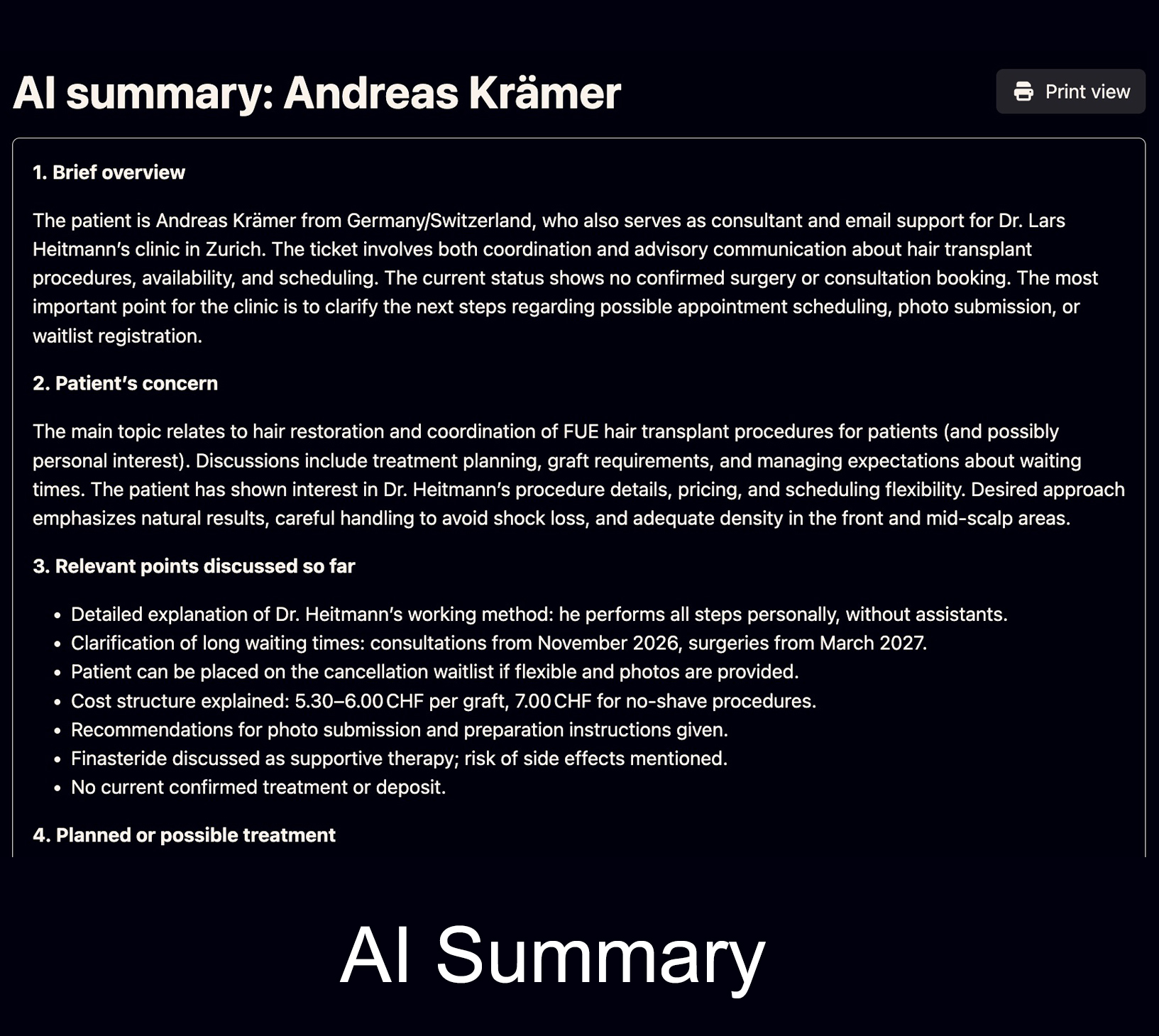
Long client emails or complex histories can be condensed into clearer points, helping the team understand the case faster.
See all featuresReply with full history
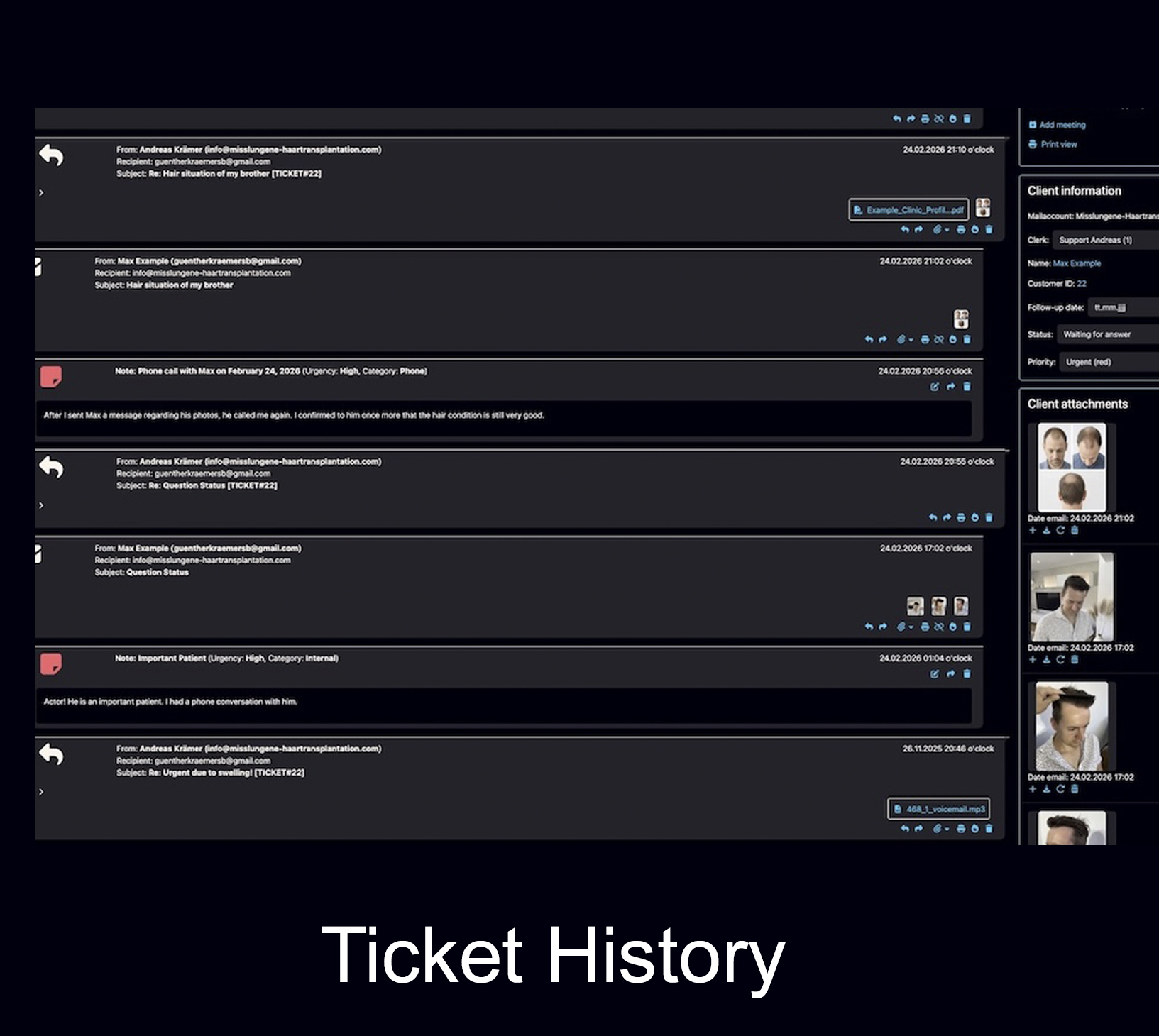
The editor becomes more useful because the client history is nearby: previous emails, notes, files, images and follow-ups stay connected.
Complete historyFor communication that needs precision, context and consistency.
The Bodo AI Editor is especially helpful when clients ask detailed questions, return after a long time, send long emails or need careful explanations.
Hair transplant and cosmetic clinics
Prepare clearer replies for consultations, treatment planning, aftercare questions and image-based patient communication.
Open clinic use case AdvisorsTax advisors, trustees and accountants
Support recurring client questions, document-related replies, summaries and structured communication around long-term client cases.
Open advisor use case TeamsTeams with shared inbox work
AI helps with the text while Bodo keeps ownership, ticket status, history and internal collaboration clear.
Open team workflowThe AI Editor becomes stronger when it works with the full Bodo system.
AI-supported writing is one part of the workflow. Bodo connects it with notes, voice messages, files, follow-ups and long-term client history.
Notes and documentation
Document internal context, decisions and case details close to the reply workflow.
Open notes feature VoiceVoice messages and transcription
Use voice communication and transcription when a spoken explanation is faster or more personal.
Open voice feature ImagesDocumentation and image management
Keep visual documentation, notes and patient communication together in one structured history.
Open documentation pageAI can prepare the reply. Responsibility remains with the team.
Bodo is designed for professional client communication. AI should support staff, but not replace responsibility, expertise or careful review.
Review before sending
AI drafts should be checked by the responsible person, especially in sensitive or professional cases.
Use real context
Good replies depend on the ticket history, files, notes and previous communication — not just on a prompt.
Keep tone consistent
AI can help maintain a clear, friendly and professional communication style across the team.
Reduce repetitive work
Staff spend less time writing similar explanations and more time reviewing the actual case.
Questions about the Bodo AI Editor.
A quick overview for teams that want AI support without losing client history, structure and responsibility.
What is the Bodo AI Editor?
The Bodo AI Editor is an AI-supported email editor inside the Bodo ticketing workflow. It helps teams draft, automatically suggest, improve, summarize and translate replies while the client history, notes, files, images and previous emails remain visible in the same system.
Can Bodo suggest automatic replies based on the full ticket history?
Yes. Bodo can create an automatic reply suggestion based on the full ticket history using OpenAI and the Assistants API. Ticket history, configured prompts and stored context files help produce a more relevant result.
Do you need your own OpenAI account for the Bodo AI Editor?
Yes. The AI functions require your own OpenAI account. Depending on the setup, Bodo can work with the OpenAI Assistants API, configured prompts and context files so that answers better match the specific use case.
Does the Bodo AI Editor include an AI chat with voice input?
Yes. In addition to automatic reply suggestions, Bodo also includes an AI chat. You can type or speak instructions, for example to improve a paragraph, draft an answer or rewrite text.
Can AI summarize the latest ticket status?
Yes. Bodo can use AI to summarize the current ticket status, explain what the customer wants, what is still open and what should happen next. This is especially useful in long ticket threads.
Can attachments and images be included in AI requests?
Yes. Relevant files, images, customer documents and standard texts can be included in the AI request so the answer has more context and can be of higher quality.
Can Bodo analyze images and support rough graft estimation?
Yes. Especially in image-based industries such as hair transplantation, Bodo can support a rough visual first assessment and rough graft estimation. This is mainly helpful for an initial internal review.
What is the Bubble Menu in the Bodo AI Editor?
The Bubble Menu is an AI quick menu for selected text inside the editor. When you highlight a sentence or paragraph, you can directly improve it, rewrite it, shorten it, make it friendlier or more formal, and translate it. This makes editing faster because you do not have to rewrite the entire email.
Does AI replace human review in Bodo?
No. The Bodo AI Editor supports human teams, but it does not replace professional review, responsibility or experience. Replies and assessments should still be checked by the responsible person before use or sending.
Use AI for better replies — and Bodo for the complete client context.
The Bodo AI Editor helps your team write, automatically suggest, improve, summarize and translate emails directly inside the ticket history — where the complete client case stays organized.