What Is an Email Ticketing System?
An email ticketing system turns customer emails into structured cases. Instead of managing important communication inside a normal inbox, teams can track every request, reply, file, note, responsibility and follow-up in one organized workflow.
The goal is simple: customer communication should not disappear inside scattered inboxes, forwarded emails, private folders or individual memory.
An email ticketing system organizes email communication as traceable tickets.
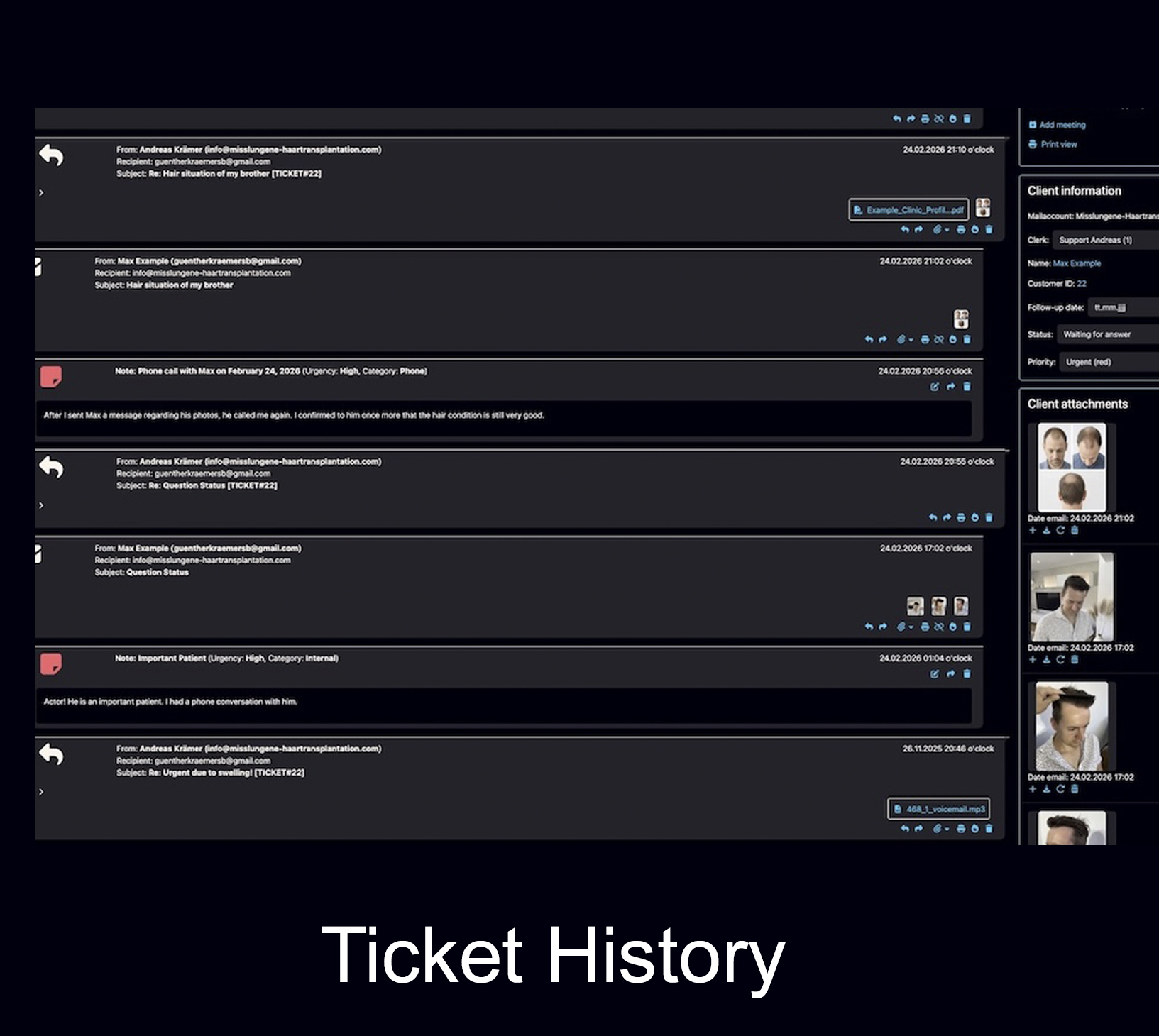
A ticket can include the original message, replies, attachments, internal notes, status, responsible team members, follow-up dates and the full communication history. This makes it easier to answer, document, assign and continue customer cases over time.
Email ticketing is not just about receiving emails. It is about managing the work behind them.
A normal inbox shows messages. An email ticketing system shows the case behind the message: what the customer asked, what has already been answered, which files belong to the case, who is responsible and what should happen next.
The real problem is rarely email itself.
Email is still one of the most stable and widely accepted channels for professional communication. The problem starts when important client cases are handled only through inbox folders, forwarded messages and personal memory.
What does an email ticketing system do?
A good email ticketing system adds structure to communication. It helps teams see what is open, what has been answered, what still needs action and where the complete history of a customer case can be found.
Creates structured tickets
Incoming emails become tickets or cases. This makes it easier to see which inquiries still need attention and which ones are already resolved.
Keeps the communication history
Replies, previous messages, attachments and later updates remain connected to the case instead of being scattered across separate inboxes.
Shows responsibility
Team members can see who is responsible for a case, who is working on it and where action is still required.
Connects files and documents
PDFs, images, documents and other attachments remain close to the communication history instead of disappearing in downloads or folders.
Supports follow-ups
Important customer requests, open questions and future tasks can be followed up more reliably with reminders, status handling and next steps.
Improves traceability
A structured history helps the team understand what happened before, what was promised and why a certain decision was made.
How is an email ticketing system different from a normal inbox?
A normal inbox is designed for messages. An email ticketing system is designed for organized work around messages. That difference becomes important when communication is long-term, detailed, team-based or documentation-heavy.
When should a company use an email ticketing system?
A small company can often start with a normal inbox. That is normal. But at some point the inbox becomes the weak point: inquiries increase, several people answer the same customers, files get lost, follow-ups are missed and old context becomes hard to find.
An email ticketing system becomes useful when customer communication is no longer just a simple message exchange, but a real workflow.
Several people answer customer emails
As soon as more than one person works on the same inbox, responsibility and visibility become important.
Customers return after weeks, months or years
If older communication still matters later, the full case history must remain easy to find.
Files, images or documents belong to the case
Attachments should not be separated from the discussion, notes and decisions they belong to.
Follow-ups are important
If timing matters, open questions and future actions should not depend only on personal memory.
Email ticketing, CRM, shared inbox and helpdesk: what is the difference?
These terms are often mixed together. In practice, they solve different parts of the same problem: how a company organizes customer communication, customer data and team work.
Shared inbox
A shared inbox allows several people to access the same mailbox. It can work for simple team email handling, but it often becomes limited when cases need long-term history, notes, files, assignment and follow-ups.
CRM system
A CRM usually focuses on contacts, companies, sales opportunities and customer records. It is useful for managing relationships, but not every CRM is built for detailed email-based case handling.
Helpdesk software
Helpdesk tools are often built for support requests that open, get solved and close. That is useful for many support teams, but not always ideal for long-term client relationships.
Email ticketing system
Email ticketing focuses on turning email communication into organized tickets or cases, with status, history, responsibilities and documentation.
AI email assistant
AI can draft, rewrite, translate or summarize emails. But AI alone does not create a complete client file, assign responsibility or keep files and follow-ups organized.
Bodo’s approach
Bodo combines email ticketing, CRM-style client history, files, notes, follow-ups, team visibility and AI-supported communication in one structured workflow.
Important features of a good email ticketing system
The best system is not always the one with the longest feature list. What matters is whether the system keeps communication understandable, traceable and usable for daily work.
Structure is more important than isolated automation.
AI, templates and automation can help. But if the underlying client history is fragmented, faster writing does not solve the real problem. The communication itself must remain organized.
Complete customer history
Messages, replies, files, notes and follow-ups should stay connected instead of being split into fragments.
Internal notes and documentation
Teams need a place for internal context that should not be sent to the customer.
File and document handling
Images, PDFs, forms and attachments should remain close to the customer case.
Team workflow
Assignment, status and visibility help prevent duplicate answers and unclear responsibilities.
Follow-ups and reminders
Open leads, missing documents and next steps should stay visible until they are handled.
How Bodo approaches email ticketing
Bodo is an email ticketing system and CRM built around one simple principle: one client, one permanent ticket, one complete history. This makes it different from systems that create disconnected tickets for every separate subject line or short support case.
One client, one ticket
The communication stays centered around the customer. New replies, files, notes and follow-ups remain part of the same long-term history whenever possible.
Files and images stay connected
Attachments, documents, photos and uploads remain close to the communication they belong to, instead of being scattered across devices or folders.
Internal notes stay inside the case
Important background information, decisions and observations can be documented internally without exposing them to the client.
Follow-ups stay actionable
Follow-up dates, reminders and open tasks help reduce the risk that promising leads or important requests quietly disappear.
Teams see what is happening
Assignment, staff visibility and workflow status help teams understand who is responsible and what is still open.
AI works inside the structure
Bodo can support summaries, reply drafts, rewriting, translation and clearer communication while the client history remains structured.
Continue reading
These pages explain how Bodo applies email ticketing in real client communication, industry workflows and long-term customer history.
Frequently asked questions about email ticketing systems
What is an email ticketing system?
An email ticketing system is software that turns email communication into structured cases or tickets. It helps companies organize incoming and outgoing messages, files, notes, responsibilities, status and follow-ups in one workflow.
How is an email ticketing system different from a normal inbox?
A normal inbox is mainly built for message exchange. An email ticketing system adds structure around the message: case status, customer history, internal notes, file handling, assignment, follow-ups and traceability.
Is an email ticketing system the same as a CRM?
No. A CRM usually manages contacts, companies, sales opportunities and relationship data. An email ticketing system manages the communication workflow itself. Bodo combines both ideas by keeping customer communication inside a structured long-term client history.
Can small teams benefit from email ticketing?
Yes. Small teams often need structure even more because they cannot afford lost leads, duplicate answers or forgotten follow-ups. Email ticketing helps keep work visible and reduces dependence on individual memory.
Does AI replace email ticketing?
No. AI can help write, rewrite, translate and summarize emails. But AI does not automatically create a complete client file, assign responsibility, connect documents or manage follow-ups. AI works best when the underlying communication is already structured.
Email is the channel. The ticket is the structure.
A professional email ticketing system does more than collect messages. It keeps the full customer case traceable: emails, replies, files, notes, responsibilities, follow-ups and history.