Email Management Software for Customer Inquiries.
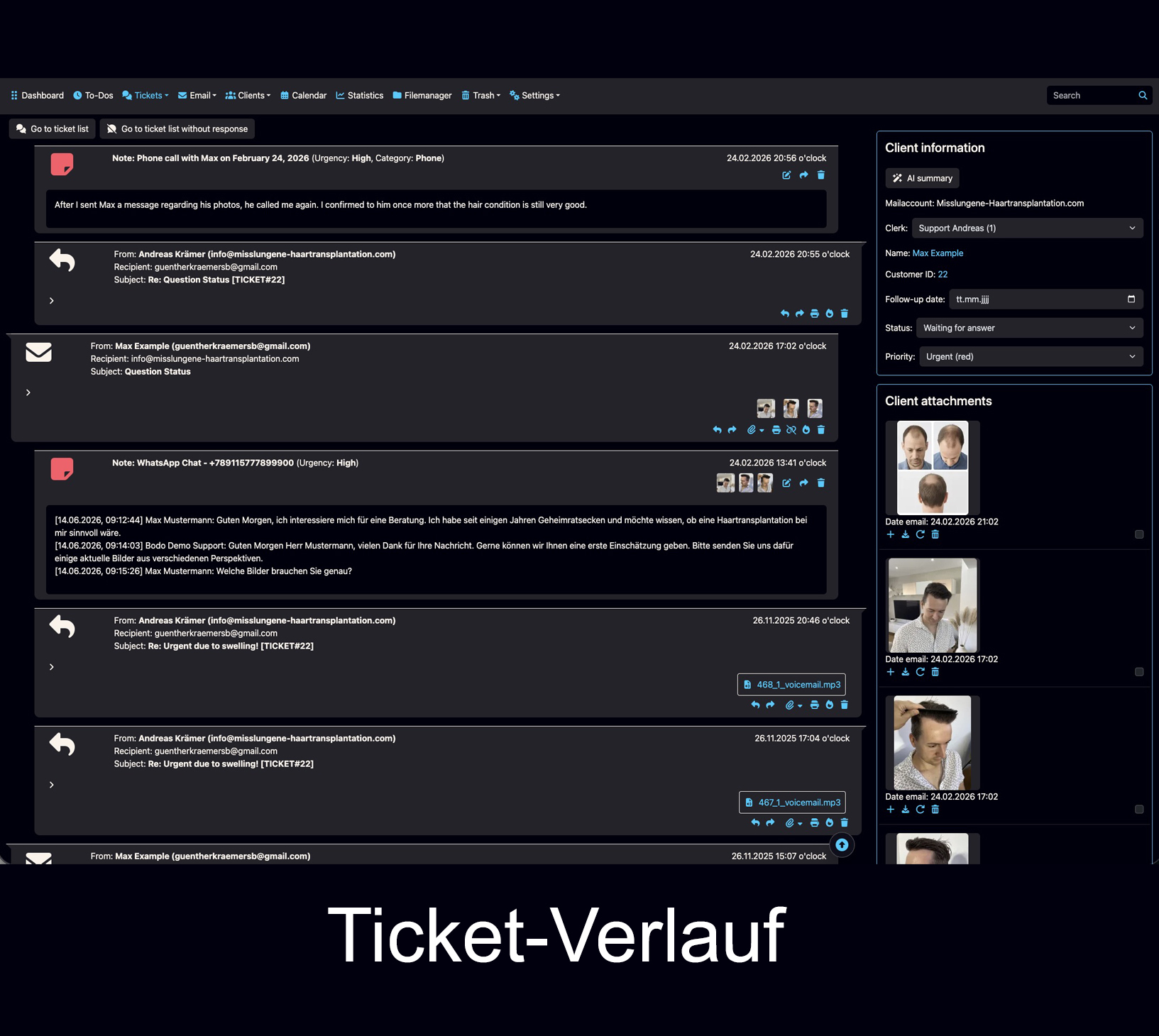
Organize customer emails not just as individual messages, but as complete client cases. Bodo connects emails, client history, files, notes, ownership and follow-ups in one structured workflow.
For teams that currently handle customer emails through Gmail, Outlook, Proton Mail or a shared inbox and need more visibility — without giving up familiar email communication.
Email is not the problem. Missing context is.
A normal inbox or simple shared mailbox can work well while message volume is low and only a few people are involved. As customer communication grows, however, it becomes harder to keep track of the complete client case — not just the latest email or shared inbox.
The messages are there — the context is scattered.
Previous replies, attachments, internal information and next steps can become scattered across inboxes, folders and separate threads.
Team ownership quickly becomes unclear.
As soon as several team members handle the same customer communication, it needs to stay clear who is responsible and whether someone is already working on the case.
Long-term client relationships need history.
When a client returns months or years later, your team should not have to start from zero or reconstruct important information.
What should email management software for customer inquiries do?
It should do more than display emails. What matters is that your team can quickly understand the client, the previous communication, the responsibility and the next step.
Who is the person behind the message?
Communication stays connected to the client and their previous history.
What has already been discussed?
Emails, replies, images, files and internal notes remain traceable in context.
Who is handling the case?
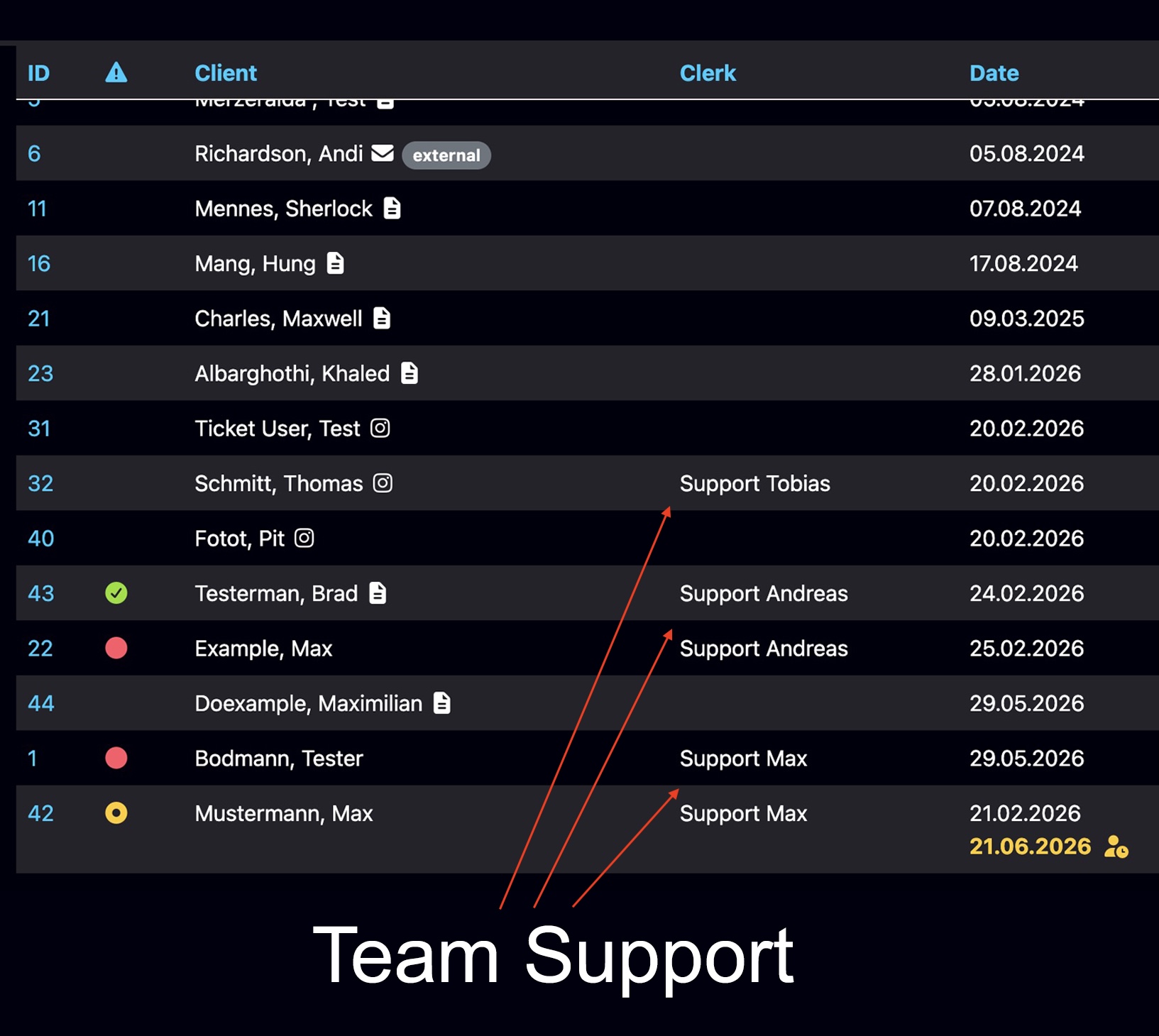
Assignments and team visibility help keep ownership and active work transparent.
What must not be forgotten?
Follow-up dates bring open client cases back into focus at the right time.
From the email inbox to one connected client case.
Bodo turns customer communication into a structured working case. Instead of treating individual messages in isolation, it remains clear what belongs to this client.
This is especially important when clients return regularly, several team members are involved, or files, images, notes and later follow-ups belong to the case.
- Incoming and outgoing emails stay in the client context.
- Files, images and internal notes stay with the right case.
- Multiple email addresses can be assigned to the same client.
- Ownership and next steps remain traceable.
What happens when a client writes again after two years?
In this short video, Andreas Krämer, founder of Bodo, explains why complete client context can be crucial in day-to-day communication.
Bodo is developed and operated from Switzerland. Founder Andreas Krämer explains the idea behind complete client history personally in this video.
This is exactly where the difference between a simple inbox and a structured client history becomes clear. The client does not expect your team to have forgotten the entire previous relationship.
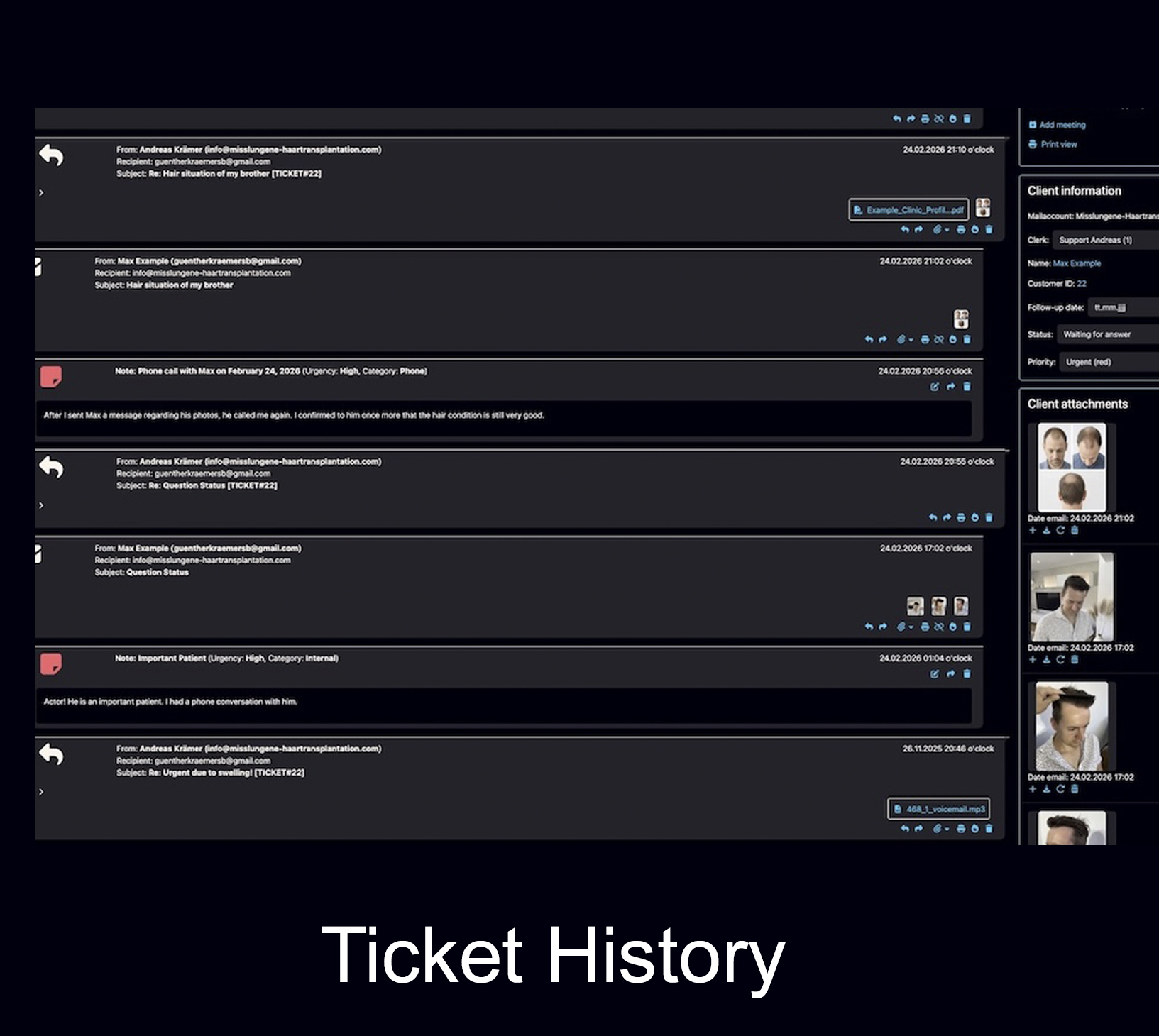
With Bodo, previous emails, images, files, notes and follow-ups can remain connected to the client case. That means the team does not automatically start from zero again.
The real value is not only today’s reply, but the context behind that reply.
Founder of Bodo
A clear workflow for customer inquiries by email.
Bodo combines familiar email communication with a structured workflow behind it. The client case stays understandable even when several steps or team members are involved.
Customer inquiry arrives
The email is not treated as just another message. It is connected to the client and the relevant case.
Context becomes visible
Previous communication, files, images, notes and relevant information remain traceable together.
The team works on the case
Assignments and Staff Working Visibility help reduce parallel work and duplicate replies.
The case remains connected
Even after a reply, the history and follow-ups remain connected to the client and can be found again later.
Multiple team members. One shared client context.
Email management becomes especially important when several people handle customer inquiries. Bodo is therefore not designed for a single inbox only: team members can work with individual logins, see responsibilities and handle client cases within the same structured history.
Every team member works with individual access.
Multiple team members can work with customer communication in Bodo at the same time. Instead of using one unclear shared login, every team member receives individual access.
At the same time, it remains visible who is responsible for a client or ticket, who is already working on it and which next steps are still open. This keeps team communication traceable without fragmenting the client context.
- Individual team member access
- Assign clients and tickets to team members
- Make active work visible across the team
- Organize priorities and follow-ups together
- One connected client history for authorized team members
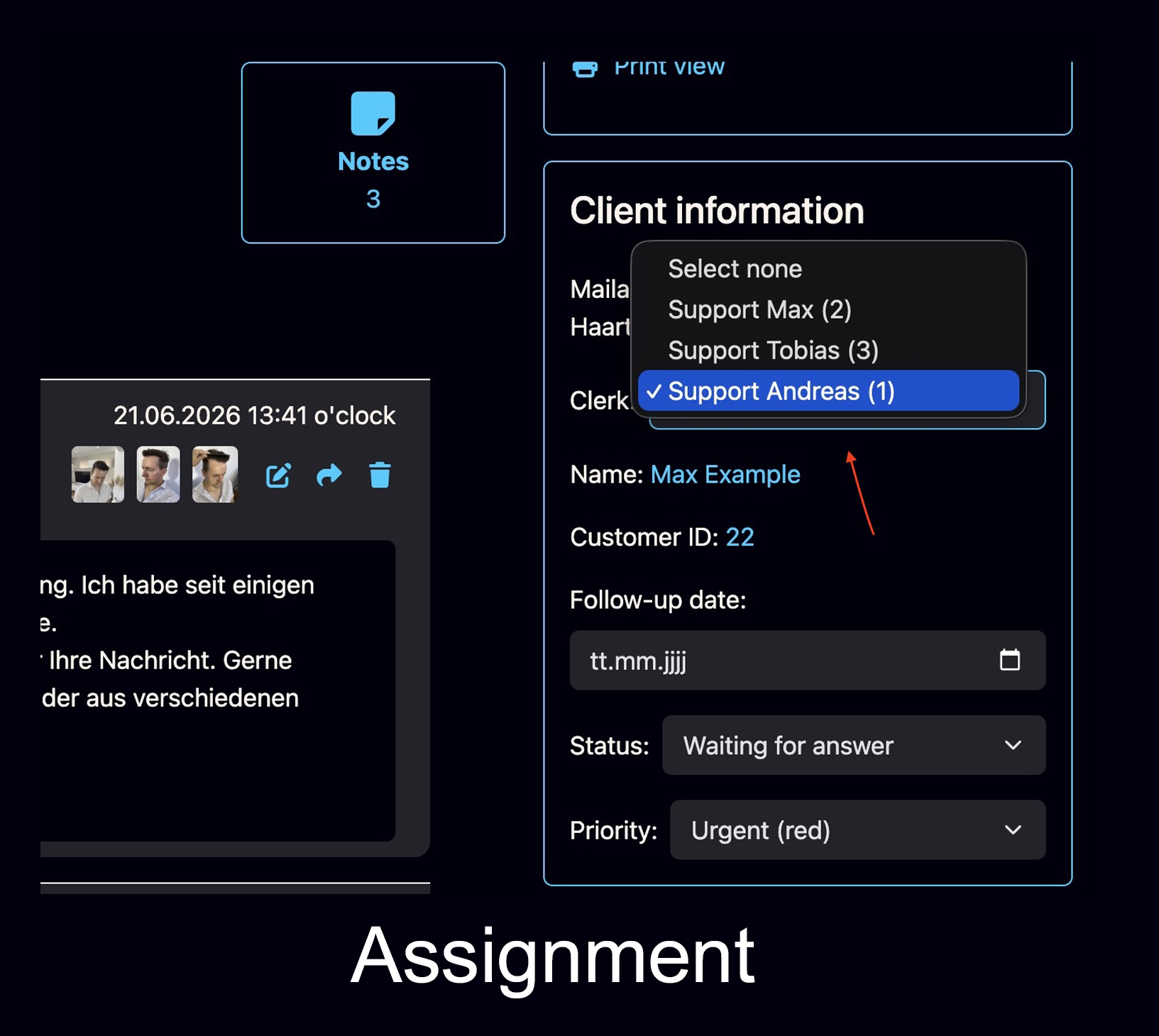
Assign Clients and Tickets
A client case can be assigned to the responsible team member. This makes it clear who owns the case and who takes the next step.
Explore Staff Assignment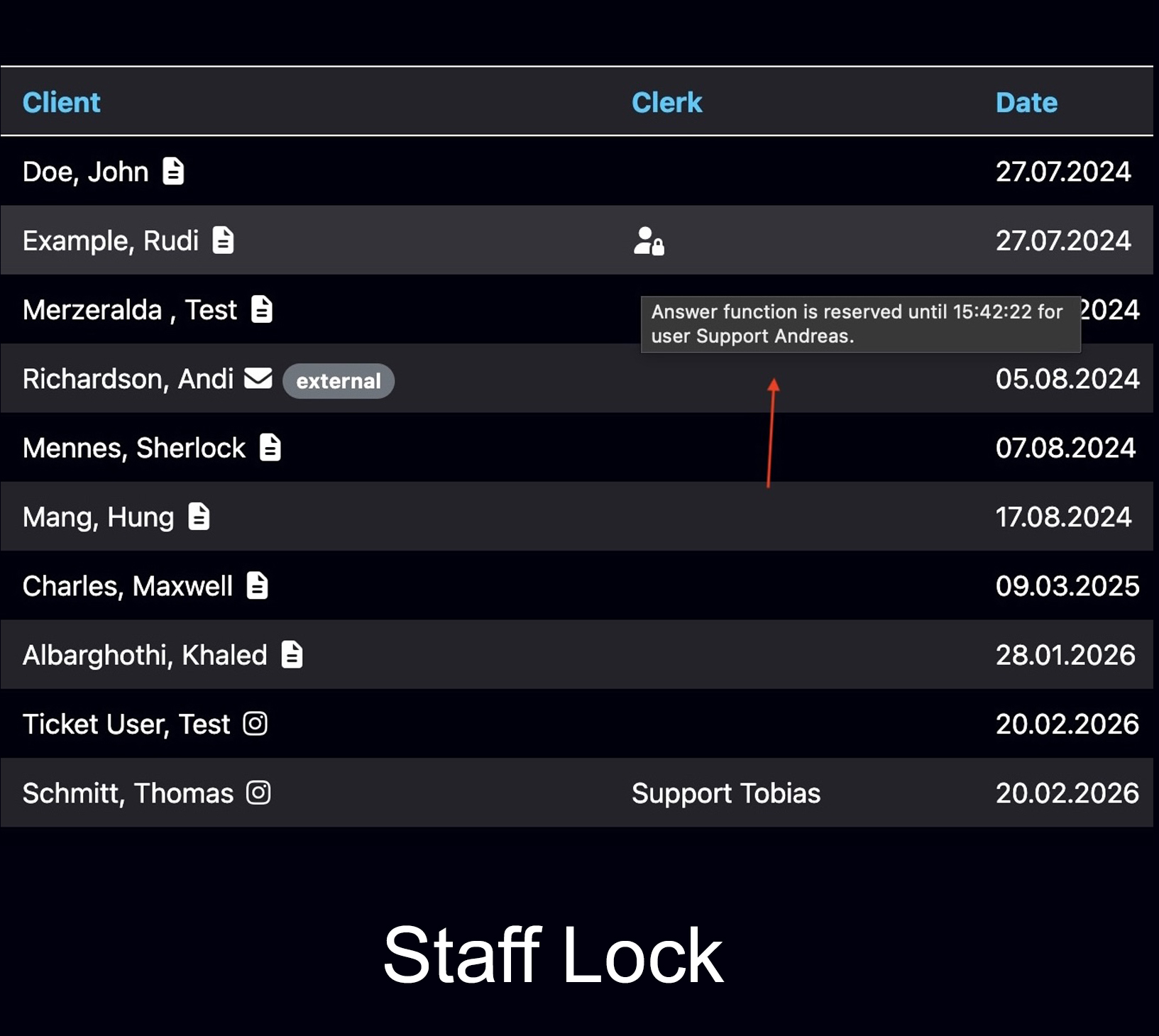
See when someone is already working
Bodo can show when another team member is already working on a ticket. This helps avoid duplicate replies and parallel handling of the same customer inquiry.
Explore Working Visibility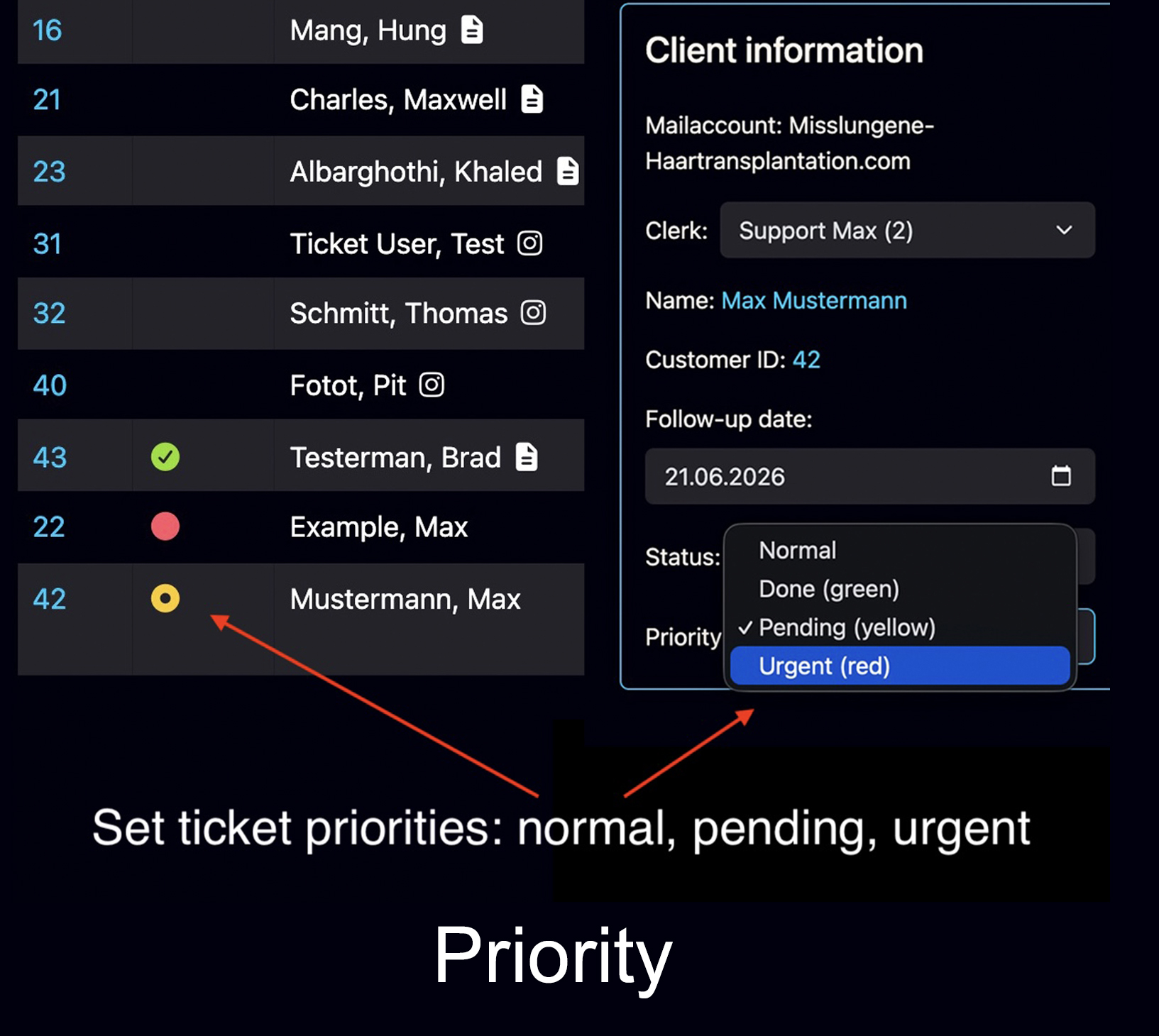
Make urgent client cases visible
Tickets can be prioritized so the team can identify urgent customer inquiries faster and organize the working day more clearly.
Explore Team WorkflowIt is not enough to find the email. The full context matters.
Professional customer communication often includes more than text. Images, documents, different email addresses and later follow-ups can all belong to the same case.
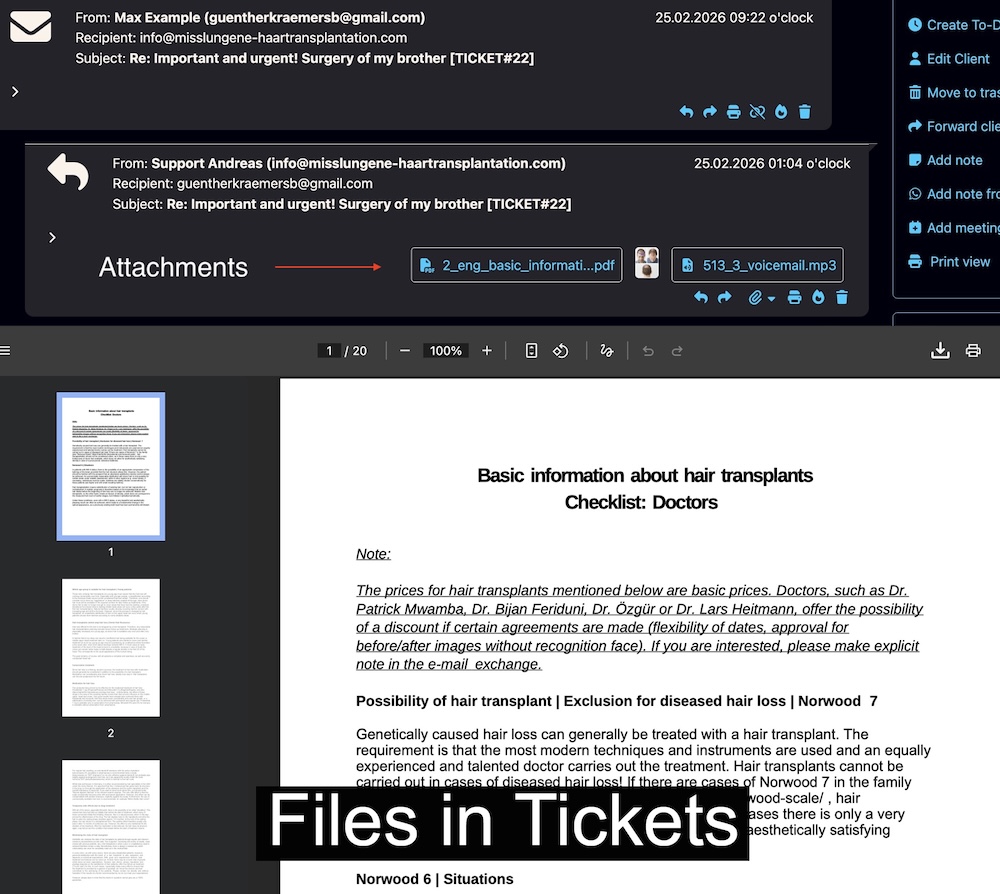
Documents and Attachments in the Case
PDFs, images and other files remain connected to the ticket, making it clear which document belongs to which client and case.
Explore File Features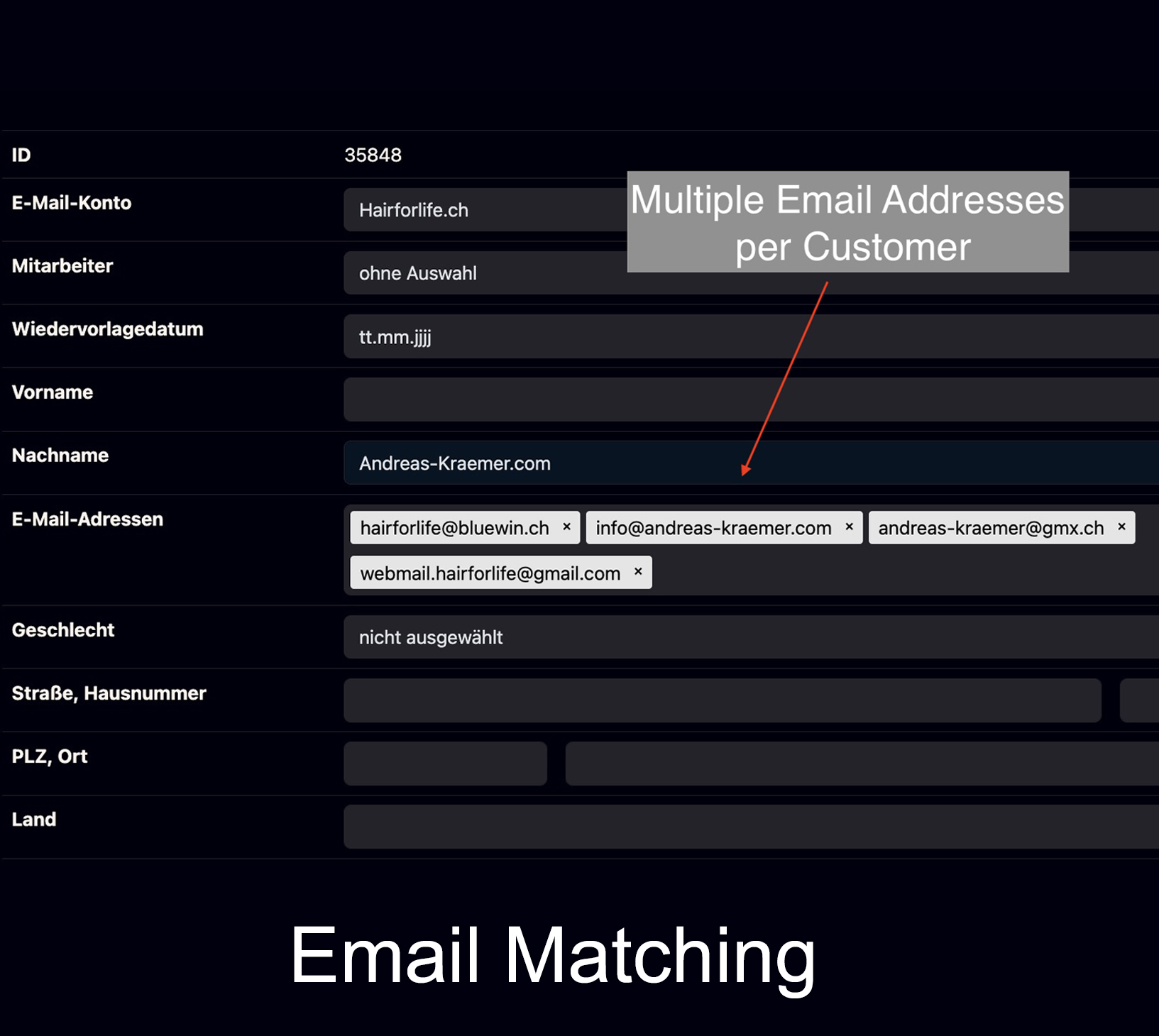
Multiple Email Addresses per Client
If a client uses different email addresses, the communication can still be assigned to the same client history.
Explore Email Matching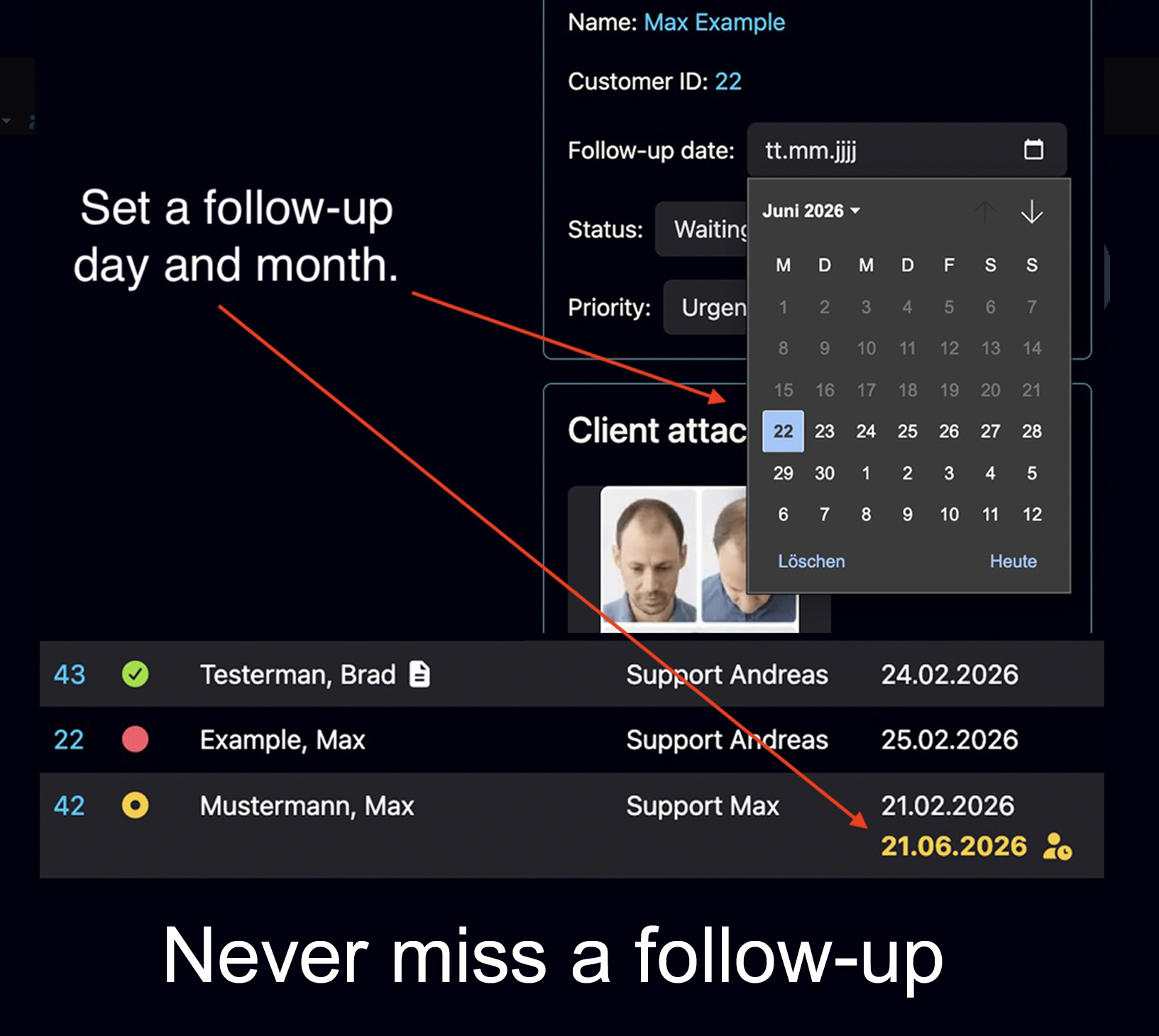
Bring Open Cases Back Into View
Follow-up dates bring client cases back into focus at the right time instead of relying only on memory or separate reminders.
Read the Follow-Up GuideShared Inbox or Email Management with Client History — What Is the Difference?
A Shared Inbox, also called a shared mailbox or team inbox, helps several team members handle the same customer emails together. Bodo goes one step further: in addition to shared handling, it focuses on the long-term client case, complete history, ownership, internal information and follow-ups.
| Area | Normal Email Inbox | Shared Inbox | Bodo |
|---|---|---|---|
| Core Principle | Messages, folders and threads | Shared handling of one inbox | Connected client case with history |
| Client History | Scattered across messages and folders | Depends on the system | Emails, files, notes and other case information stay connected |
| Ownership | Often manual or outside the inbox | Available in many solutions | Staff assignment inside the client workflow |
| Internal Notes | Usually separate | Available with some providers | Directly inside the client case context |
| Follow-ups | Often handled through calendars, flags or reminders | Varies by provider | Follow-up dates directly connected to the case |
| Multiple Email Addresses | Can create separate threads | Varies by solution | Can be assigned to the same client |
| Long-Term Context | Often has to be reconstructed | Depends on structure and history model | Long-term client history is a core principle |
Note: Features of shared inbox and email systems vary by provider and plan. This table describes typical differences in approach and is not a universal feature claim about third-party products.
AI-Assisted Email Management Directly in the Client Context.
AI is most useful when it does not operate in an isolated chat. The Bodo AI Editor supports your team directly where ticket history, previous emails, notes, files, images, follow-ups and client context already come together.
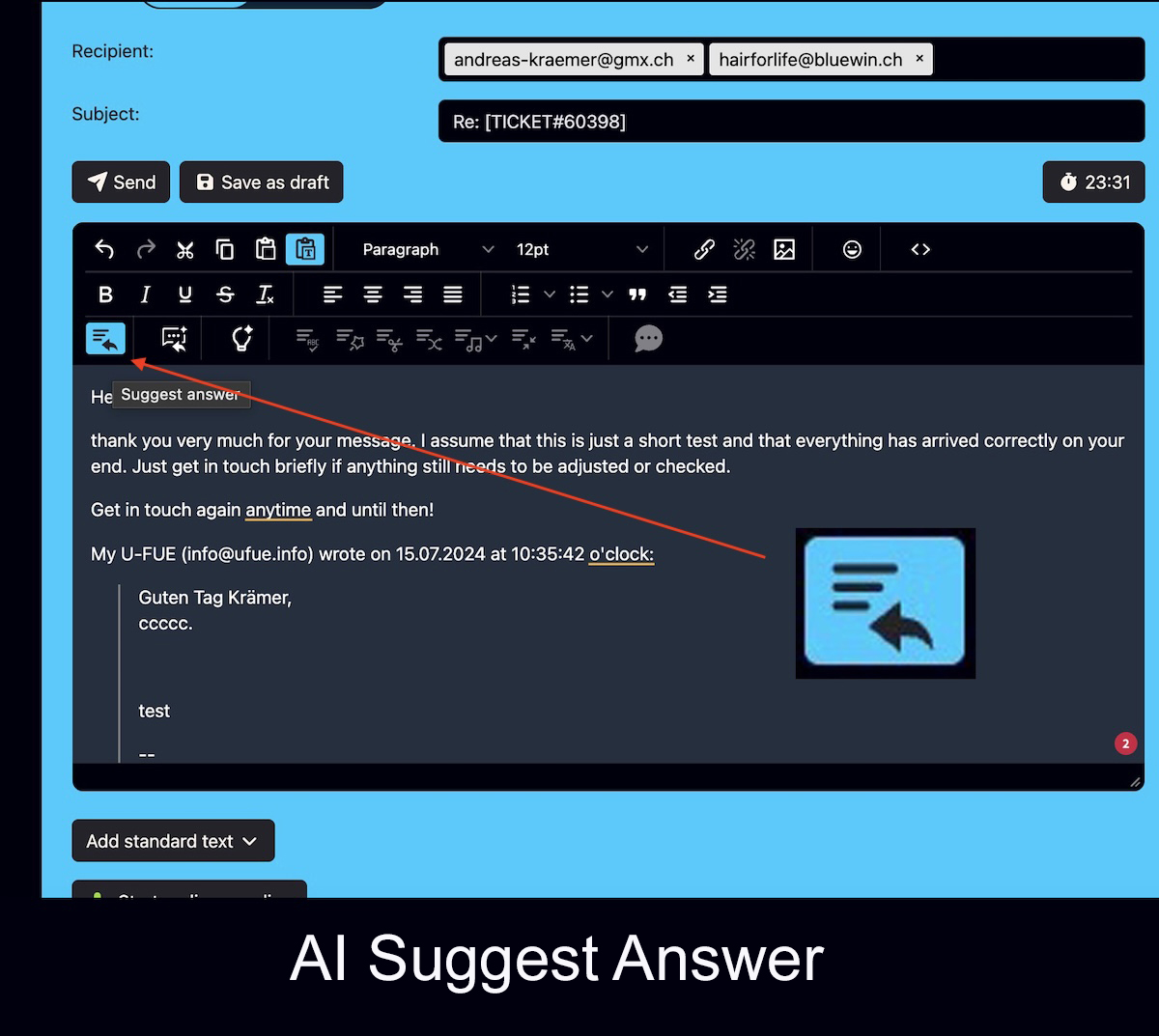
Draft, improve and summarize replies — without constantly switching between tools.
The Bodo AI Editor can prepare a reply suggestion based on the existing ticket history. You can also improve, rewrite, shorten, translate or summarize text directly inside the editor.
With AI Chat, instructions can be given by text or voice. Selected passages can be edited directly through the bubble menu. The current ticket status as well as relevant files or images can also be included in the AI context.
A separate OpenAI account is required for AI features. AI-generated results should be reviewed by the responsible person before sending.
For businesses where a customer email is more than a one-off support question.
Bodo is especially useful when client relationships last longer, several team members are involved, or context, documents and later follow-ups matter for a professional response.
Consulting Firms and Service Providers
When client cases continue for weeks, months or years and previous decisions remain relevant.
Clinics and Practices
When emails, images, files, follow-up questions and long-term client or patient communication belong together.
Explore Bodo for Clinics →Tax Advisors, Accountants & Trustees
When communication and documents need to remain traceable across the team and returning clients should not have to be understood from scratch every time.
Explore Bodo for Tax Advisors & Trustees →Law Firms and Specialist Advisors
When the history of a case and previous communication are essential for the next reply.
Teams with Returning Clients
When several team members work on customer communication and tasks, files and previous agreements need to stay connected.
Explore Bodo Team Workflow →Businesses with Complex Customer Inquiries
When an inquiry cannot be resolved with a standard reply and the full client context remains important for handling the case.
The Right Next Pages.
Depending on whether you want to understand the ticketing principle, the features or long-term client context in more detail.
How Bodo Turns Emails into Structured Client Tickets
The main product page for email ticketing, workflow and client history.
Explore Email Ticketing → FeaturesAll Features at a Glance
Ticketing, files, images, notes, team features, AI, follow-ups and additional tools.
Explore Features → Client HistoryWhen a Client Returns After Years
Why long-term context builds trust and why complete history matters in day-to-day work.
Explore Client History →Questions About Email Management Software for Customer Inquiries.
Key points for businesses that want to organize customer emails more systematically and handle them with clear team visibility.
What Is Email Management Software for Customer Inquiries?
Email management software for customer inquiries helps businesses handle customer emails in a structured way and keep relevant information connected to the client. This can include client history, files, internal notes, ownership and follow-ups.
How Is Bodo Different from a Normal Email Inbox?
A normal email inbox is primarily organized around messages, threads and folders. Bodo also organizes communication as a connected client case with history, files, notes, follow-ups and team ownership.
Is Bodo a Shared Inbox or Shared Mailbox Alternative?
Bodo supports collaborative handling of customer communication and can be an alternative to a traditional shared inbox or shared mailbox. Its additional focus is the permanent client case, complete history, ownership, follow-ups and team workflow.
How Does Bodo Help Teams Handle Customer Emails?
Staff assignment, Staff Working Visibility, internal notes, priorities and a shared client history help keep ownership and current work traceable.
Can Bodo Assign Multiple Email Addresses to the Same Client?
Yes. Multiple email addresses can be assigned to the same client, allowing communication from different sender addresses to remain connected to the same client history.
Does Bodo Support Follow-Ups and Recontact Dates?
Yes. Follow-up dates can remain connected to the client case so open items become visible again at the intended time.
What Role Does the Bodo AI Editor Play in Email Management?
The Bodo AI Editor can prepare replies from ticket history and help write, improve, rewrite, shorten, translate and summarize text. AI Chat, the bubble menu, ticket-status summaries and the use of files and images as context are also available. This keeps AI inside the structured client workflow instead of in a separate tool.
Manage Customer Inquiries by Email in a Structured Way.
If your business needs more than a normal inbox, shared inbox or traditional shared mailbox, a Bodo demo shows how email ticketing, client history, files, notes, ownership, follow-ups and the Bodo AI Editor work together in one workflow.