CRM vs. Helpdesk vs. Email Ticketing System: What Is the Difference?
Many companies know that their customer communication has become too chaotic. But the next question is often unclear: do they need a CRM, a helpdesk, a shared inbox or an email ticketing system?
The difference matters. A CRM mainly helps organize customer relationships and sales information. A helpdesk often manages support cases that are opened, solved and closed. An email ticketing system helps organize the actual work around customer emails: messages, files, notes, responsibilities, status, follow-ups and long-term history.
A CRM manages the customer record. A helpdesk manages support cases. Email ticketing manages the communication workflow.
A CRM can tell you who the customer is, what company they belong to and where they are in a sales process. A helpdesk can help solve support issues. An email ticketing system shows what the customer asked, what was answered, which files belong to the case, who is responsible and what needs to happen next.
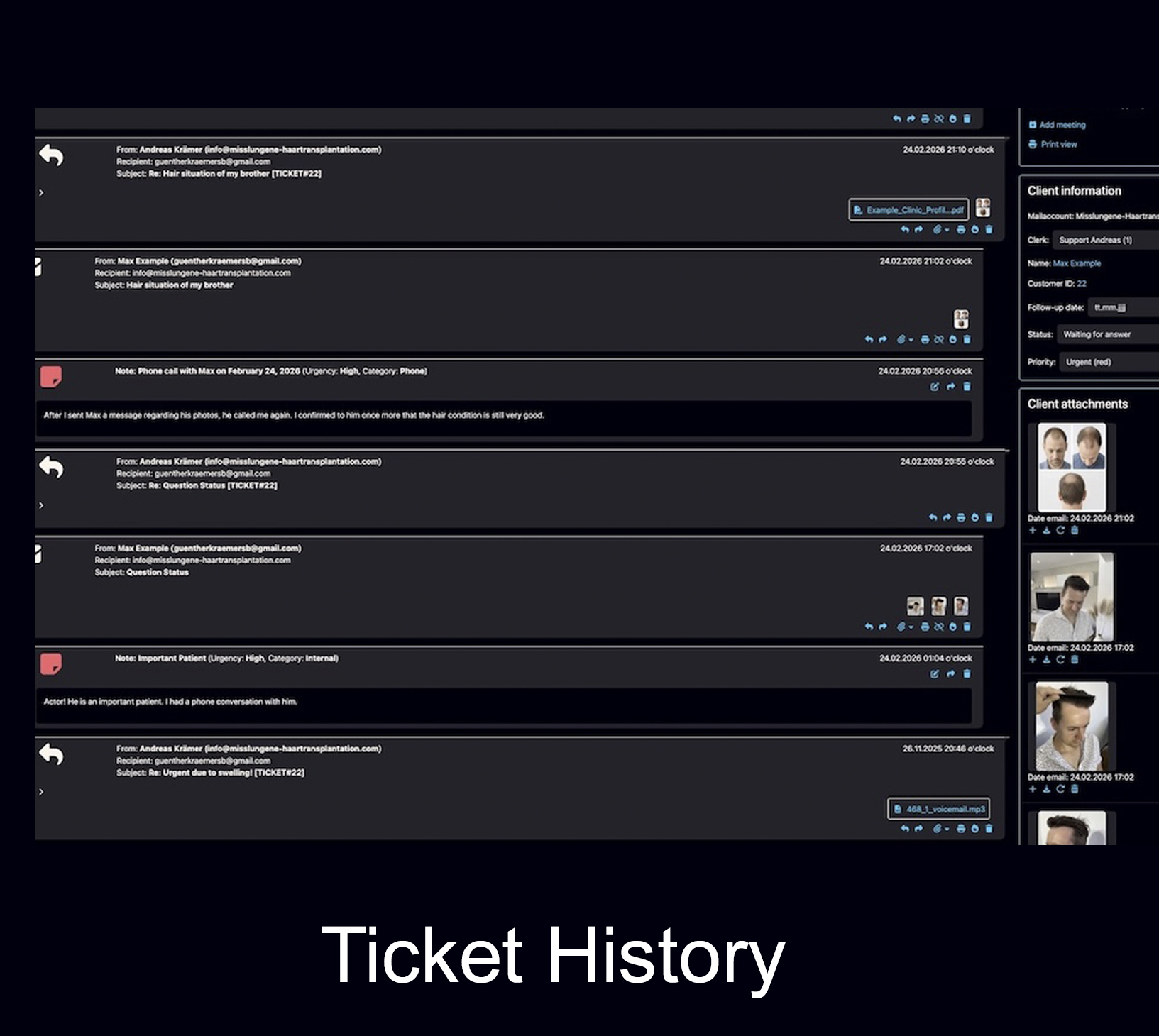
CRM answers “who is this customer?” Email ticketing answers “what is happening with this case?”
Both questions are important. The problem starts when a company tries to solve every communication problem with one tool. A CRM can store customer data, but it may not manage daily email work well. A normal inbox can send messages, but it does not create structured customer history. A helpdesk can close support cases, but not every client relationship works like a short support ticket.
The real decision is not CRM or ticketing. It is relationship data versus communication workflow.
Many businesses need customer records and structured communication. That is why Bodo combines CRM-style customer history with email ticketing, files, notes, follow-ups and team visibility.
What each system is usually built for
CRM, shared inbox, helpdesk and email ticketing are often mentioned together. But in daily work, they solve different parts of the same bigger problem: how a company handles customer communication and customer context.
CRM system
A CRM usually focuses on contacts, companies, sales opportunities, pipeline stages, activities and relationship data. It helps a business know who the customer is and where the commercial relationship stands.
Shared inbox
A shared inbox lets several people access the same mailbox. It can be useful for simple teamwork, but often becomes limited when cases need assignment, internal notes, status, files and long-term traceability.
Helpdesk software
Helpdesk tools are often designed for support requests: open a ticket, solve the issue, close the ticket. That works well for many support teams, but not every customer relationship is a short problem to close.
Email ticketing system
An email ticketing system turns incoming and outgoing emails into structured cases with status, history, responsibilities, files, notes and follow-ups. It focuses on the work around communication.
AI email assistant
AI can write, improve, summarize or translate replies. But AI alone does not create a reliable client file, assign responsibility, manage attachments or keep follow-ups visible.
Bodo’s position
Bodo is built for companies that need both: a structured client history and an email-based workflow for communication, files, notes, follow-ups, responsibilities and AI-supported replies.
CRM vs. helpdesk vs. email ticketing system: side-by-side comparison
The easiest way to understand the difference is to compare what CRM, helpdesk, shared inbox and email ticketing are expected to do in daily customer work.
Which one do you need: CRM, helpdesk, shared inbox or email ticketing?
The right answer depends on the problem you are trying to solve. Many companies choose the wrong category because they look at software names instead of their actual workflow problem.
A good decision starts with a simple question: is your biggest problem customer data, support tickets, shared mailbox access or long-term email communication?
Choose a CRM when your main problem is pipeline and relationship data
If you need sales stages, deal values, account ownership and pipeline reporting, a CRM is usually the right foundation.
Choose a shared inbox when the workflow is simple
If your team only needs to see and answer the same mailbox, a shared inbox may be enough for a while.
Choose helpdesk software for short support requests
If most requests are technical problems that are opened, solved and closed, a helpdesk workflow can be a good fit.
Choose email ticketing when communication is the actual client file
If emails, files, notes, follow-ups and history define the customer case, you need more than a mailbox.
Why CRM alone often does not solve email chaos
A CRM can be extremely valuable. But many companies still struggle after implementing one because the daily communication remains scattered in inboxes, forwarded emails, attachments, private folders and employee memory.
Emails remain outside the real workflow
If important messages are only logged or copied into a CRM, the team may still work from the inbox. The customer record exists, but the communication process remains fragmented.
Files are separated from context
Attachments, images, PDFs and documents often lose meaning when they are not close to the conversation, decision or follow-up they belong to.
Follow-ups depend on discipline
If follow-ups are not part of the active communication workflow, they can become separate tasks that are easy to ignore or forget.
Team visibility remains unclear
A sales owner or account owner is not the same as knowing who is currently answering, documenting, waiting for documents or preparing the next reply.
Old context becomes hard to reconstruct
When customers return after months or years, the team needs the full history quickly: emails, notes, files, promises, decisions and previous answers.
AI does not fix missing structure
Faster writing helps, but it does not automatically create a reliable client file. AI needs a structured workflow around it.
Bodo combines CRM, email ticketing and permanent customer history
Bodo is not built around the idea that every new subject line should become a disconnected support ticket. It is built around a more long-term principle: one client, one ticket, one complete history.
CRM-style customer context
Bodo keeps customer communication and customer context close together, so the team does not have to search across inboxes, folders and separate records.
Email ticketing workflow
Incoming and outgoing emails become part of a structured workflow with status, responsibility, internal notes, files and follow-ups.
Permanent customer history
When a customer returns later, the relevant communication, attachments, internal notes and previous decisions remain available in one place.
Team visibility
Assignment, ticket status and staff working visibility make it easier to see who is responsible and reduce duplicate answers.
Files, notes and documents
PDFs, images, documents, uploads and internal notes stay close to the client communication instead of becoming separate fragments.
AI inside the workflow
AI can support summaries, reply drafts, rewriting and translation while the actual client history remains structured and traceable.
Examples: which tool fits which situation?
These examples help show where CRM, helpdesk, shared inbox and email ticketing usually fit best.
The biggest mistake is choosing software by category instead of workflow.
Software labels can be misleading. A CRM may include email features. A helpdesk may include customer profiles. A shared inbox may include assignments. But the real question is whether the tool supports the way your company actually communicates with clients.
For long-term client work, context is often more important than speed.
A fast reply can still be a bad reply if the team does not see the full history, previous promises, attachments, internal notes and next steps.
Start with the workflow problem
Ask whether you are trying to manage sales data, support issues, shared mailbox access or long-term client communication.
Check where the real client history lives
If the real history is still scattered across inboxes and folders, the system is not solving the core problem.
Look at files, notes and follow-ups
Professional client communication usually includes more than just sent and received messages.
Do not confuse AI with infrastructure
AI can help write better emails, but it does not automatically create order, responsibility or a complete client file.
Continue reading
These related pages explain how Bodo handles email ticketing, customer history, team workflow and AI-supported communication.
Frequently asked questions
What is the difference between CRM, helpdesk and an email ticketing system?
A CRM usually manages contacts, companies, opportunities, sales stages and customer records. Helpdesk software is often built for support requests that are opened, solved and closed. An email ticketing system manages communication that arrives through email and turns it into structured tickets or cases with status, responsibility, history, files, notes and follow-ups.
Do I need a CRM or an email ticketing system?
If your main problem is managing sales opportunities, contacts and pipelines, you likely need a CRM. If your main problem is email chaos, missing context, unclear responsibility, documents, follow-ups and long-term communication history, you likely need an email ticketing system. Some companies need both.
Is a shared inbox the same as an email ticketing system?
No. A shared inbox allows several people to access the same mailbox. An email ticketing system goes further by adding structured tickets, status, assignments, internal notes, file handling, follow-up dates and a traceable communication history.
Is helpdesk software the same as email ticketing?
Helpdesk software is often designed for support requests that are opened, solved and closed. Email ticketing focuses on organizing email-based customer communication as structured cases. Some helpdesk systems include email ticketing, but not every email ticketing workflow is a classic helpdesk workflow.
How does Bodo position itself between CRM and email ticketing?
Bodo combines email ticketing, CRM-style customer history, files, notes, follow-ups, team visibility and AI-supported communication. It is built around the principle of one client, one ticket and one complete history.
CRM stores the customer record. Bodo keeps the client history alive.
Bodo brings CRM-style customer context and email ticketing workflow together: emails, files, notes, follow-ups, responsibilities and AI-supported replies in one structured place.