
Why Follow-Ups Get Lost in Client Communication — and How to Prevent It
Most lost follow-ups do not happen because a company does not care. They happen because the next step is hidden somewhere else: in an inbox flag, a forwarded email, a private calendar, a spreadsheet, a chat thread or an employee’s memory.
When client communication becomes longer, more detailed or team-based, follow-ups need to be part of the client file — not a separate reminder floating outside the case.
Follow-ups get lost when the reminder is separated from the client history.
A follow-up is not only a date. It is a promise, a next step, a responsibility and part of the client relationship. If the date is not connected to the full case history, the team may remember that something should happen but not understand what, why, who or when.
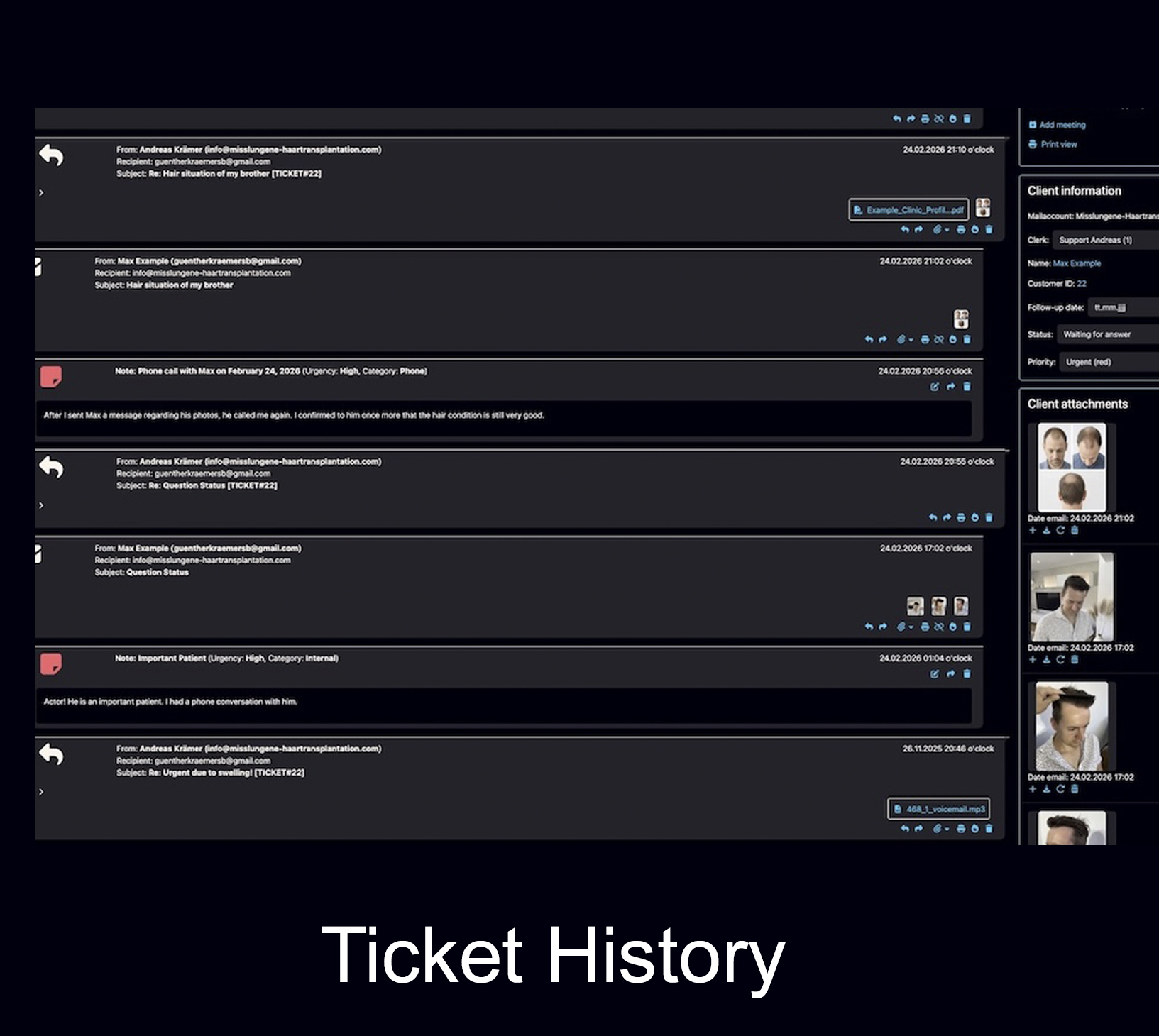
A follow-up is not a separate task. It belongs to the client case.
In many companies, follow-ups are treated like small personal reminders: a flag in Outlook, a star in Gmail, a note in a calendar, a message in a chat, a line in a spreadsheet or a mental note after a phone call.
That can work for one person and a few simple cases. It becomes unreliable when several employees, several channels, multiple files, internal decisions and long client histories are involved.
The question is not “Do we have a reminder?” The question is “Can we understand the case when the reminder appears?”
A professional follow-up should show the client, the previous conversation, the attachments, the internal notes, the responsibility and the reason why the next contact matters.
Why follow-ups get lost
Lost follow-ups are usually not one big mistake. They are the result of many small workflow gaps that appear harmless until an important lead, client promise or deadline disappears.
The next step is not written down clearly
A message ends with “we will get back to you later”, but the exact next step is not recorded. No date, no owner, no reason and no visible status are attached to the case.
The reminder lives outside the client history
A calendar entry may say “follow up with client”, but it does not show the emails, images, files, internal notes, previous promises and current status that the team needs to answer properly.
Email flags and folders hide context
Flags, stars and folders can mark a message, but they do not automatically create a complete customer file with responsibilities, follow-up dates, internal notes and documents.
Several people assume someone else will act
In a shared inbox or team mailbox, one person may read the message, another may answer and a third may assume the case is already handled. Without assignment, responsibility stays unclear.
Clients move across channels
A client may first write by email, later send a message on WhatsApp, then reply from another email address. If follow-ups are tied to channels instead of the client file, the history fragments.
The case looks “closed” but is not finished
Many follow-ups are not urgent today. That makes them dangerous. If a case is archived, moved to a folder or forgotten after a reply, the next step can disappear quietly.
A reminder tool is not the same as a follow-up workflow.
Many tools can remind you that something should happen. Fewer tools keep the follow-up connected to the full client history.
Lost follow-ups damage more than timing.
A missed follow-up can look like a small operational mistake. In reality, it can affect trust, revenue, documentation, team quality and the client experience.
The client may not know that the follow-up disappeared in a folder, spreadsheet or calendar. The client only experiences silence, delay or a reply without context.
Leads go cold
Many inquiries need the right timing. If the next contact is missed, the client may choose another provider or lose interest.
Clients repeat themselves
When the history is unclear, the client may have to explain the same situation again, which weakens the professional impression.
Promises become invisible
A promise made weeks ago can be buried in a long thread, forwarded email, chat message or personal note.
Team quality becomes inconsistent
One employee may be extremely organized while another uses a different system. The client should not feel that difference.
How to prevent lost follow-ups
The solution is not to remember more. The solution is to make the follow-up part of the client workflow from the moment the next step becomes clear.
Define one official client file
Decide where the real customer history lives. Email, chat, documents and notes should lead back to one understandable case.
Set the follow-up date inside the case
The follow-up should not be an isolated calendar entry. It should stay connected to the client, ticket, files and communication history.
Make ownership visible
A follow-up needs responsibility. The team should know who owns the next step and whether the case is open, waiting or scheduled.
Keep notes and files close
When the follow-up date arrives, the person handling the case should immediately see the relevant notes, attachments and previous decisions.
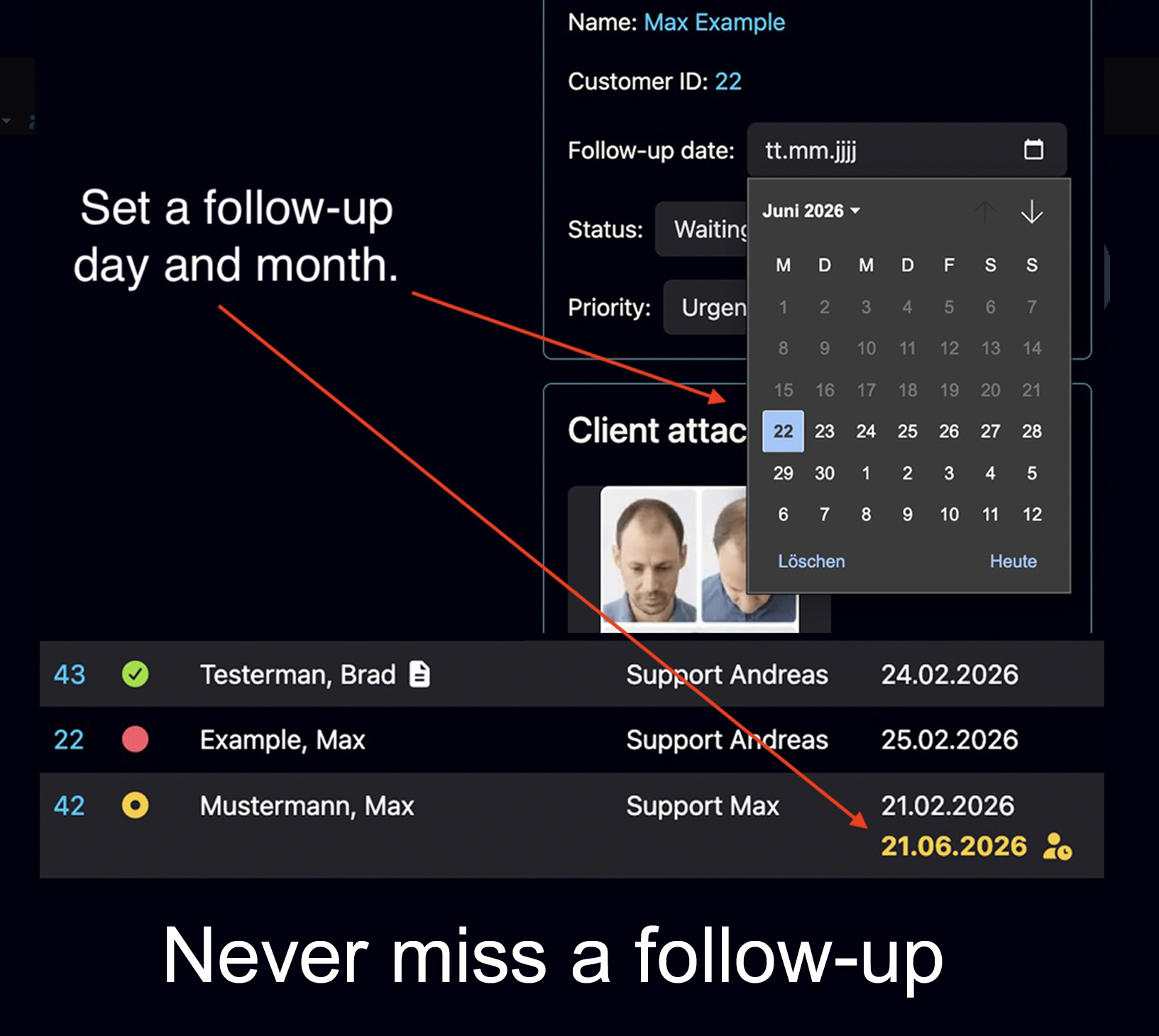
What structured follow-ups look like in practice
In Bodo, a follow-up is not a loose reminder in a calendar or a personal note outside the case. You set a follow-up day and month directly in the ticket. On that date, the ticket becomes visible again as an open task.
This is the important difference: the follow-up appears together with the client history, previous emails, notes, files and context. The team does not only see that something is due — it can immediately understand why the next step matters.
When the client does not respond, Bodo can help recontact them automatically
Follow-Up Dates are mainly an internal workflow tool: they bring a ticket back to the team at the right time. Automatic Reminder Emails solve a related but different problem: the customer has inquired, your team has replied, and then the customer does not answer.
In that situation, Bodo can automatically remind customers after your last service reply. The timing can be configured, the reminder wording can be adapted to your business, and silent leads can be reactivated without relying on one employee’s memory.
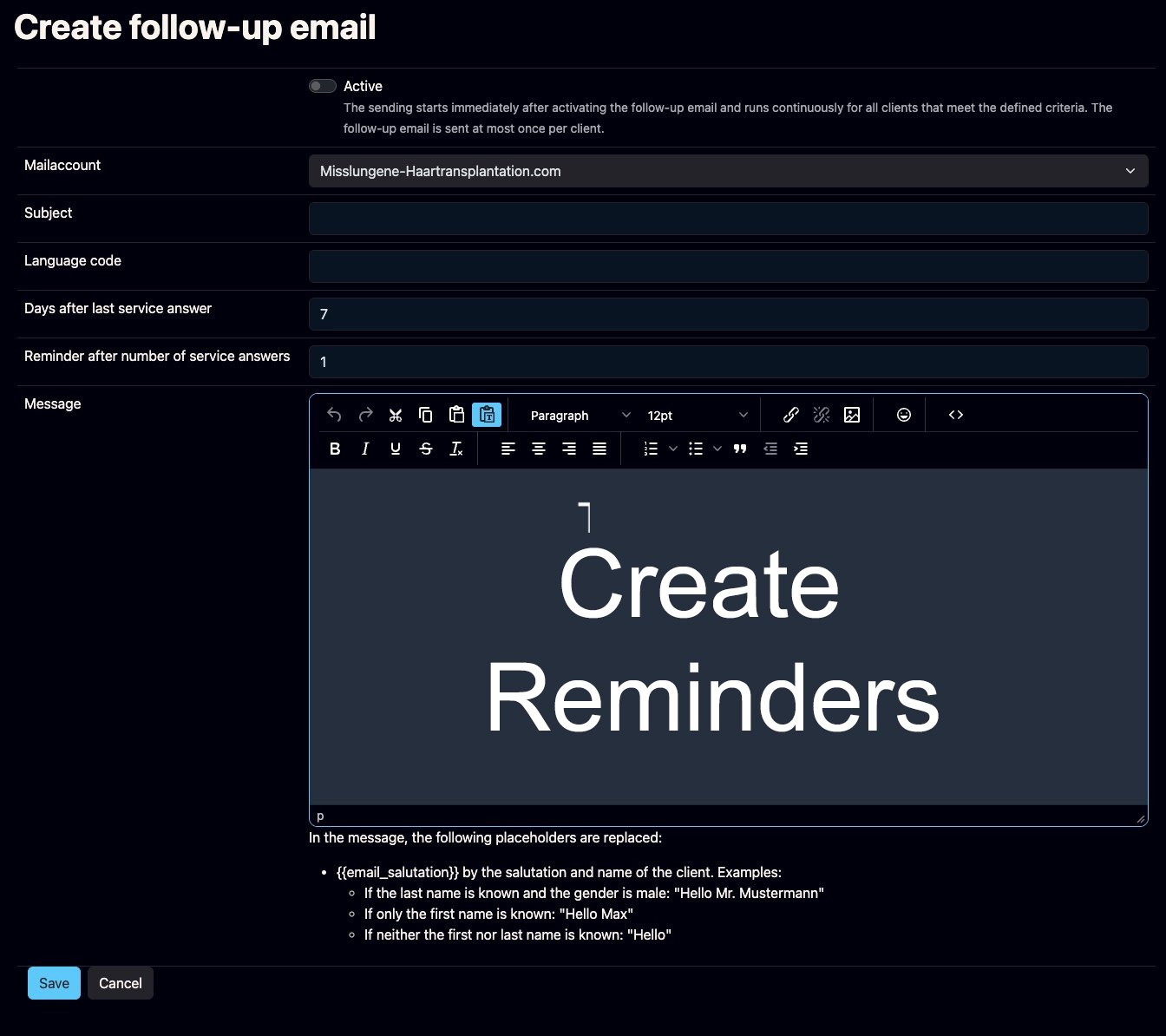
Bodo connects follow-up dates with the full customer history.
Bodo is built around a simple idea: one client, one ticket and one complete history. That principle matters especially for follow-ups.
When a customer should be contacted again, the follow-up belongs to the same place as the emails, files, notes, responsibilities and previous communication. The team does not only see a date. It sees the context behind the date. If the customer has not responded after your last reply, automatic reminder emails can add another layer: a structured recontact instead of a forgotten silent lead.
AI can help write the next reply. But the system must know when and why the reply is needed.
That is why follow-ups are not just a small feature. They are part of the communication infrastructure that keeps client relationships reliable over time.
Follow-up date connected to the ticket
The date stays where the client history lives, instead of being hidden in a private reminder.
Files and notes remain visible
When the next step appears, the relevant documents, internal notes and previous messages are nearby.
Team responsibility is clearer
Follow-ups become part of the team workflow, not just a personal habit of one employee.
Automatic reminder emails can support recontact
When a customer does not respond after your last service reply, configurable reminders can help reactivate silent leads.
Long-term relationships stay understandable
If the client returns after months or years, the history and previous follow-up logic are still traceable.
Typical situations where follow-ups disappear
The pattern is similar across many businesses: the client case continues, but the next step is not attached to the history strongly enough.
A potential client needs time
A prospect asks for information but wants to decide later. Without a structured follow-up date, the lead may disappear after the first reply even though the timing was simply not right yet.
Missing files should be requested again
A customer promises to send images, PDFs or forms. If that request is only hidden in a thread, the team may never notice that the required documents did not arrive.
An employee is absent
If follow-ups live in one employee’s calendar or memory, vacation, illness or staff changes can interrupt the client relationship immediately.
The right moment is later
Some cases need a reply next week, next month or after a certain event. The longer the delay, the more dangerous personal reminder systems become.
The client writes in another channel
A follow-up may start by email but continue in a messenger or phone call. Without one central file, the next step can be split across channels.
The case becomes long-term
Long client relationships often contain several phases. Follow-ups must remain connected to the full history, not only the latest message.
A simple follow-up rule for professional client communication
If the next step matters for the client relationship, it should not live only in a personal tool. It should live in the client file.
Who is responsible?
Every follow-up should have a clear owner or at least a visible team responsibility. Otherwise, everyone can see the case but no one owns the next action.
When should it happen?
The follow-up date should be easy to see, not hidden in a personal calendar or buried in a long email thread.
Why does it matter?
The reason for the follow-up should be clear from the case history: decision, promise, missing document, timing, lead stage or client request.
Build the follow-up around the client file, not around scattered reminders.
Follow-ups are closely connected to email ticketing, shared inbox workflows, client history and platform dependency. These related guides explain the surrounding problems.
Questions about lost follow-ups
Why do follow-ups get lost in client communication?
Follow-ups get lost when the next action is separated from the client history. This often happens when teams rely on email flags, personal calendars, spreadsheets, messenger reminders, memory or forwarded messages instead of one structured client file with status, responsibility and follow-up dates.
Is a follow-up just a reminder?
No. A business follow-up is not just a reminder. It is part of the client relationship: what was promised, when the client should be contacted again, which files or notes belong to the case and who is responsible for the next step.
Why are email flags and calendar reminders not enough?
Email flags and calendar reminders can help individuals, but they often do not give the whole team the full client context. A reminder may say that something should happen, but it may not show the complete conversation, attachments, internal notes, previous promises and current case status.
How can companies prevent lost follow-ups?
Companies can prevent lost follow-ups by defining one official client file, recording follow-up dates directly inside the case, assigning responsibility, keeping files and notes close to the communication and making upcoming or overdue follow-ups visible to the team.
How does Bodo help with follow-ups?
Bodo connects follow-up dates with the client ticket, email history, files, internal notes, responsibilities and long-term customer history. Follow-up dates make a ticket visible again as an open task, while automatic reminder emails can recontact customers who did not respond after the last service reply. Both functions help keep timing, context and responsibility connected.
What is the difference between Follow-Up Dates and Automatic Reminder Emails?
Follow-Up Dates are internal reminders connected to the client ticket. On the selected date, the ticket becomes visible again as an open task for the team. Automatic Reminder Emails are outbound messages that can remind customers who inquired but did not respond after your last service reply. One function helps the team remember the next step; the other can help reactivate silent leads.
Follow-ups should not depend on memory.
A client relationship becomes safer when every next step remains connected to the complete history: emails, files, notes, responsibility, timing and context.