
Why a Normal Email Inbox Is Not a Client File
Outlook, Gmail and shared team mailboxes are useful for sending and receiving email. But a mailbox is not the same as a professional client file.
A real client file needs more than messages: it needs complete history, files, internal notes, responsibilities, status, follow-ups and a clear timeline that remains understandable even months or years later.
Email is a channel. An inbox is a container. A client file is a structured history.
A normal inbox can show messages. It does not automatically show the complete client case: what was discussed, which attachments matter, who is responsible, what still needs action and which follow-up belongs to the customer.
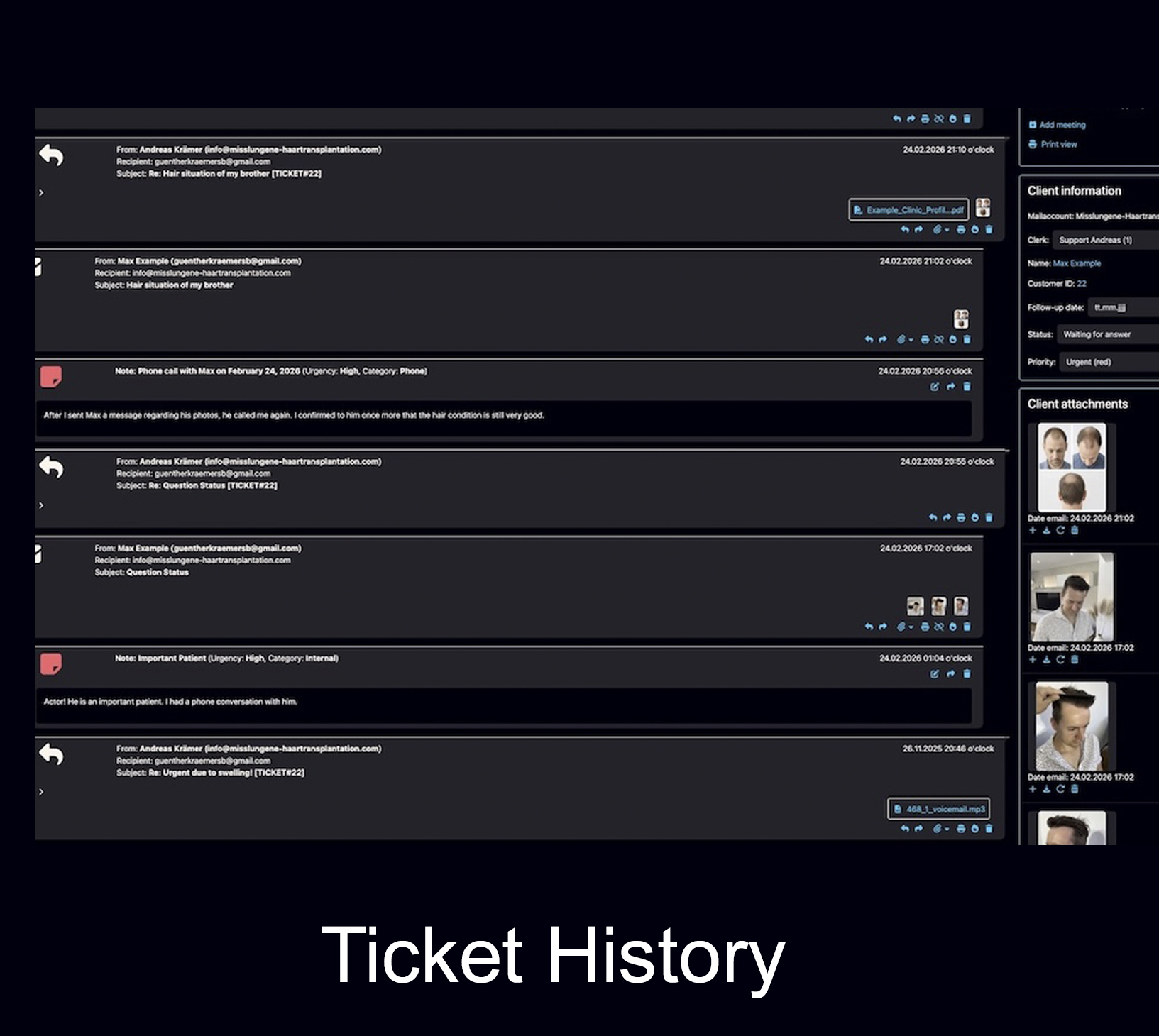
Email is still useful. The problem is using the inbox as the file.
This article is not an argument against email. Email remains one of the most stable and widely accepted channels for professional communication. The problem starts when a normal inbox, folder structure or forwarded email thread becomes the only place where the client history is stored.
The inbox was designed for communication, not case management.
A client case is usually more than one message. It may include images, PDFs, forms, previous promises, internal decisions, follow-up dates, multiple email addresses and several employees working on the same history.
Where a normal inbox breaks down
A mailbox can work when communication is simple. It becomes risky when the customer relationship becomes longer, more detailed, team-based or documentation-heavy.
Folder chaos replaces structure
Folders can organize messages, but they do not create a complete case file. A message can be filed in one place while attachments, notes and later replies remain somewhere else.
Forwarding creates fragments
Forwarded emails often create parallel threads. One employee sees one version, another sees another version, and the full context becomes harder to reconstruct.
Attachments get separated from meaning
PDFs, images and documents can be downloaded, renamed, moved or forgotten. Without a client file, the team may later find the file but not the decision or conversation it belonged to.
Responsibility stays unclear
In a shared inbox, several people may assume someone else is handling the case. Labels and flags help, but they do not replace a clear workflow with assignment and status.
Internal notes are missing
Important background information often does not belong in an email to the client. Teams need internal notes that stay connected to the case but are not sent outside.
Follow-ups depend on memory
If follow-ups are handled with stars, flags, calendar reminders or personal habits, promising leads and important requests can quietly disappear.
A mailbox shows messages. A client file explains the case.
The difference is practical. When a customer returns after a long time, a normal inbox may show old emails. A real client file should show the full history and the current situation.
A team mailbox can look organized while the client history is still incomplete.
Many companies start with info@, support@ or a shared Outlook or Gmail mailbox. That is often a reasonable first step. Everyone can see incoming messages, and simple questions can be answered quickly.
But as soon as communication becomes more serious, the weaknesses appear: unclear responsibility, duplicate replies, missing notes, inconsistent follow-up and no single long-term customer file.
The same client writes several times
Different subject lines, different employees and different email addresses can create separate fragments of one client relationship.
Several people work in the same mailbox
Without visible responsibility, it becomes unclear who is answering, who is waiting and who owns the next step.
Important files arrive as attachments
Attachments should stay connected to the case, not just to one old email message in one long thread.
The customer returns months or years later
The team needs the full context quickly: what was discussed, what was promised and what happened next.
The client file must belong to the company, not to a folder habit.
Data sovereignty is not only a messenger topic. It also applies to email workflows. If the real knowledge about a client exists only in personal inboxes, private folders, downloaded attachments and employee memory, the company does not have a reliable client file.
Company control
The company should know where client communication is stored, who has access and how the history can be continued if an employee is unavailable or leaves.
Long-term continuity
Email addresses usually remain more stable than phone numbers or messenger accounts. But stability only helps when the email history is structured.
Governance and retention
Modern email platforms can support retention and eDiscovery rules, but that does not automatically turn everyday inbox work into a clear client case history.
Microsoft explains that retention for Exchange can cover messages, drafts, sent messages and attachments in user and shared mailboxes. Google Vault describes retention rules for Google Workspace data, including Gmail. These tools can help with preservation and compliance, but they do not replace a practical client workflow with notes, responsibilities, status and follow-up.
Sources: Microsoft Purview: retention for Exchange, Google Vault: how retention works
Do not replace inbox chaos with messenger chaos.
Some companies move more and more client communication from email into WhatsApp, Instagram or other messengers because it feels faster. That can help for first contact, but it can also increase dependency on external platforms and make documentation harder.
The better principle: flexible entry channels, one structured client file.
Clients can contact a company through the channel that is easiest for them. But once the conversation becomes a real client case, the company should move the important information into a system it can control, search and continue.
WhatsApp’s own Business Messaging Policy says access to WhatsApp Business Services may be limited or removed if content or actions violate terms or policies. WhatsApp also publishes separate Business Data Processing Terms. In Switzerland, SIDD recommends clear internal policies and compliant alternatives for business communication in sensitive contexts.
For a deeper look at platform access, account restrictions and messenger dependency, read the related guide: Messenger account restrictions: why client data needs its own system.
Sources: WhatsApp Business Messaging Policy, WhatsApp Business Data Processing Terms, SIDD: Is WhatsApp GDPR-compliant?
How Bodo turns email into a real client file
Bodo does not reject email. It uses email as a stable communication channel and adds the structure that a normal inbox is missing.
Email arrives
A customer writes by email, replies to an existing message or sends documents, images or other attachments.
Case is structured
The message becomes part of a structured client history instead of remaining only in a mailbox thread.
Team can work
Notes, files, assignment, status and follow-ups help the team understand what is open and what happened before.
History stays available
When the client returns later, the relevant communication, documents and decisions remain connected.
Bodo is built around one client, one ticket, one complete history.
A normal inbox is message-centered. Bodo is client-history-centered. The goal is that the team sees the customer case, not just isolated emails.
Complete client history
Emails, replies, documents, images, notes and follow-ups remain connected to the client instead of being scattered across threads and folders.
Files stay connected
Attachments are not just old email extras. They become part of the client case, close to the discussion and decisions they belong to.
Internal notes
Team members can document background information, observations and internal decisions without sending those notes to the client.
Team workflow
Assignment, status and staff visibility help reduce duplicate work and unclear responsibility in team communication.
Follow-ups
Follow-up dates keep open leads, missing documents and next steps visible until they are handled.
AI inside structure
AI can support summaries, rewriting, reply drafts and translation while the client history remains organized and traceable.
When a normal inbox may still be enough
Not every company needs a full email ticketing system from day one. A normal inbox can be enough when the work is simple, short and handled by one person. The need for structure appears when the inbox becomes the only memory of the company.
Simple one-person communication
If one person answers a small number of simple emails and no long-term history is required, a normal inbox may be enough.
Growing team communication
As soon as several people answer the same customers, the risk of duplicate replies, missing context and unclear ownership increases.
Long-term client relationships
If customers return after weeks, months or years, the company needs more than search results inside an old mailbox.
Continue reading
These related pages explain how Bodo turns email communication into structured client history and why channels alone are not enough.
Frequently asked questions
Why is a normal email inbox not a client file?
A normal email inbox is designed to send, receive and store messages. A client file needs more structure: complete history, files, internal notes, responsibilities, status, follow-ups and a clear timeline. Outlook, Gmail or a shared mailbox can be part of communication, but they usually do not create a reliable client file by themselves.
Is email still a good business communication channel?
Yes. Email remains a stable and widely accepted channel for professional communication. The problem is not email itself. The problem starts when an inbox, folder structure or forwarded email thread becomes the only place where the client history is stored.
What is the problem with shared inboxes?
A shared inbox can help several people access the same mailbox, but it often becomes confusing when responsibilities, internal notes, files, follow-ups and long-term client history are needed. Teams may still rely on folders, forwarding, CC, manual memory and informal habits.
How is an email ticketing system different from an inbox?
An email ticketing system turns email communication into structured cases. It can connect emails, replies, attachments, internal notes, responsibilities, status and follow-up dates to one customer history. A normal inbox mainly shows messages.
How does Bodo turn email into a client file?
Bodo keeps email communication, files, notes, follow-ups, responsibilities and AI-supported replies connected in a structured workflow. It is built around the principle of one client, one ticket and one complete history.
Email is the channel. Bodo is the client file.
Keep the stability of email, but add the structure of a real client file: history, files, notes, responsibilities, follow-ups and AI-supported communication in one place.